EN
41
5.5.2 WAN
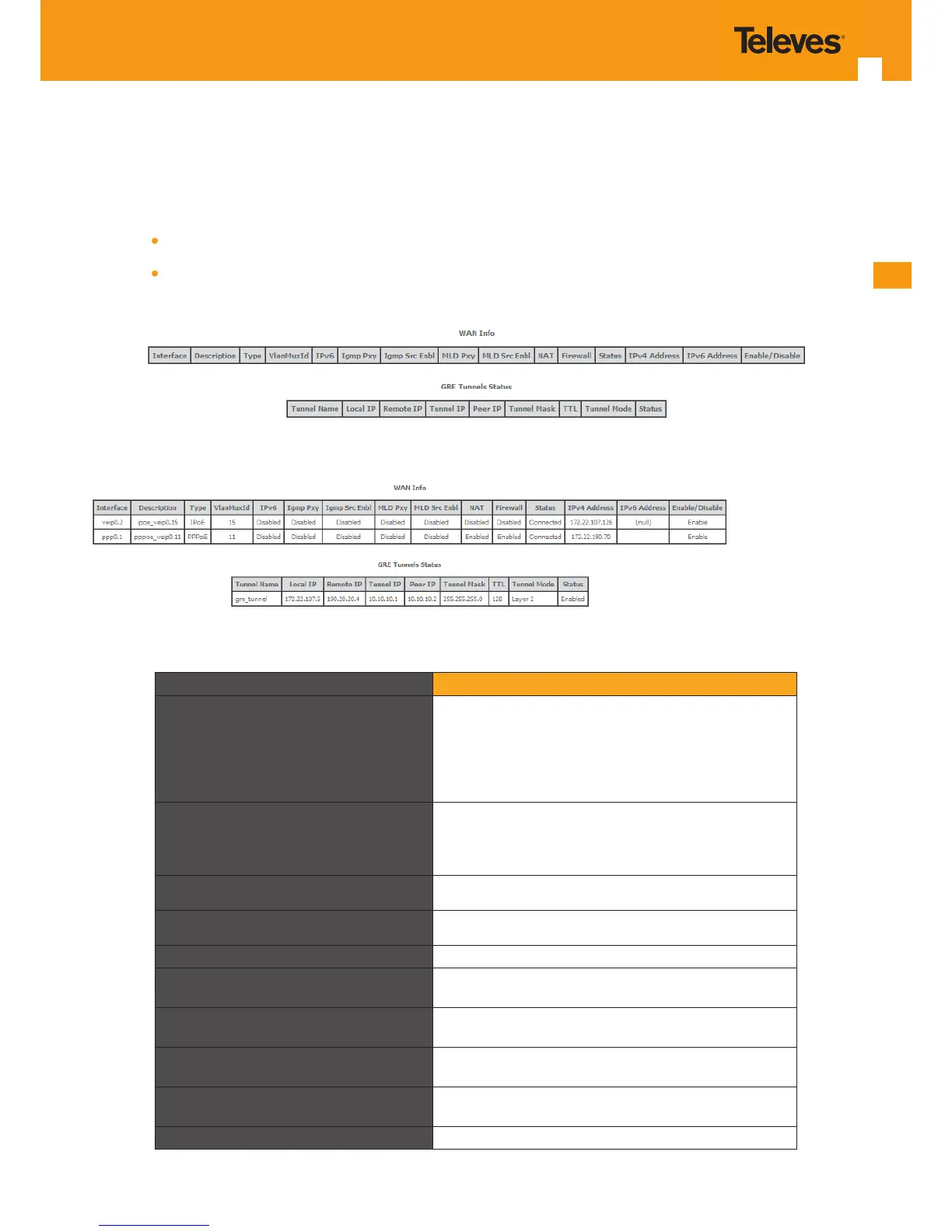
Selection of the Device Info sub-menu item WAN displays in the main window the current WAN conguration details, Figure 5-6.
The window is composed of two tables:
WAN info;
GRE Tunnels Status
Description of the WAN Info Table parameters can be found in Table 5-2 and GRE Tunnels Status table parameters in.Table 5-3.
Figure 5-6: WAN current conguration details window – initial window
Figure 5-7: WAN current conguration details window – example of 2 WAN interfaces and a GRE Tunnel congured
Parameter Description
Interface
WAN interface identication (string); attributed on the
Wan interface conguration; if not set by the user, the
system names the interface automatically as “xxx0.n/”,
where xxx is the type of interface (eg ppp stands for pp-
poe) n is number indicating order of interface creation,
starting in 1
Description
WAN service description; String that can be entered by
the user; default values indicates type of WAN service
(pppoe/ipoe/gre/br), used layer 2 interface (eg. veip0/
eth1) interface and used vlan id (eg. 11)
Type Identies Wan service Type (PPPoE/IPoE/gre/br)
VlanMuxId Used 802.1Q VLAN ID (0-4094)
IPv6 Flag (enable/disable) ; indicates if IPv6 is enabled
Igmp Pxy
Flag (enable/disable) ; indicates if IGMP proxy is enabled;
to use for multicast conguration in the case of IPv4.
Igmp Src Enbl
Flag (enable/disable); indicates if IGMP source is enabled;
to use for multicast conguration in the case of IPv4.
MLD Pxy
Flag (enable/disable) ; indicates if MLD proxy is enabled;
to use for multicast conguration in the case of IPv6.
MLD Src Enbl
Flag (enable/disable) ; indicates if MLD source is enabled;
to use for multicast conguration in the case of IPv6.
NAT Flag (enable/disable); Indicates if NAT is enabled
Table 5-2: WAN Info Table parameters



 To Next Page