EasyManua.ls Logo

Televes 769501 - 4.4 Interface connection

Televes 769501
196 pages
Print Icon
To Next Page IconTo Next Page
To Previous Page IconTo Previous Page
Loading...
EN
35
4.4 Interface connection
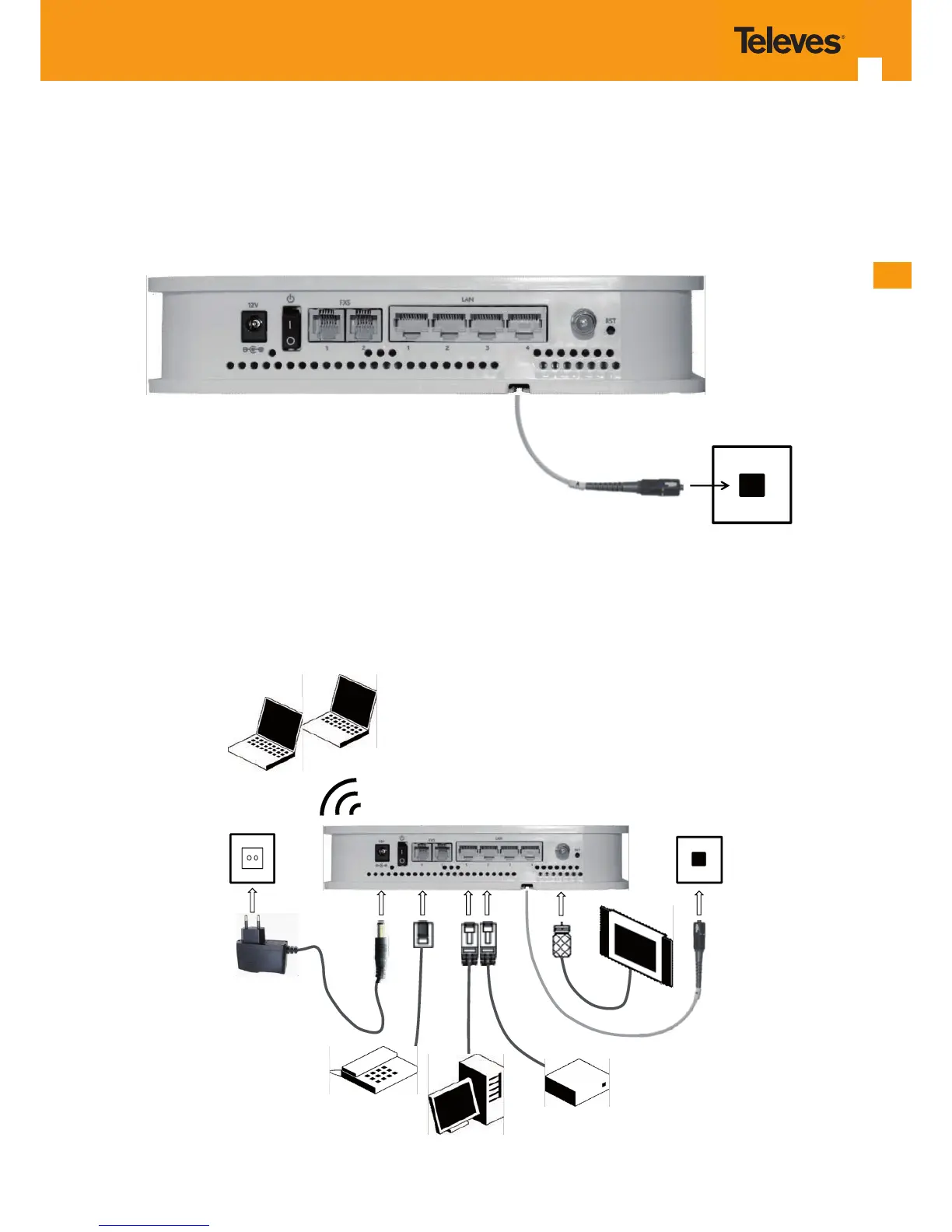
4.4.1 Optical cable connection
Connect the optical cable (C1) from the Refs. 769501-769502 to the optical socket, Figure 4-5;
Optical
wall socket
C1
Figure 4-5: Interfaces connection (PON Interface)
4.4.2 General Overview of Refs. 769501-769502 Connections
Figure 4-6 below shows the connections to be made between the Refs. 769501-769502 and the home network devices. Please refer to Figure 4-1
and 4-1 for the Refs. 769501-769502 connector description and to Table 4-2 for the description of the connecting cables that must be used.
Optical
wall socket
Laptops
PC
SETOP BOX
Telephone/Fax
220V/110 V
AC
ONT-RGW Rear View
C4
C3
C3
C2
C1
W1
C5
TV
Figure 4-6: Refs. 769501-769502 connections

Table of Contents