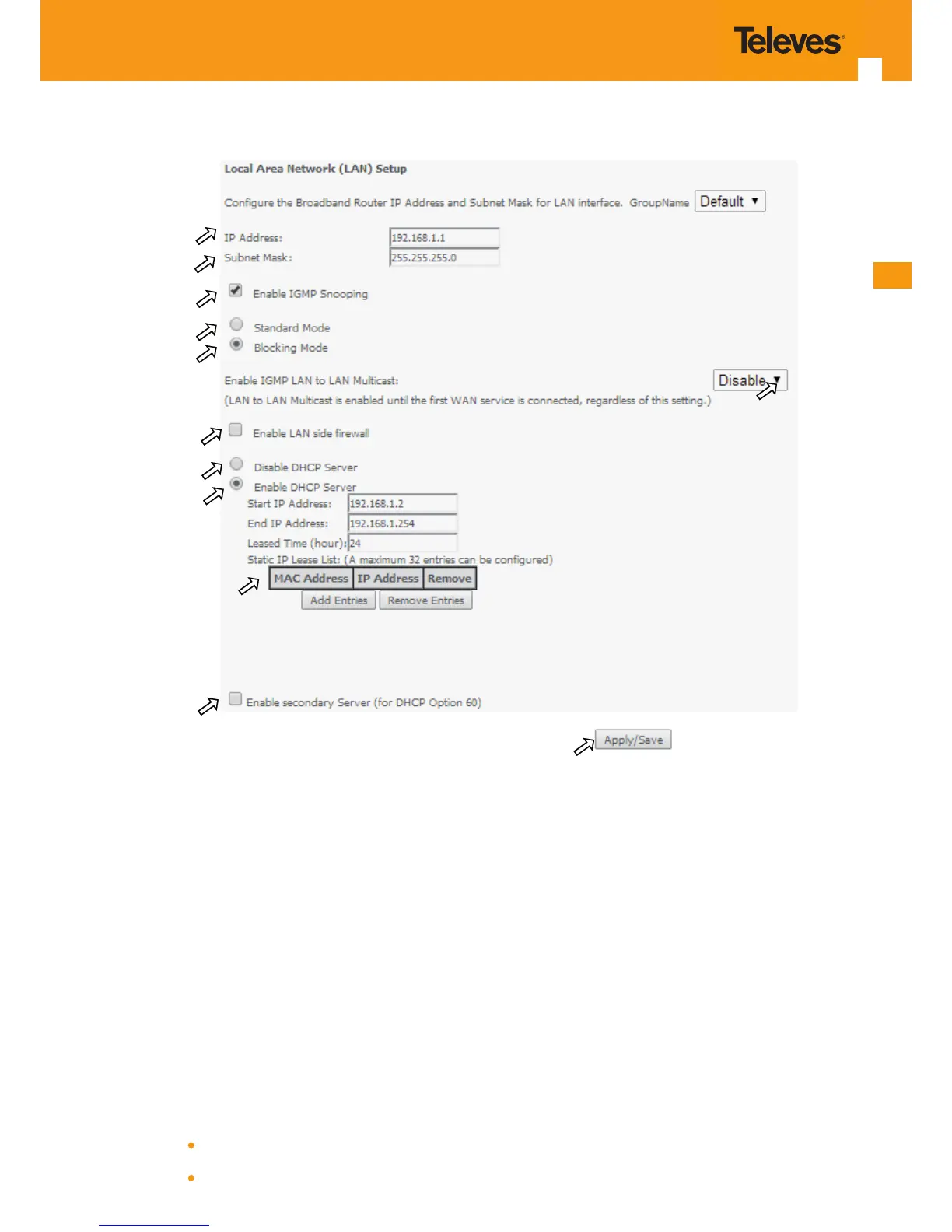
Figure 5-74: Advanced Setup - LAN Setup window
At this window execute the following steps:
STEP 1. IP Address –This is the Refs. 769501-769502 IP Address, default value 192.168.1.1, Figure 5-74-1;
STEP 2. Refs. 769501-769502 sub network Mask ; default value is 255.255.255.0, Figure 5-74-2;
STEP 3. In order to enable IGMP Snooping select this option, Figure 5-74-2;
In the case IGMP snooping is not selected multicast packets are send to all bridge ports. If this option is selected an IGMP
Snooping mode must be selected (see step 4 and step 5)
There are two modes of IGMP snooping, that establish the way groups multicast packets are forwarded by the bridge Figure 5-74- 4 and 5:
STEP 4. Standard Mode, Figure 5-74-4,
Group multicast packets are forwarded to all ports if there was no previous IGMP Group report by any port:
In the case there were previous IGMP Group reports, multicast packets are only forwarded to the ports that previously send



 To Next Page