98
GPON ONT
5.6.6.2 URL Filter
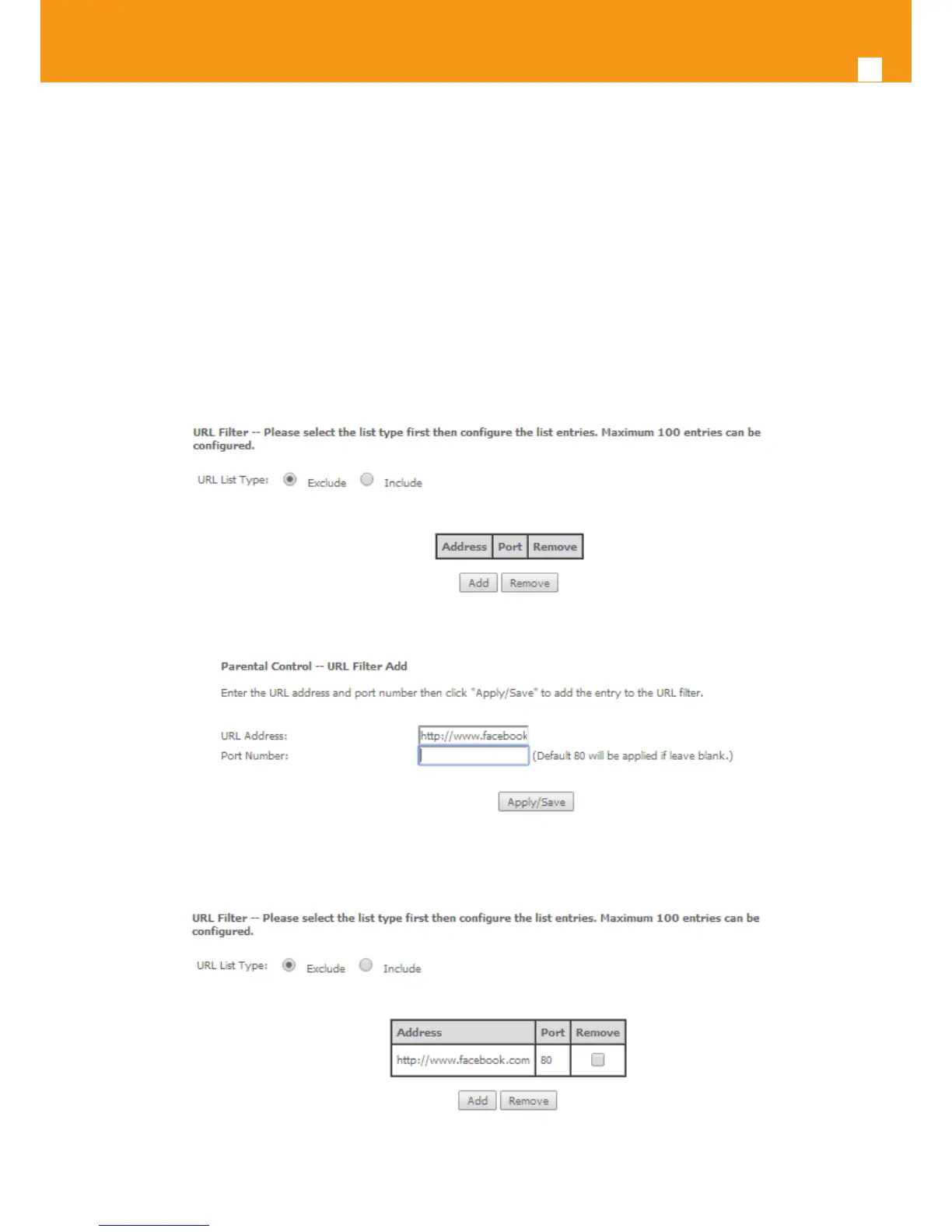
Selection of Advanced Setup submenu Parental Control, item Url Filter will display an URL Filter conguration window showing the current URL
Filter conguration table, Figure 5-105. This window allows the creation and conguration of an URL Filter list.
A short on line help text is provided in the conguration window Figure 5-105.
To create a URL lter list the URL list Type to create must be dened as Exclude or Include, Figure 5-105.
To create a new entry in the URL lter list, use the Add button, Figure 123; an URL Filter Add window will be displayed, Figure 5-106.
In this window enter the URL address. Default port number 80 will be used if Port number entry is left blank.
To nalize the add URL entry to the URL lter list use the Apply/Save button, Figure 124. The next displayed window is the initial window, showing
the current URL Filter conguration, Figure 5-107.
Figure 5-105: Advanced Setup, Parental Control – URL Filter Conguration window
Figure 5-106: Advanced Setup, Parental Control – URL Filter – Add Filter window
Figure 5-107: Advanced Setup, Parental Control – URL Filter Conguration window- Current Conguration



 To Next Page