- 19 -
6.3 Wireless Configuration
Wireless configuration includes wireless basic configuration, VAP configuration, WPS configuration
and wireless advanced configuration.
6.3.1 WLAN0(2.4GHz) Basic Configuration
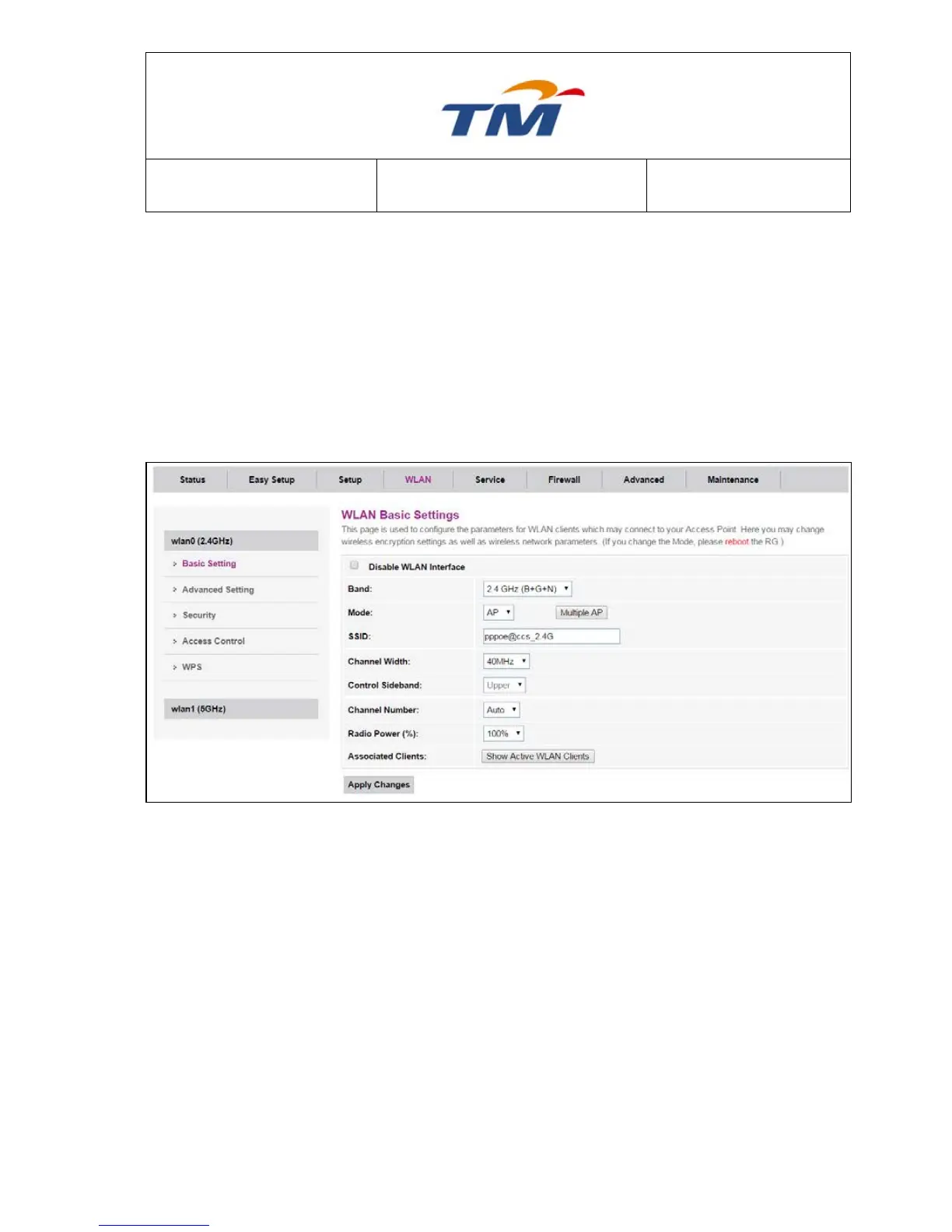
Choose WLAN > Basic, and the wireless 2.4GHz page appears. In this page, you can enable or
disable 2.4G wireless, Tick Disable WLAN Interface to disable the wireless 2.4Ghz
Band Wireless Band for 2.4GHz.
Mode Wireless Mode for this interface.
Multiple AP Click to configure more SSID for 2.4Ghz interface.
SSID SSID Name for the 1
st
Interface.
Channel Width Can select 20, 40, or 20/40, in MHz.
Control Sideband Upper Channel Band or Lower Channel Band to be selected
Channel Number Select the proper channel from the drop-down list. The default value
is Auto.
Radio Power (%) You can select 100%, 70%, 50%, 35% and 15%. The default
value is 100%.
Associated Clients Click to check all Active WLAN Clients
After setting, click Submit to apply the settings.



 To Next Page