Doc. No.:
ST/WI/RG/RGX4400
to go back to the main WAN
connection page.
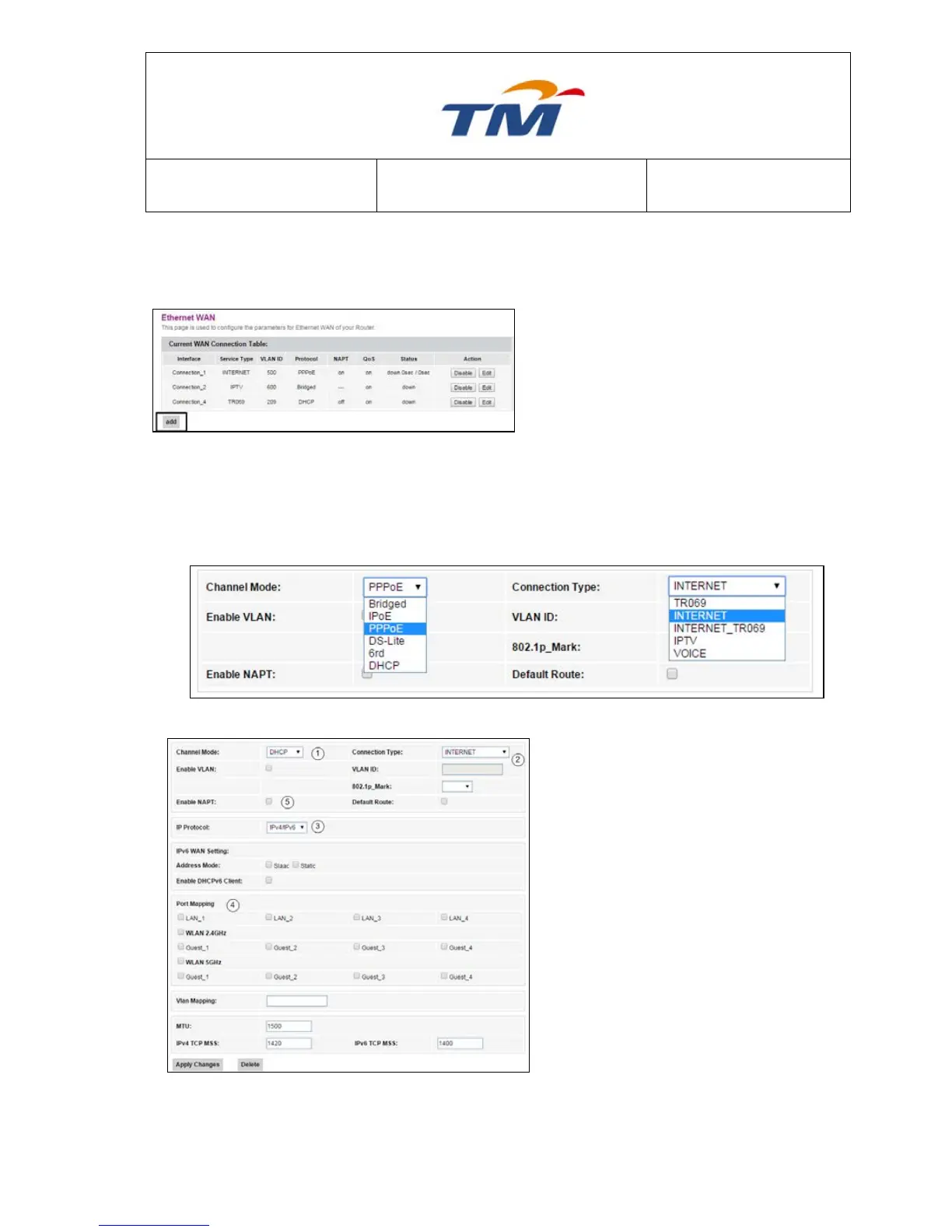
Step4 Click Add in the main page.
Step5 In the coming page, you can configure the parameters of the new WAN connection.
There are 5 Channel Mode in the dropdown list: Bridged, IPoE, PPPoE, DS-Lite,
6rd & DHCP; And 5 Connection Type in the dropdown list: TR069, INTERNET,
INTERNET_TR069, IPTV, & VOICE. You can select one based on the internet
service subscribed from your ISP.
DHCP
1) Set the Connection Type to be DHCP.
2) Set the Service Type to be INTERNET
or TR069_INTERNET.
3) Set the IP Version to be IPv4 or
IPv4&6.
4) If you want to bind this DHCP
connection to a port, select that port.
You can also bind this connection to
more than one port.
5) Enable or disable the VLAN Tagging
of this connection. If you select Enable
VLAN Tagging, you’ll be required to
enter the VLAN ID for marking the
packet.



 To Next Page