- 46 -
Protocol There are 3 options available: TCP, UDP and ICMP
Rule Action Deny or allow traffic when matching this rule.
Source IP Address The source IP address assigned to the traffic on which filtering is
Applied.
Subnet Mask Subnet-mask of the source IP
Port Starting and ending source port numbers.
Destination IP Address The destination IP address assigned to the traffic on which filtering is
applied.
Subnet Mask Subnet-mask of the destination IP
Port Starting and ending destination port numbers
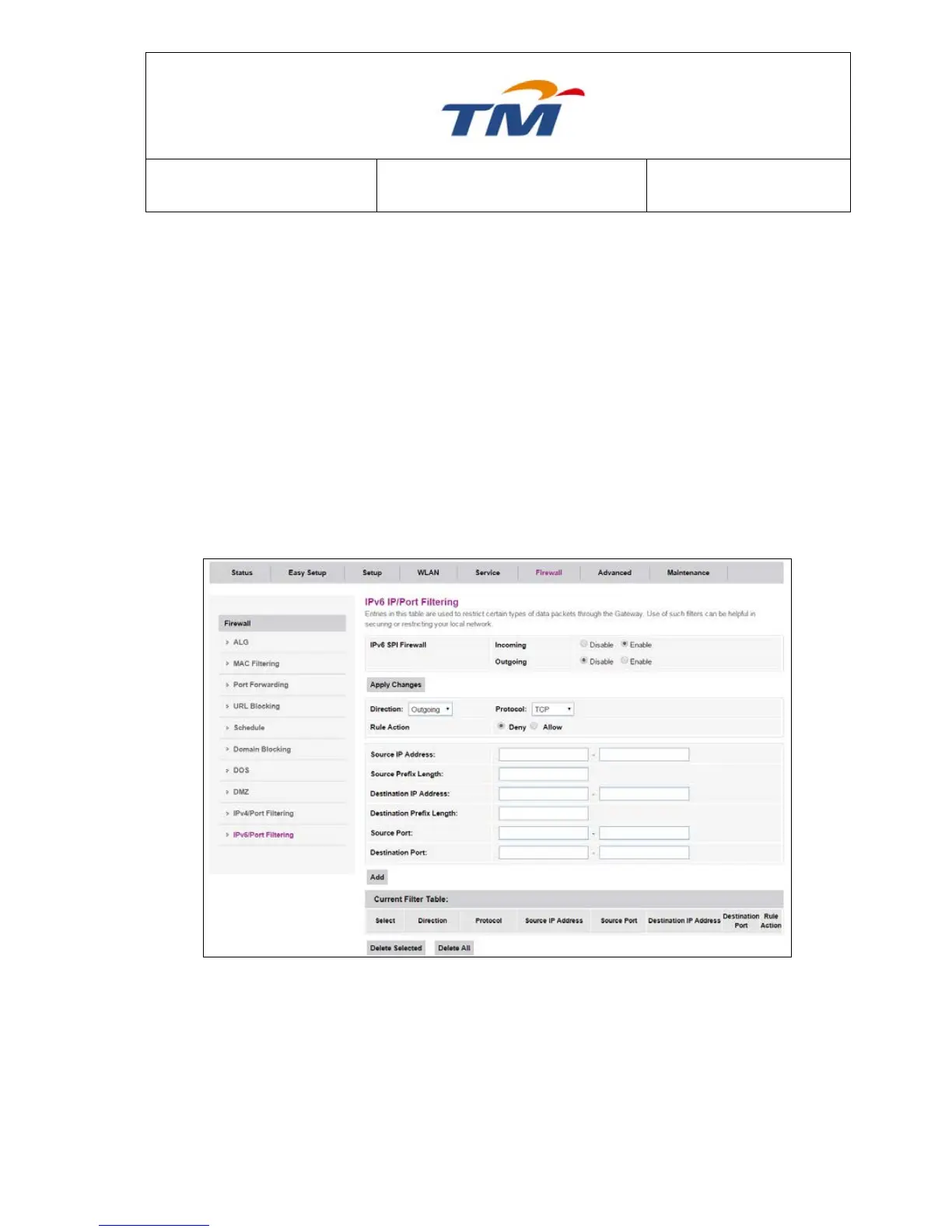
6.5.9 IPv6/Port Filtering
Enable or disable IPv6 filter, set the security level and the filter mode. You can also add an IP filter
rule to the IP filter list.
Incoming Specify the default action on the WAN to LAN forwarding path.
Outgoing Specify the default action on the LAN to WAN forwarding path
Direction Can choose Incoming or Outgoing
Protocol There are 3 options available: TCP, UDP and ICMPv6
Rule Action Deny or allow traffic when matching this rule.
Source IP Address The source IP address assigned to the traffic on which filtering is
applied
Source Prefix Length The length of the source IP address prefix.



 To Next Page