3-82
Chapter 3
INSTALLATION AND SETTING PROCEDURES (HARDWARE)
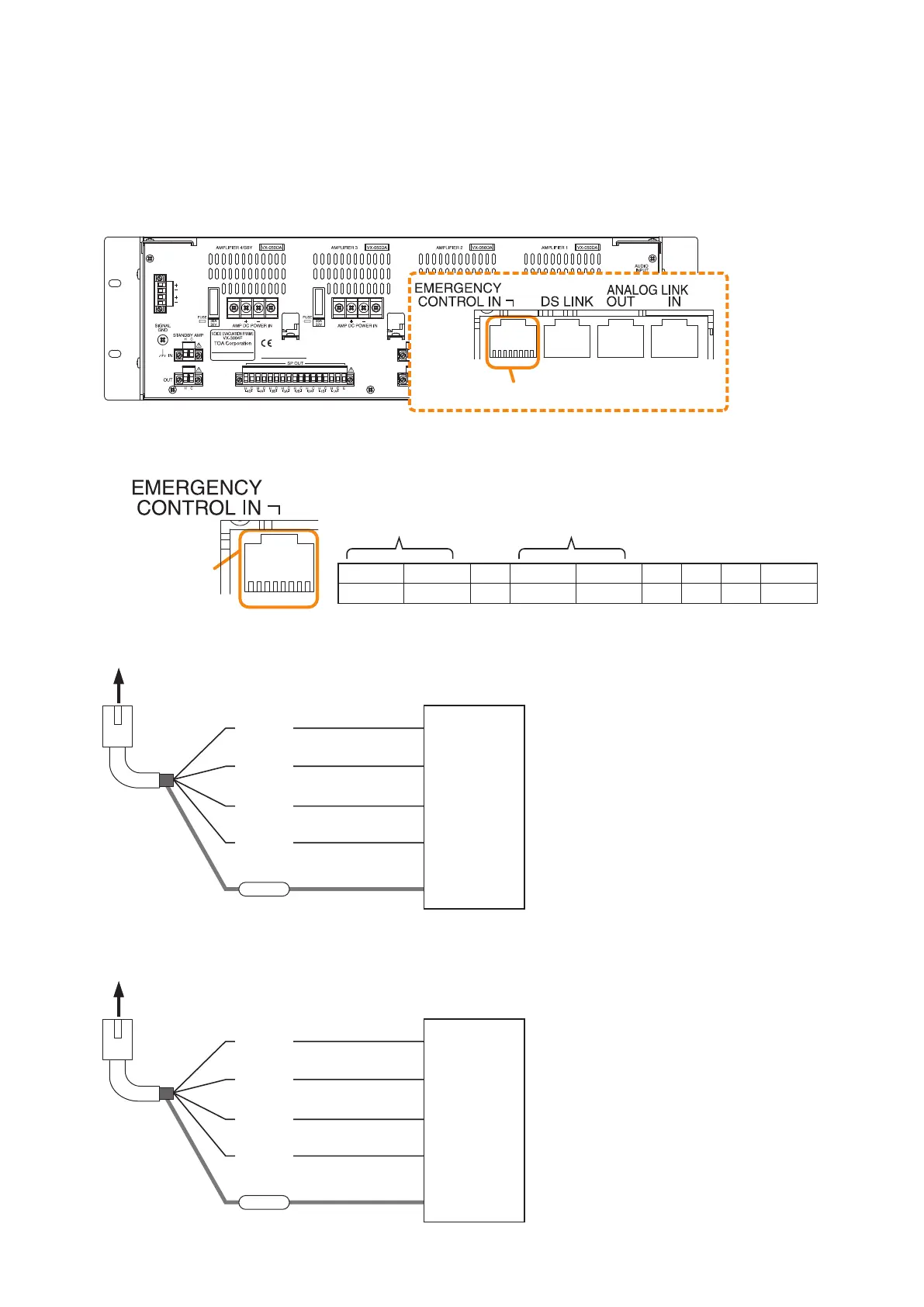
8.7. Emergency Control Input Terminal Connections
The Emergency control input terminals are voltage inputs. Cable disconnection and short-circuit can be
detected using these input terminals.
Use the VX-3000 Setting Software to set the function and polarity. (See the separate Setting Software
Instructions, "SURVEILLANCE SETTINGS," "Failure Pattern Settings," "Control Inputs Event Settings.")
The RJ45's pin arrangement and pin functions are shown below.
[Emergency control input terminal]
Connection example A
12345678
VX-3000F
Emergency control input terminal
RJ45 connector
pin No.
To VX-3000F
FDS_A+
FDS_A–
Shield
(Com)
FDS_B–
FDS_B+
RJ45 connector
pin No.
To VX-3000F
FDS_A+
FDS_A–
Shield
(Com)
FDS_B–
FDS_B+
FDS
DC 24 V (–)
DC 24 V (+)
DC 24 V (–)
DC 24 V (+)
FDS
GND_A
DC 24 V
GND_B
DC 24 V
Note
When Connection example B is selected,
set the Surveillance function corresponding
to the CIN17 (Pins 1 and 2) or CIN18 (Pins
4 and 5) to OFF. (See the separate Setting
Software Instructions, "SURVEILLANCE
SETTINGS.")
Pin1 Pin2 Pin3 Pin4 Pin5 Pin6 Pin7 Pin8 Shield
FDS
_
A+ FDS
_
A–
NC
FDS
_
B+ FDS
_
B–
NC NC NC Com
CIN17 CIN18
Connection example B
Emergency control
input terminal
12345678



 To Next Page