2-27
Chapter 2
NOMENCLATURE AND FUNCTIONS
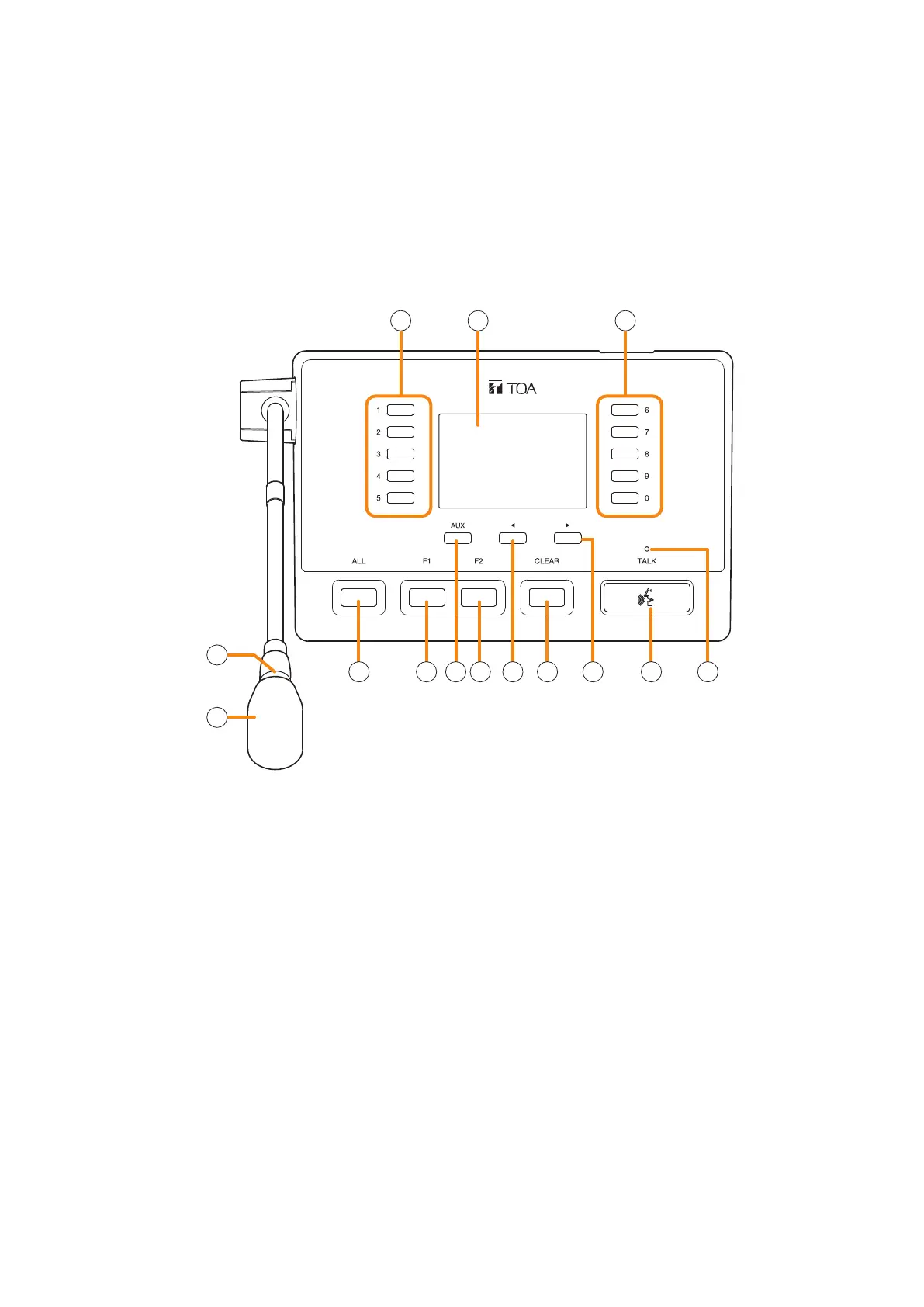
11. RM-500 REMOTE MICROPHONE
• The RM-500 is a desktop type remote microphone designed for general broadcast.
• Equipped with an LCD screen, it can display up to 80 function names registered in advance, allowing these
functions to be executed with the key operation.
• Pressing the AUX key enables the control of only the external audio signals.
• The speech intelligibility function makes it easier to hear the microphone announcements even in noisy
environments, and also allows the microphone to pick up the audio signals at an appropriate level even if
speaking too close to or too far from it.
• Can be mounted on the wall by using an optional wall mounting bracket.
1 12
5 6 67 8 9
10 11
3
12
4
1. Numeric keys
Normally, select the item number displayed on
the LCD screen. The functions set with the VX-
3000 Setting software can be executed.
When the menu screen is displayed, these keys
are used to select the menu item number or the
option number.
2. LCD screen
Normally, displays a list of the set functions and
the status of the broadcast or function.
Shifting Switch 6 of the Setting switch (16) to
the ON position switches the mode to the direct
selection, displaying the line number registration
screen.
Shifting Switch 7 of the Setting switch (16) to the
ON position switches the screen to the menu
display.
3. Microphone indicator (green)
Lights during the microphone broadcasts.
However, it does not light when announcements
are being broadcast from the microphone
connected to the AUX input terminal.
You can also set it to OFF by the system setting.
(See p. 3-24 "Setting The RM-500's Menu.")
4. Microphone
Used for making general broadcasts.
The microphone volume can be adjusted with the
Microphone volume control (15).
5. ALL key
Selects the preset zones.
6. F1/F2 key
The functions set with the VX-3000 Setting
software can be executed.
7. AUX key
Press this key to broadcast the audio signals fed
to the AUX input terminal (20).
When the menu screen is displayed, pressing this
key executes the operation as shown by the guide
displayed in the lower left of the screen.
[Top]



 To Next Page