2-12
Chapter 2
NOMENCLATURE AND FUNCTIONS
4. VX-3000PM PREAMP MATRIX PANEL
• The VX-3000PM is a 1U size*
1
Preamplier matrix panel mountable in an EIA standard equipment rack.
• The number of audio inputs, control inputs, and control outputs can be increased by connecting the VX-
3000PM to the VX-3000F via network. A single VX-3000PM unit can be connected to a single VX-3000F unit.
• The VX-3000PM is equipped with 8 audio inputs, to which various types of audio sources can be connected.
• The VX-3000PM is equipped with 20 control inputs and 10 control outputs, which accept the broadcast
activation signals from external sources and control external devices depending on the broadcast status.
*
1
1U size = 44.5 mm (standard size)
[Front]
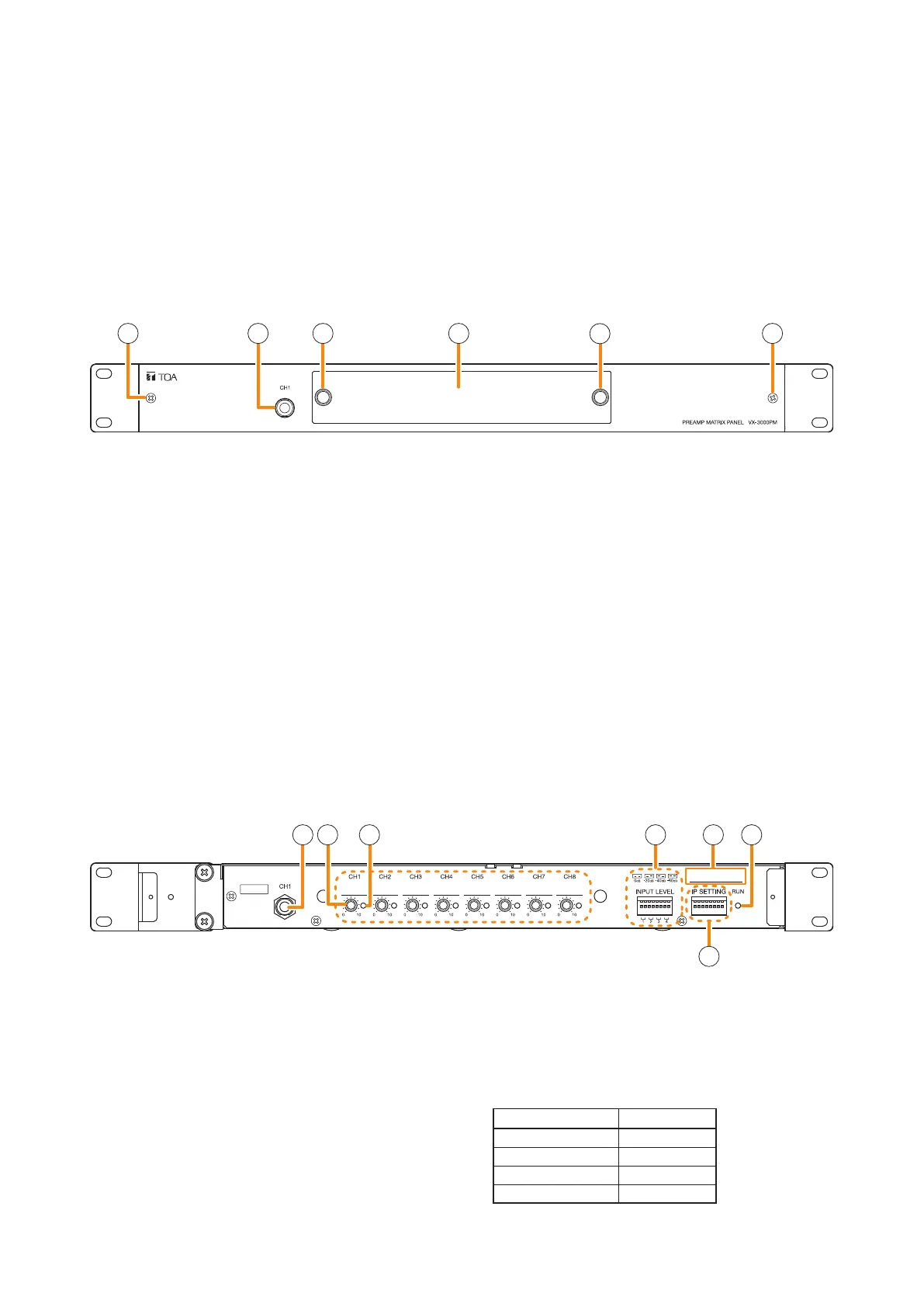
5 6 7 8 92
10
1 1
2 3
3
4
1. Fixing screws for front panel
2. Input 1 jack [CH1]
Insert the microphone's phone plug into this jack.
This Input 1 takes precedence over the rear-
mounted Audio input terminal 1 internally connected
to the Input 1.
Inserting the phone plug into this Input 1 jack
disconnects the input of the rear-mounted Audio
input terminal 1.
3. Volume control section cover knob
The cover over the volume control section can be
removed by pulling the both knobs.
4. Volume control section cover
The volume controls for all input channels are
located inside this cover.
5. Volume control
Volume controls for each input.
Inputs 1 to 8 volume controls are arranged in order
from left to right.
The volume increases as the knob is rotated
clockwise, and is minimized when the knob is
rotated fully counterclockwise (Position "0").
6. Signal indicator (Green)
Signal indicators for each input.
Lights when the signal above a certain level is
input.
The table below shows the appropriate relationship
between the input level setting and the lighting
level.
Input level setting Lighting level
0 dB*
2
–25 dB*
2
–20 dB*
2
–45 dB*
2
–40 dB*
2
–65 dB*
2
–60 dB*
2
–85 dB*
2
*
2
0 dB = 1 V
[Front panel detached]
When the front panel is removed by loosening the front panel mounting screws, the input volume controls and
the setting switches are exposed.
You can access the input volume controls when you remove the volume control section cover without detaching
the front panel.



 To Next Page