2-18
Chapter 2
NOMENCLATURE AND FUNCTIONS
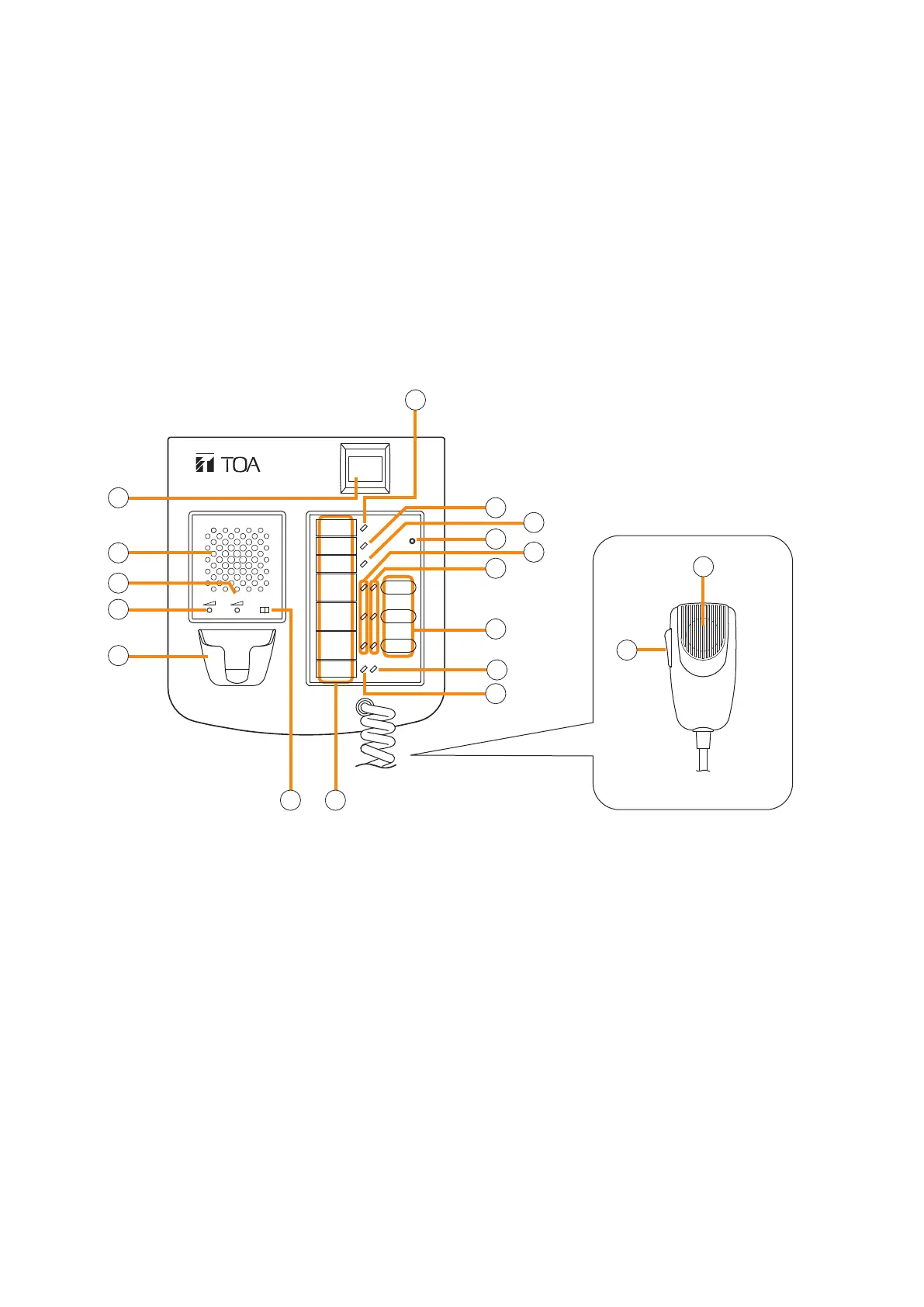
6. RM-200SF FIREMAN'S MICROPHONE
• The RM-200SF Fireman’s Microphone features 3 function keys, 1 emergency key, 1 talk key, and the indicator
lamps associated with these keys. Functions are assigned to the function keys using the VX-3000 Setting
Software.
• Specially designed for both emergency and general purpose broadcast applications, the Fireman’s Microphone
can be used for push-button zone selection and microphone broadcasts.
• VX-3000 setting software permits desired functions to be assigned to individual Function keys (equipped with
2 LED indicators).
• Up to 4 RM-320F Remote Microphone Extension units can be used with each RM-200SF Remote Microphone.
• Up to 2 RM-200SF Fireman’s Microphones can be connected within a VX-3000F.
• The CPU switch enables all-zone emergency broadcasts from the RM-200SF Fireman’s Microphone, even
when the CPU malfunctions.
• Failures of Emergency buttons and signal (both control and audio) path between the microphone (including
the internal microphone element) and the VX-3000F are automatically detected.
[Front]
1. Power indicator (Green)
Lights when the power is turned on.
2. Emergency key
Assign the function concerning the emergency
broadcast to this key using the VX-3000 Setting
Software.
This key lights or ashes depending on the
assigned function.
3. Monitor speaker
Used to monitor current broadcasts.
4. Monitor speaker volume control
Adjusts the volume of the built-in Monitor speaker
(3).
5. Microphone volume control
Adjusts the input sensitivity of the Hand-held
Microphone.
6. Microphone hanger
Used to hold the unit's Hand-held Microphone.
7. CPU switch
Normally set to ON. (Factory-preset: ON)
Setting this switch to OFF in combination with
the DIP switch (20) setting on the bottom surface
allows the all-zone emergency broadcast to be
made using a hand-held microphone by way of
analog transmission not via the CPU control.
8. Indication label insert slot
The label can be printed using the VX-3000
Setting Software. (See the separate Setting
Software Instructions, "PRINTING LABELS FOR
REMOTE MICROPHONES.")
RM-200SF
MIC SP CPU
OFF ON
1
2
3
4
5
6
7 8
9
10
11
12
13
14
15
16
17
[Hand-held microphone]
18



 To Next Page