2-22
Chapter 2
NOMENCLATURE AND FUNCTIONS
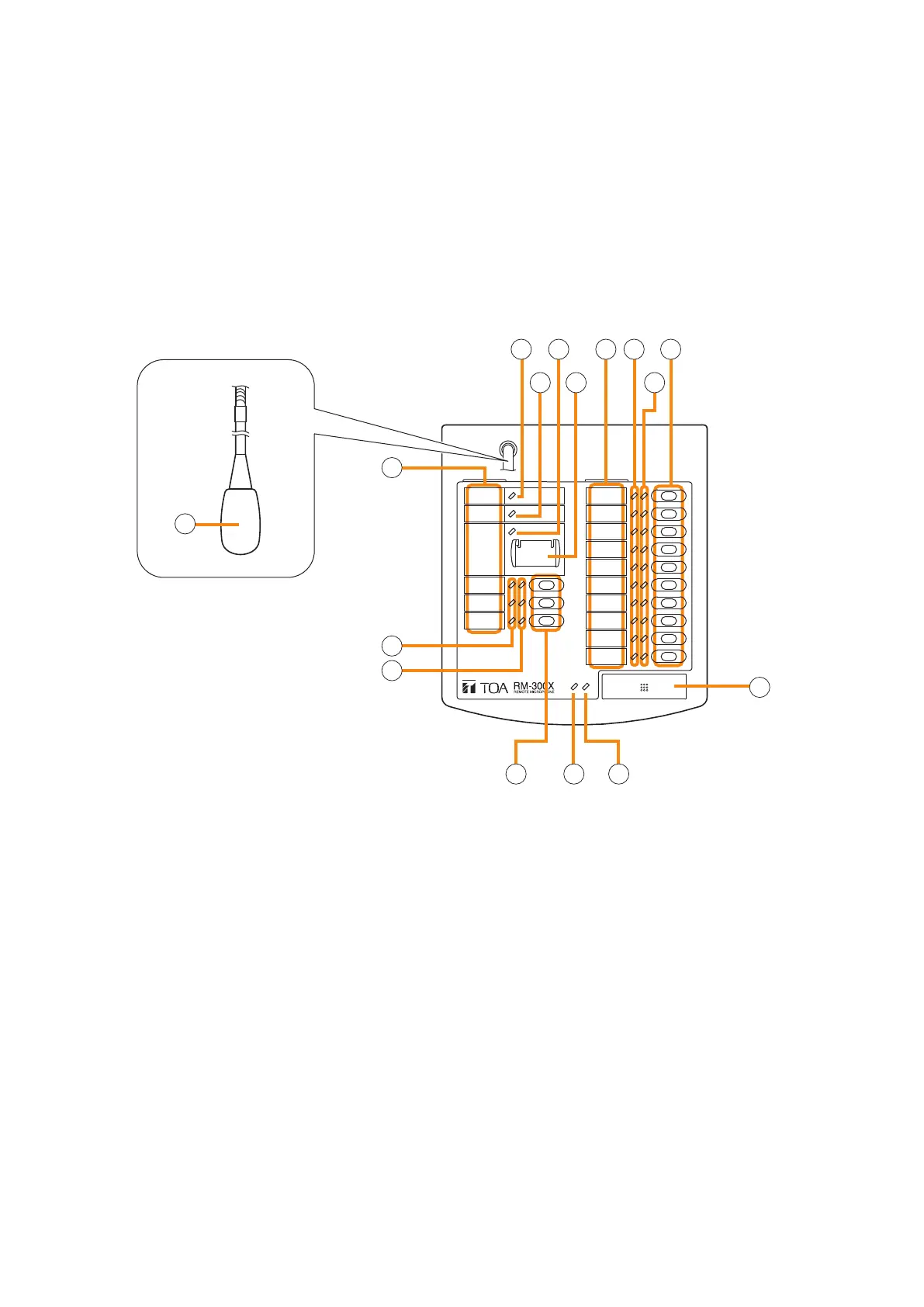
8. RM-300X REMOTE MICROPHONE
• The RM-300X Remote Microphone features 13 function keys, 1 covered key, 1 talk key, and the indicator
lamps associated with these. Functions are assigned to the function keys using the VX-3000 Setting Software.
• VX-3000 setting software permits desired functions to be assigned to individual Function keys (equipped with
2 LED indicators).
• Connecting RM-210F Remote Microphone Extension (maximum 7) to the RM-300X expands the number of
function keys and indicators in blocks of 10.
• Up to 8 RM-300X Remote Microphones can be connected within a VX-3000F.
• The DIP switch setting enables all-zone emergency broadcasts from the RM-300X Remote Microphone, even
when the CPU malfunctions.
[Top]
1
3 5
6
7
8
8
10
2 4 6 7 9
11 12 13
1. Microphone
Used for voice announcements.
2. Power indicator (Green)
Lights when the power is turned on.
3. Failure indicator (Yellow/Red)
Flashes yellow if some problem within the system
is detected.
This indicator will light yellow if the signal to the
VX-3000F to which the RM-300X is connected is
interrupted for 5 seconds or more.
This indicator will light red while the all-zone
emergency broadcasts is being made (p. 3-30)
or the RM-300X is in the reset process.
4. Emergency indicator (Red)
Lights or ashes depending on the function
assigned to the Emergency key.
5.
Emergency/all-zone emergency broadcast key
(Covered)
[Function concerning the emergency broadcast]
Assign the function concerning the emergency
broadcast to this key using the VX-3000 Setting
Software.
[Function concerning the all-zone emergency
broadcast]
Independently of settings made by the VX-3000
Setting Software, holding down this key for 4
seconds or more in combination with DIP switch
(14) setting causes the CPU to be bypassed,
enabling the all-zone emergency broadcast to
be made by way of analog transmissions. (See
p. 3-30.)
6. Indication label insert slots
Labels can be printed using the VX-3000 Setting
Software. (See the separate Setting Software
Instructions, "PRINTING LABELS FOR REMOTE
MICROPHONES.")



 To Next Page