12
COMPONENTS
OPERATION METHOD OF CONTROL PANEL
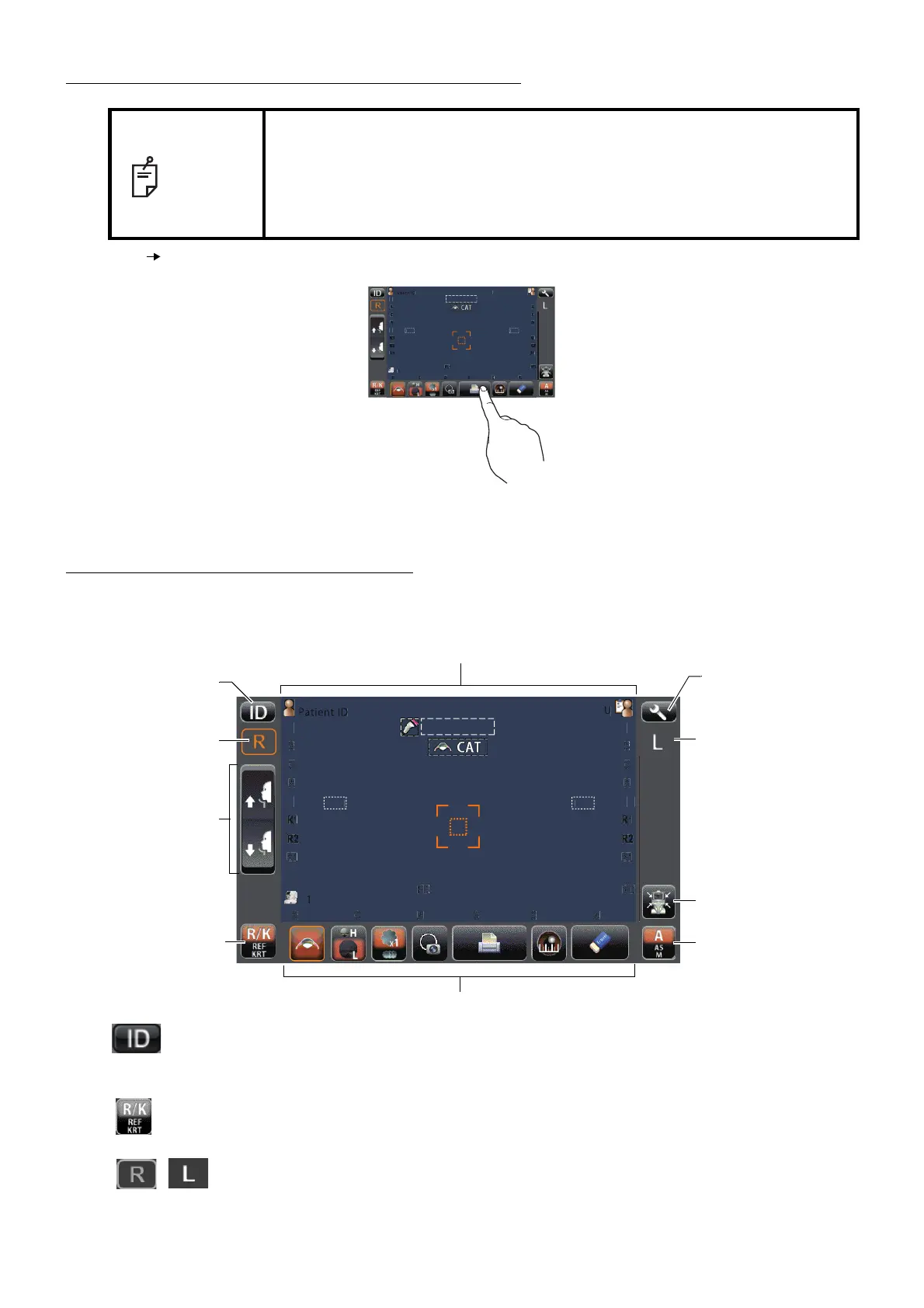
CONTROL PANEL COMPONENTS
The control panel is designed for performing various operations and settings by touching on the screen. It dis-
plays images and shows information, including set conditions and measurement results.
ID button.................................................Input the patient ID (up to 13 characters) and operator ID (up
to 13 characters). However, if no patient ID is input, the
patient No. is allocated automatically.
Measurement mode button......................Selects a measurement mode from REF, KRT and R/K.
R display/L display......................Shows the measured eye is R (Right eye) or L (Left eye).
The measured eye is framed in orange.
NOTE
• The control panel is a touch panel. Do not use any sharp tools; e.g. ball
point pen.
• Do not touch two points on a control panel simultaneously.
• If machine is moved by tapping the control panel during measurement, it
might cause an incorrect measurement.
Tap Touch the control panel softly with a finger.
PatientID
3/3
3/3
3/3
3/3
-1.25
-1.25
-.5
-.5
18
18
7.8
7.8
7.8
7.8
12.
12.
-1.25
-1.25
-.5
-.5
18
18
18
18
3/3
3/3
3/3
3/3
-1.25
-1.25
-1.25
-1.25
-.5
-.5
-.5
-.5
7.8
7.8
7.75
7.75
18
18
18
18
18
18
1
R
S
K
R1
R2
A1
R
K
R1
R2
A1
VD
PD
mm
OPCON
TARO
TOPCONTAROU
mm
Semi Auto
PatientID
3/3
3/3
3/3
3/3
-1.25
-1.25
-.5
-.5
18
18
7.8
7.8
7.8
7.8
12.
12.
-1.25
-1.25
-.5
-.5
18
18
18
18
3/3
3/3
3/3
3/3
-1.25
-1.25
-1.25
-1.25
-.5
-.5
-.5
-.5
7.8
7.8
7.75
7.75
18
18
18
18
18
18
1
R
S
K
R1
R2
A1
R
K
R1
R2
A1
VD
PD
mm
PC
N
TAR
TOPCONTAROU
mm
Semi Auto
Measurement mode button
Function button
R display
L display
Display
ID button
Alignment mode button
Settings button
Reset button
Up/down button
for chinrest



 To Next Page