Calibration
Body Sensor
27
X-52/X-72 2D Excavator Installation and Calibration Manual P/N: 1022461-01
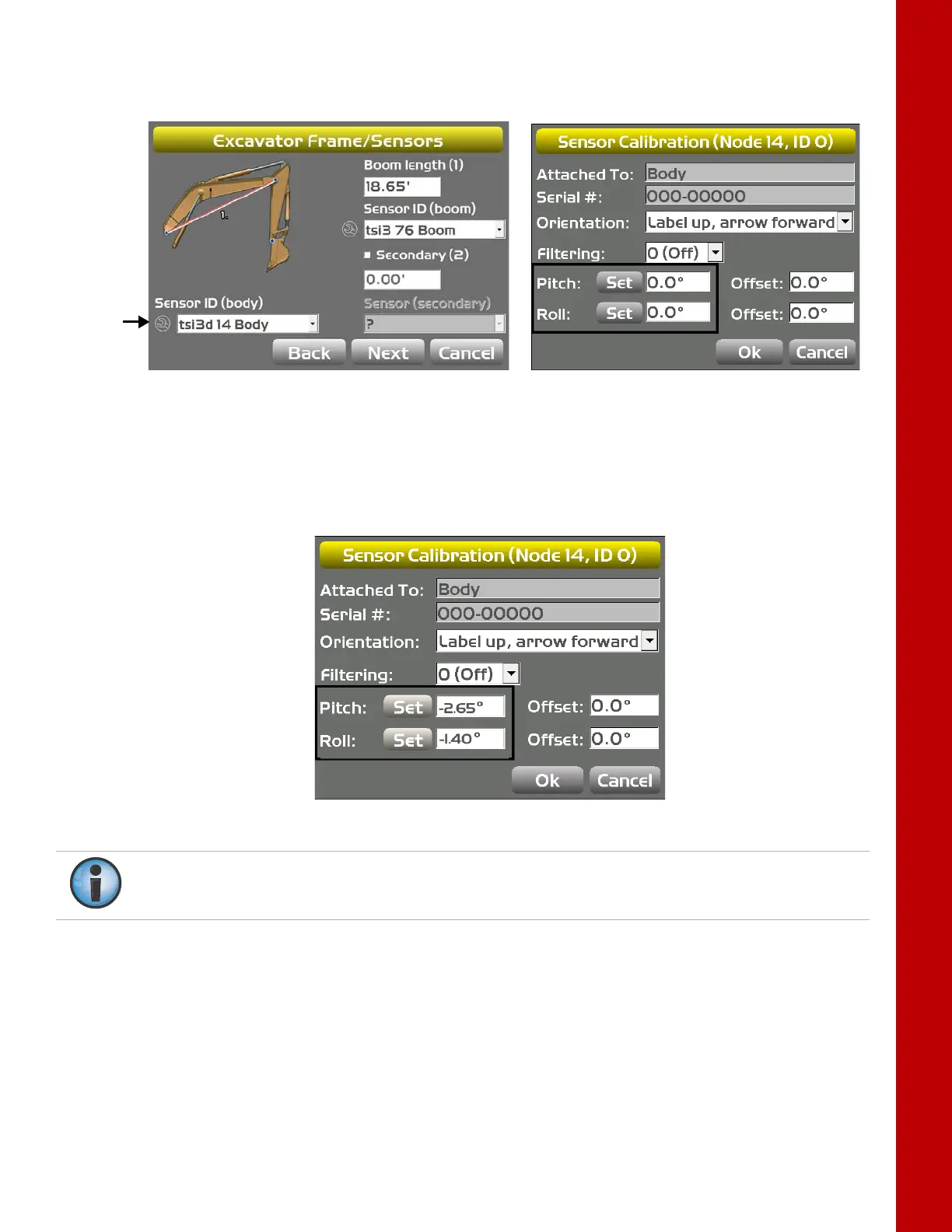
9. Tap Set next to Pitch, enter the value as zero, and tap Set again (Figure 30); repeat for the
Roll value.
Figure 30: Set Pitch and Roll Values to Zero
10. Without moving the tracks, rotate the machine 180° (Position 2) as shown in Figure 29 on
page 26.
11. Tap Set next to Pitch, set the value to half the displayed values, and tap Set again
(i.e. -5.3/ 2 = -2.65 and -2.8/ 2 = -1.4) (Figure 31); repeat for the Roll value, and then tap OK.
Figure 31: Set Pitch and Roll Value to Half of Displayed Values
12. Tap Ok to return to the Excavator Frame/Sensor screen.
Once the body sensor roll value is calibrated, rotate the machine until the body Roll is 0.0.
The remaining sensors require 0.0 Roll to be calibrated.



 To Next Page