Calibration
Boom Sensor
28
X-52/X-72 2D Excavator Installation and Calibration Manual P/N: 1022461-01
Boom Sensor
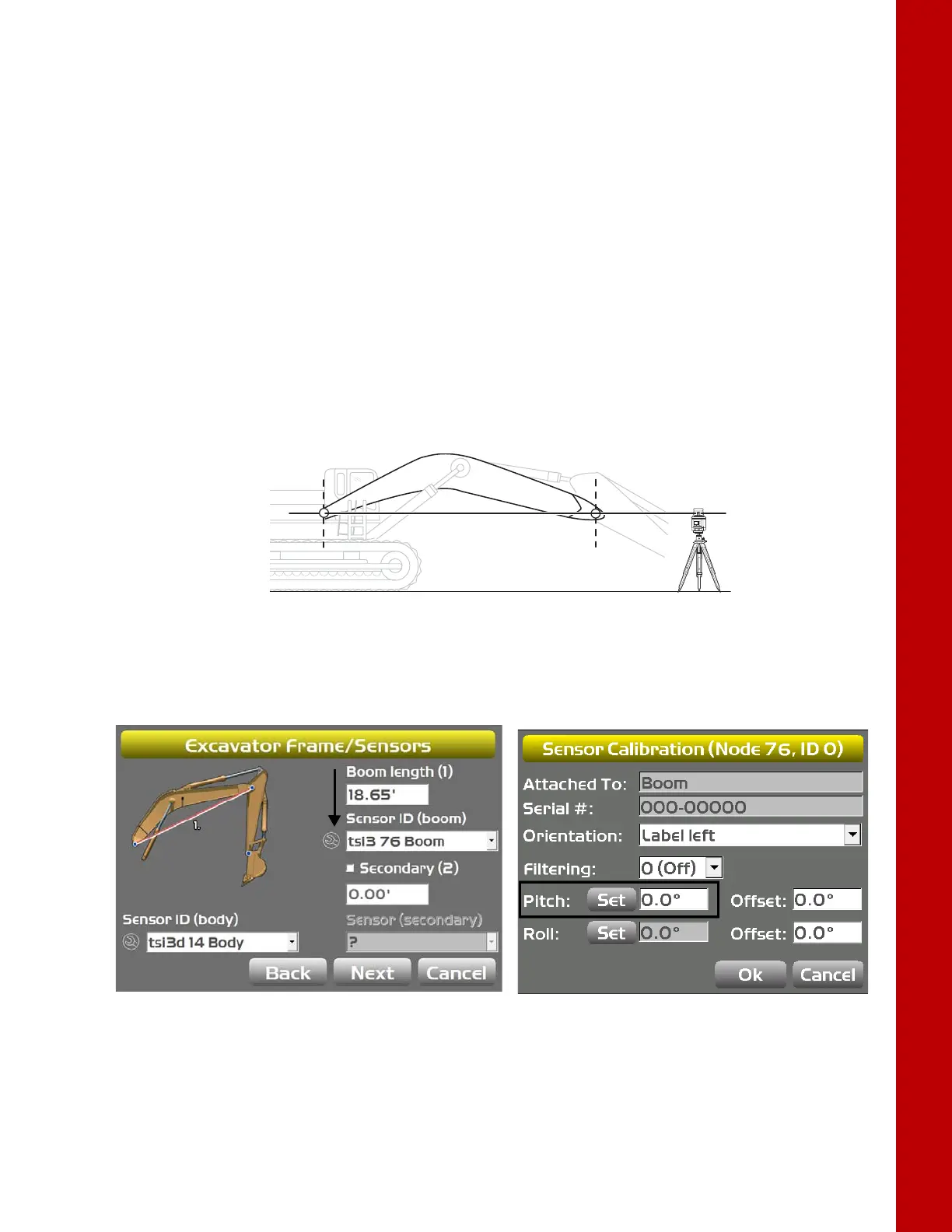
When performing the boom sensor calibration, a laser is recommended to correctly position the boom
at zero degrees.
1. Tap the Wrench icon that corresponds to the boom sensor (Figure 31).
2. Select the correct orientation from the drop-down menu.
3. Ensure the machine is parked on a flat and stable surface, and that the Body Sensor reads a 0.0
degree roll.
4. Place a zero slope rotating laser along the side of the machine to shine on both the boom pivot
and stick pivot.
5. Adjust the laser height to strike the center of the boom pivot (Figure 32).
6. Move the boom to align the stick pivot with the laser
(Figure 32).
Figure 32: Place Laser to Strike Center of Boom Pivot
7. Tap the Wrench icon that corresponds to the boom sensor (Figure 33).
8. Tap Set next to Pitch, enter the value as zero, and tap Set again (Figure 33).
Figure 33: Set Pitch Value to Zero
9. Tap OK to return to the Excavator Frame/Sensors screen.



 To Next Page