Calibration
Excavator Hitch
38
X-52/X-72 2D Excavator Installation and Calibration Manual P/N: 1022461-01
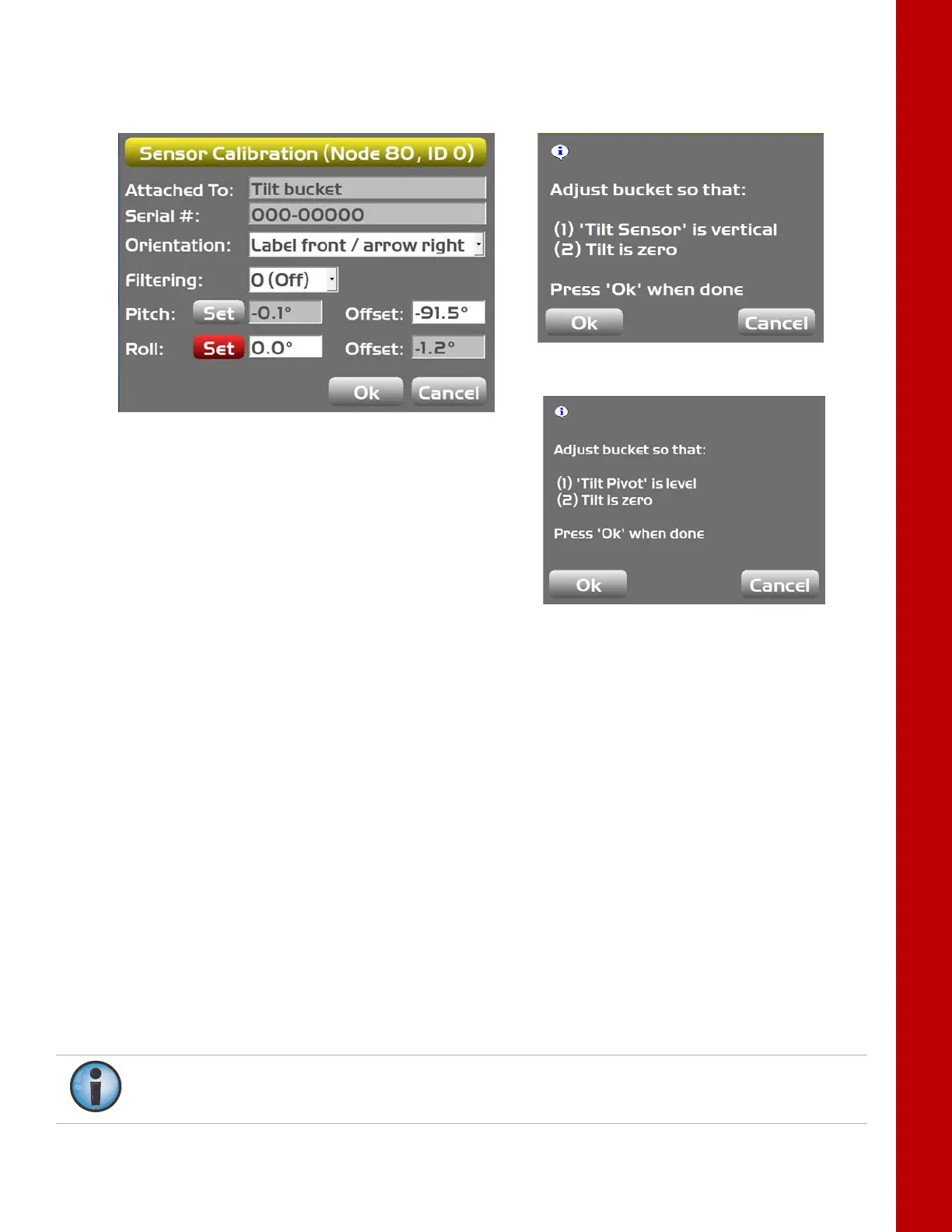
11. Click on the Set button for Roll. A popup screen will appear.
Figure 47: Set Roll
12. To set the roll:
a. Single Axis TS-i3: Ensure Tilt is zero and the Tilt Sensor is vertical. For the Tilt sensor to
be vertical, the label must be straight forward with arrow pointing to the right from the
cab perspective or straight back with arrow pointing to the right from the cab
perspective. Tap Ok.
– The roll will be set to 0.0, and the relationship between the verticality of the tilt sensor
and Hitch sensor will be recorded
b. Dual Axis TS-i3d: The tilt sensor should be horizontal (label facing up). Ensure the Tilt
Pivot is level and the Tilt is zero. Tap Ok.
– The roll will be set to 0.0.
13. Tap Ok to finish this calibration.
Single-axis TS-i3
Dual-axis TS-i3d
To calibrate the bucket edge, see “Attachment Edge” on page 34.
If setting up multiple buckets
of any kind, see “Multiple Attachments” on page 35.



 To Next Page