Mounting the OneLINK Device
If you are installing the OneLINK device with a OneLINK EZIM, mount the EZIM with or near the camera.
Most Vaddio Thin Profile Wall Mounts include two mounting holes to attach the EZIM to the underside of
the mount using two 6-32 screws. Connect all required cables during camera installation.
Rack and under-table mounting kits are available for the receiver. Follow the mounting instructions supplied
with the kit.
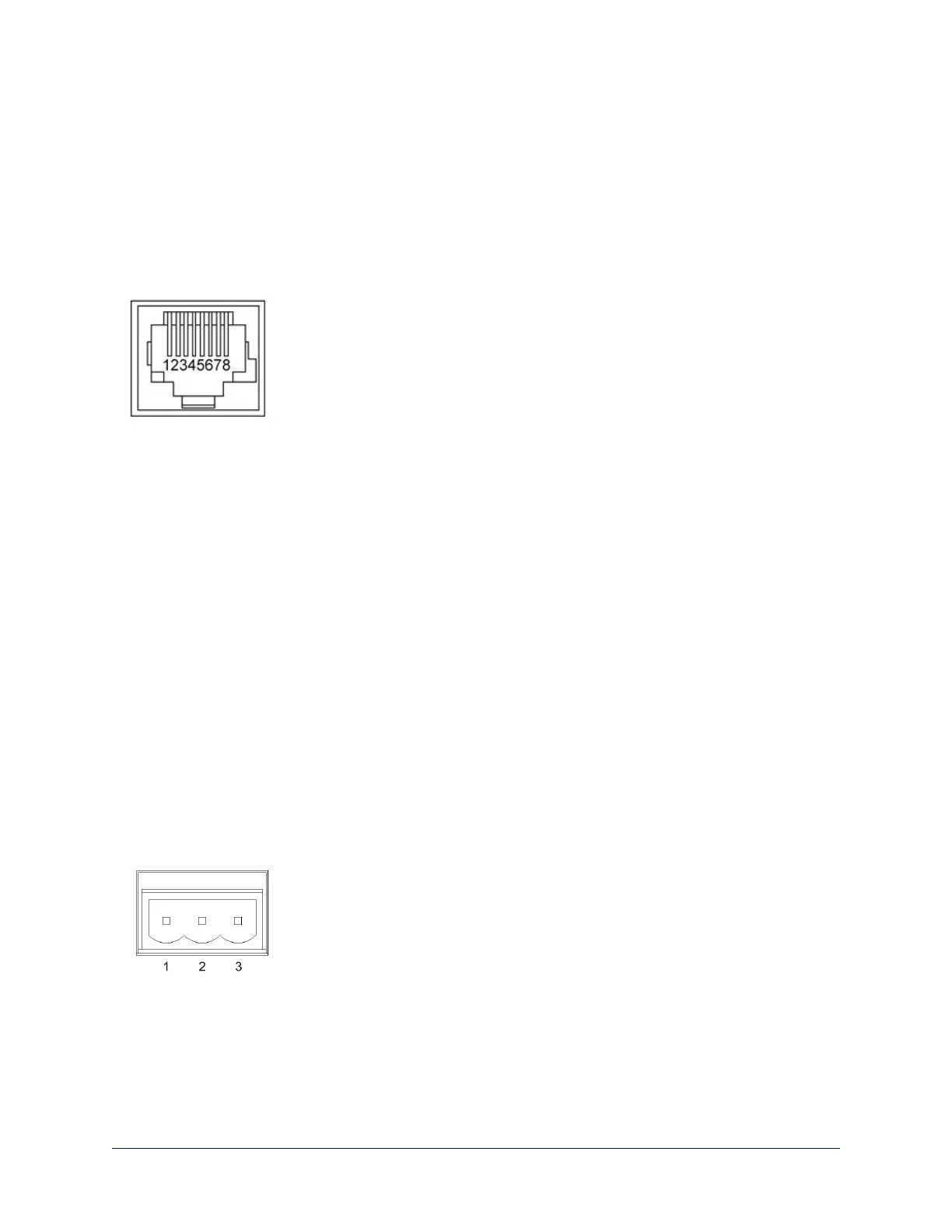
RS-232 Connector Pin-Outs
OneLINK Receiver - RS-232 Control Port
1. Unused
2. Unused
3. Unused
4. Unused
5. Unused
6. GND – green
7. RX (from TX of controller) – brown/white
8. TX (to RX of controller) – brown
OneLINK EZIM - RS-232 Control Port
1. Unused
2. Unused
3. Unused
4. IR GND
5. IR (non-mod)
6. GND – green
7. TX (to RX of camera) – brown/white
8. RX (from TX of camera) – brown
Note
Vaddio recommends adhering to the 568B cabling standard for Cat-5 cabling.
IR Forwarding Connector Pin-Out
1. Modulated IR
2. Common Ground
3. Non-modulated IR
11
Integrator's Complete Guide to the OneLINK HDMI Camera Extension



 To Next Page