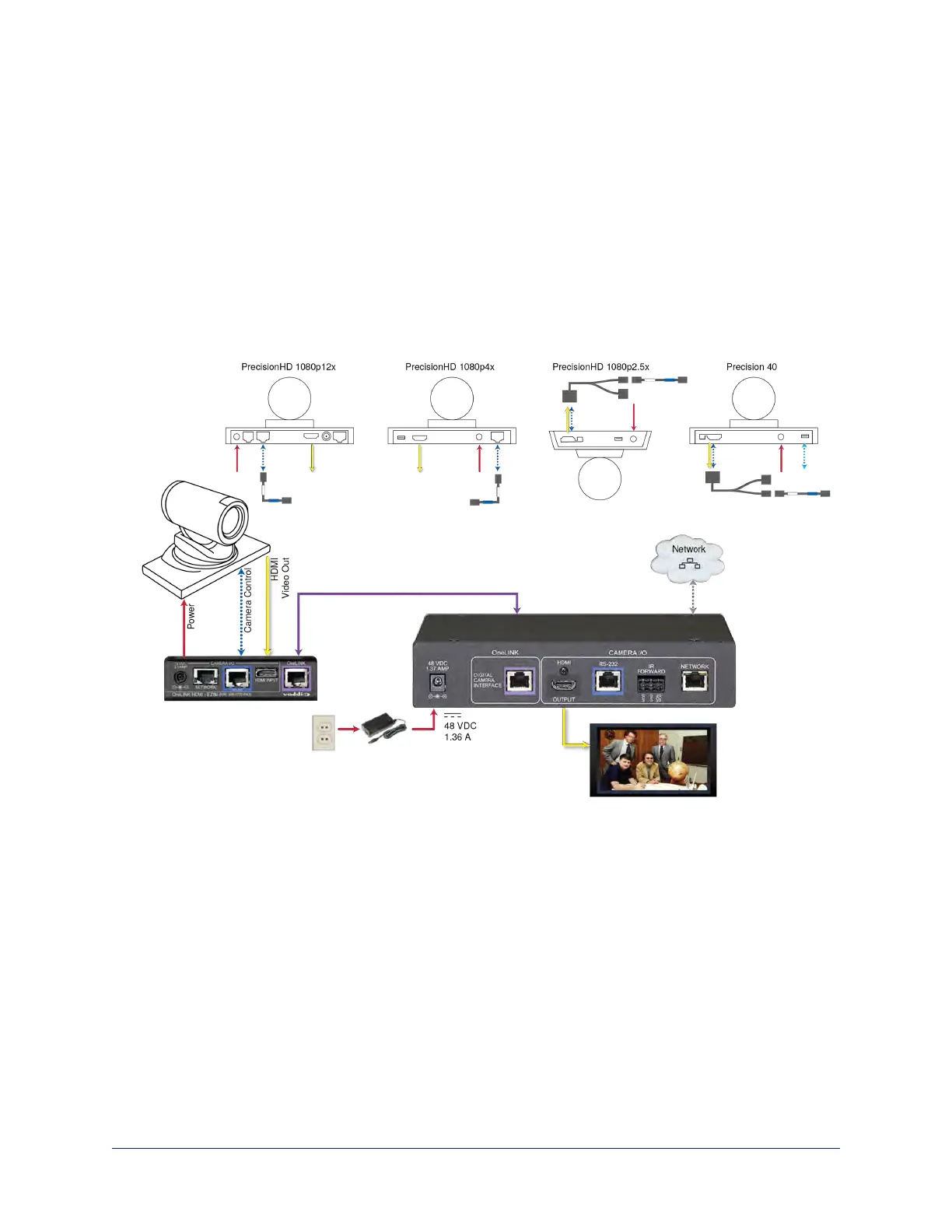
Connecting a Cisco Camera
999-9560-000/001/009
In these diagrams, the OneLINK device extends power and control to a Cisco camera, and brings camera
video to the connected HDMI display.
Items in these diagrams:
n OneLINK HDMI receiver and OneLINK EZIM
n Camera-side fan-out cable (not included; used with Precision 40 and Precision HD 1080p2.5x)
n Ciscocamera (not included)
n HDMI display and HDMI cable (not included)
n Cat-5e cables for OneLINK and network connections (not included)
Cisco Precision 40 or Precision HD Series Camera
Note
If connecting to a Cisco Precision 40 or Precision HD 1080p2.5x camera, you will need to provide a Cisco
split cable, Cisco part number CAB-PHD4XS2-SPLIT.
25
Integrator's Complete Guide to the OneLINK HDMI Camera Extension



 To Next Page