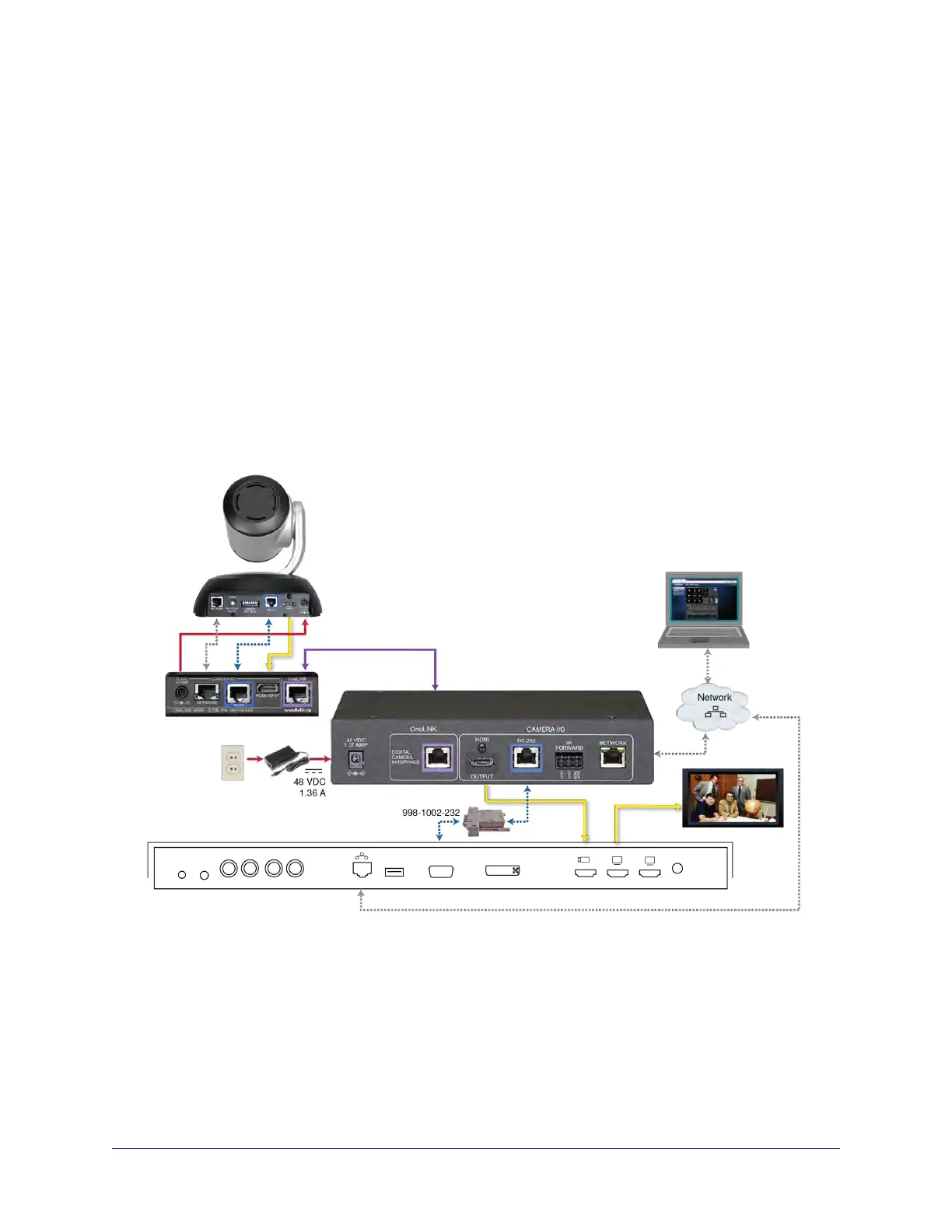
Connecting a RoboSHOT HDMI Camera and Cisco Codec
999-9570-000/001/009
In these diagrams, the OneLINK device extends network connectivity, power, and control to a RoboSHOT
HDMI camera, and connects it to a Cisco codec. The codec provides HDMI video to the connected
display.
Items in these diagrams:
n OneLINK HDMI receiver and OneLINK EZIM
n Power supply and AC cord set
n RS-232 adapter 998-1002-232 (used with standard Cat-5 cable on C20, C60. and SX80 codecs)
n Cisco split cable CAB-PHD4XS2-SPLIT (not included; required for SX20 codec)
n Codec-side null modem cable (used with split cable on SX20 codec)
n RoboSHOT 12 HDMIcamera (not included)
n Cisco codec (not included)
n HDMI display and HDMI cable (not included)
n Laptop providing access to the camera's web interface (not included)
n Cat-5e cables for OneLINK and network connections (not included)
RoboSHOT HDMI Camera and Cisco C20 Codec
36
Integrator's Complete Guide to the OneLINK HDMI Camera Extension



 To Next Page