Visual Conventions for Connection Diagrams
The following sections provide representative connection diagrams for the various OneLINK kit and system
configurations available. All diagrams in this guide use these visual conventions for connection type.
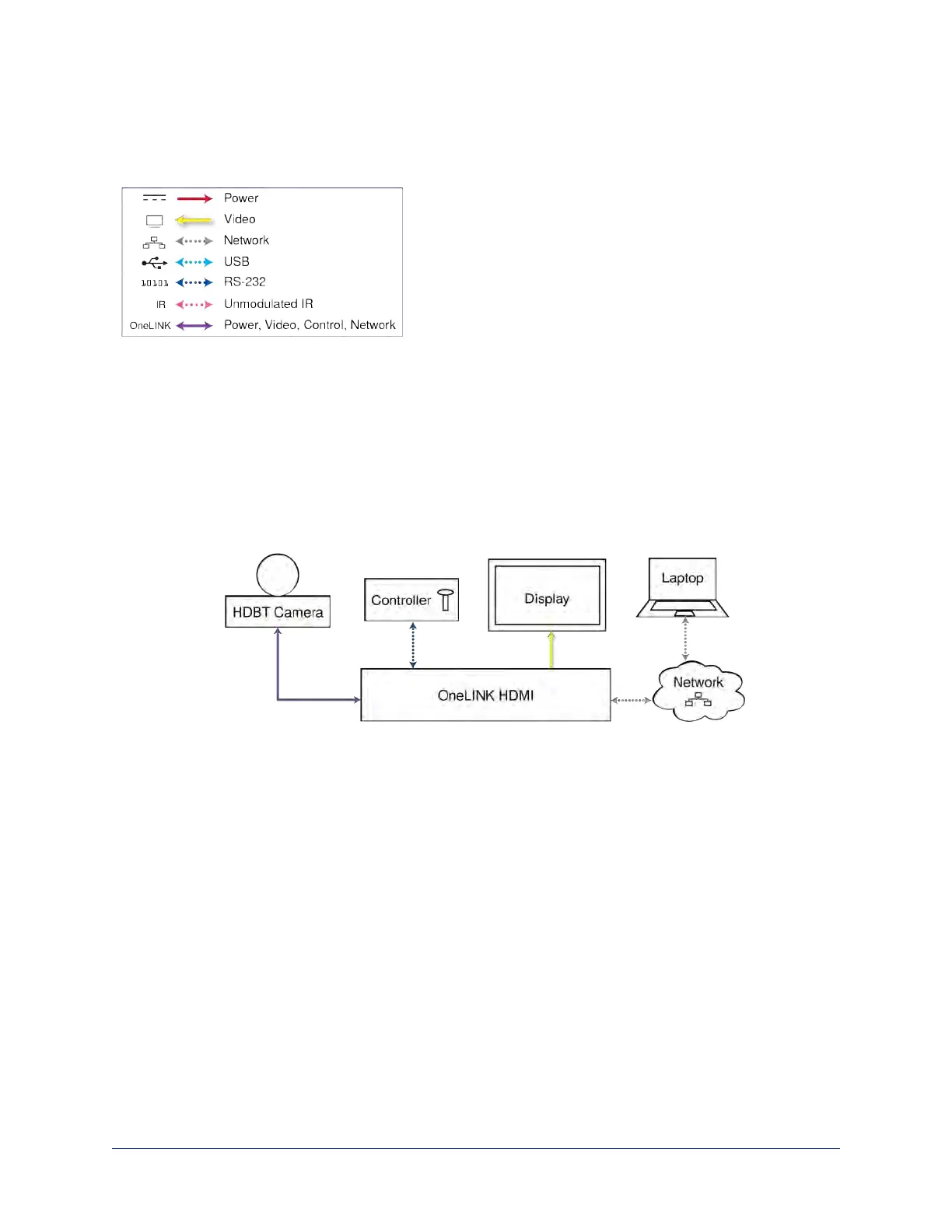
Connections for HDBaseT Cameras
In this configuration, the OneLINK HDMI extends network connectivity, power, and control to an HDBaseT
camera, and brings HDMI video from the camera to a display. The camera can optionally be controlled by a
camera controller on an RS-232 serial connection to the OneLINK HDMI or over the network, depending on
the controller.
If an IP stream is available from the camera, the OneLINK device passes it to the network. IP streaming
resolutions up to 2160p/30 are supported. HDMI output resolution and streaming parameters (including
resolution) are configured on the camera, not the OneLINK device.
Kits and Systems for HDBaseT Cameras
This block diagram applies to:
n OneLINK HDMI for HDBaseT Cameras, 999-1105-043/143/943 – compatible with all Vaddio HDBaseT
cameras.
n RoboSHOT 12 HDBT OneLINK HDMI System, 999-9960-100/101
n RoboSHOT 30 HDBT OneLINK HDMI System, 999-9963-100/100W/101/101W
n RoboSHOT 20 UHD OneLINK HDMI System, 999-9950-100/101/109
n DocCAM 20 HDBT OneLINK HDMI System, 999-9968-200/201/209
n Future systems consisting of a Vaddio HDBaseT camera and a OneLINK HDMI receiver
12
Integrator's Complete Guide to the OneLINK HDMI Camera Extension



 To Next Page