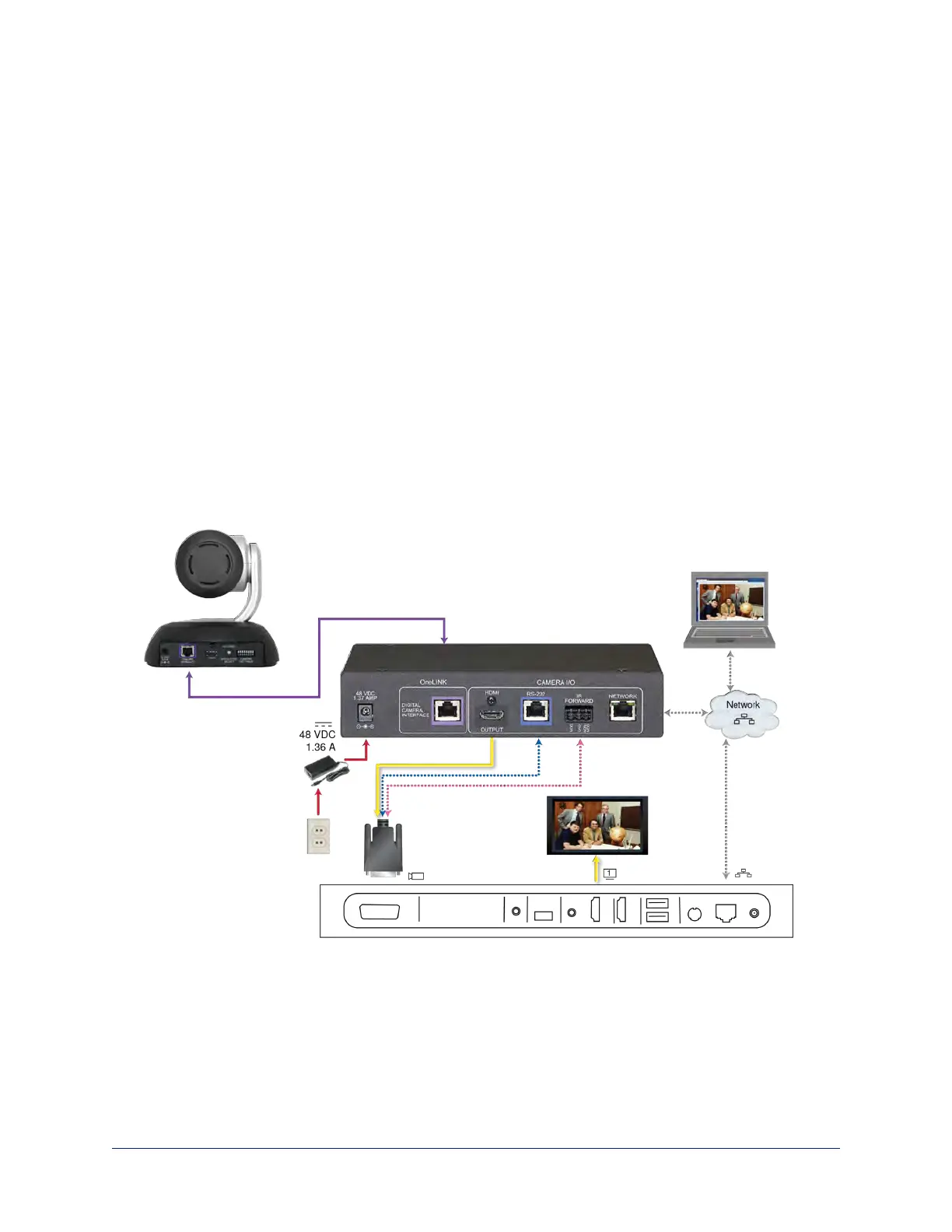
Connecting a Vaddio HDBaseT Camera and Polycom Codec
999-9545-000/001/009
In these diagrams, the OneLINK device extends network connectivity, power, and control to a RoboSHOT
HDBT camera, and connects it to a Polycom RealPresence Group Series codec. The OneLINKdevice
passes the camera's IP stream (if available) to the network. The codec provides HDMI video to the
connected display.
Other Vaddio HDBaseT cameras would be connected in exactly the same way.
Items in these diagrams:
n OneLINK HDMI receiver
n Power supply with ACcord set
n Codec-side fan-out cable, bare wires terminated with 3-position, 5mm Euro-style connector
n RoboSHOT 12 HDBTcamera (not included)
n Polycom RealPresence Group Series codec (not included)
n HDMI display and HDMI cable (not included)
n Laptop receiving the camera's IP stream (not included)
n Cat-5e cables for OneLINK and network connections (not included)
RoboSHOTHDBT Camera and Polycom RealPresence Group 310 Codec
The Group 500 codec looks very similar and connects in the same way.
Other Vaddio HDBaseT cameras connect in the same way.
15
Integrator's Complete Guide to the OneLINK HDMI Camera Extension



 To Next Page