Hardware Note: IR Forwarding
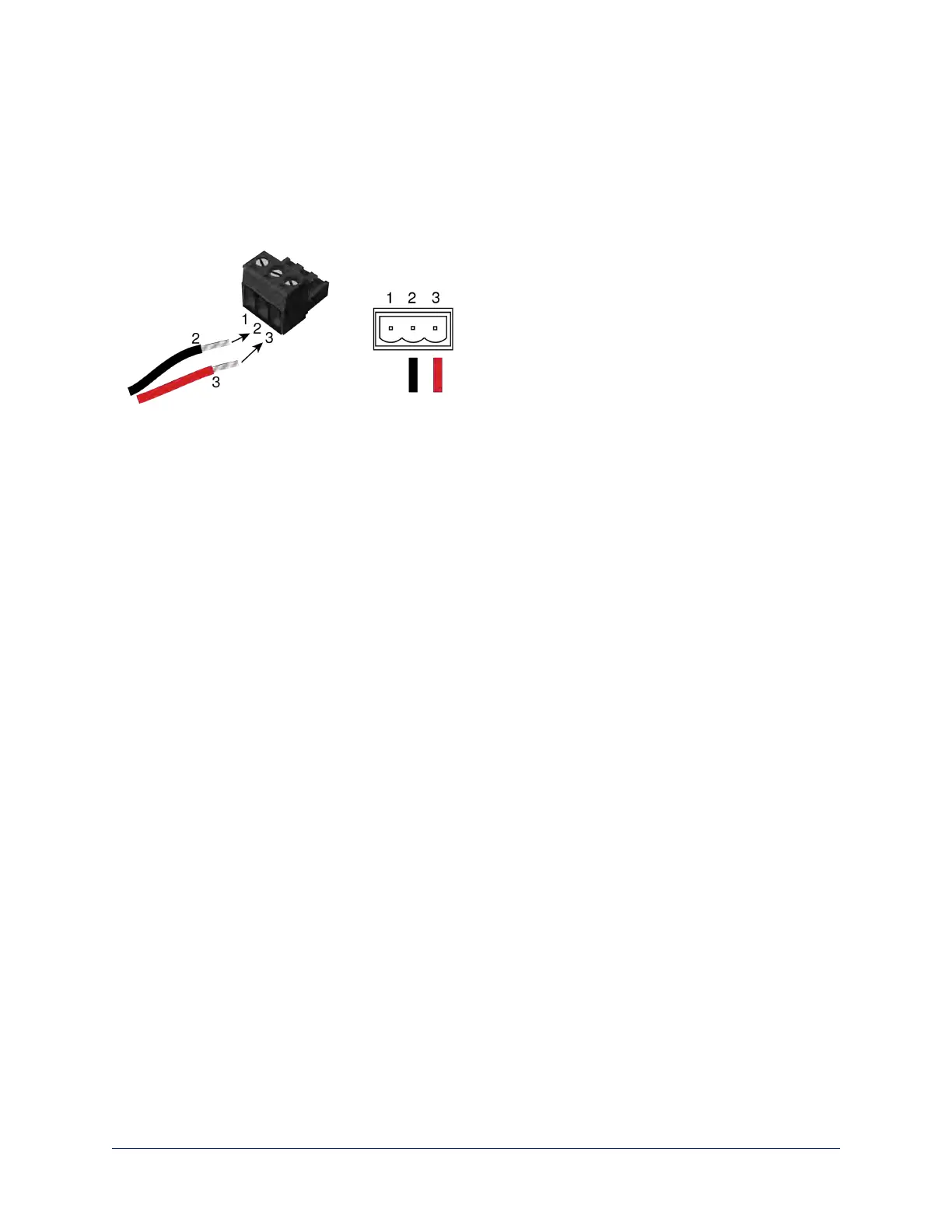
Use the supplied 3-position Euro-style connector to terminate the two unterminated wires of the codec-side
fan-out cable as follows:
n Black wire: Center position (pin 2)
n Red wire: Right position (pin 3)
Connect this part of the fan-out cable to the IR FORWARD connector on the OneLINK HDMI receiver.
Note
Some fan-out cables have a black/white wire instead of a red one. Wiring is the same – black to pin 2,
black/white to pin 3.
Some older fan-out cables have the wires reversed. This will not damage the equipment. If IR forwarding
does not work when you terminate the cable per these instructions, remove power from the OneLINK
device, disconnect the fan-out cable, and re-terminate the wires with red (or black/white) to pin 2 and black
to pin 3. Then reconnect the cable and power up the OneLINK device again.
Hardware Note: Connection and Configuration Changes
After connecting or configuring the equipment, reboot the OneLINK device, camera, and codec. Note that
rebooting the OneLINK device does not affect the camera and codec; they must be rebooted separately.
Camera Configuration
Keep in mind that the OneLINK HDMI displays its own IP address, not the camera's IP address.
Point the remote at the camera and press the Data Screen button to see the camera's IP address on the
connected display.
You can configure the following settings on your Vaddio HDBaseT camera:
n HDMI output resolution: Depending on the camera, set this using the rotary switch on the back of the
camera or the virtual rotary switch on DIP Switches tab of the System page.
n IP streaming: Streaming page. Settings include Enable/disable, streaming quality, and streaming
resolution.
n Codec Control Mode: Soft DIP on the DIP Switches tab of the System page.
n IR: ON (default). DIP switch 3 on the back of RoboSHOT 20 UHD or RoboSHOTHDBT cameras, soft
DIP 3 on the DIP Switches tab of the System page for DocCAM 20 HDBT.
Note
Codec Control Mode was added to Vaddio cameras in early 2018. Your camera may require a firmware
update to add this capability.
17
Integrator's Complete Guide to the OneLINK HDMI Camera Extension



 To Next Page