Need help?
Do you have a question about the VALCO MELTON MCP-8 and is the answer not in the manual?
Provides an overview of the MCP-8 Control Unit's capabilities and design for adhesive system pattern control.
Details the key features and capabilities of the MCP-8 Unit, including application types and operational modes.
Emphasizes reading all safety precautions before handling the MCP-8 Control Unit and its associated equipment.
Explains the various symbols used in the manual and on the equipment to denote hazards and safety requirements.
Outlines the owner's obligations regarding safety information, training, and equipment maintenance.
Defines the intended use of the equipment and advises against modifications or unintended applications.
Provides universal safety precautions for the installation, startup, and general use of Valco Melton equipment.
Details essential safety measures to follow when shutting down the equipment, including purging and power disconnect.
Highlights safety precautions specific to hot melt applications, including ventilation and avoiding open flames.
Provides immediate steps to take if hot adhesive comes into contact with the skin, emphasizing not to remove it.
Outlines the emergency steps to follow if a person inhales adhesive fumes, focusing on fresh air and medical help.
Instructs on actions to take in case of adhesive-related fire or explosion, including extinguisher types.
Provides guidelines on proper handling, installation, and maintenance of hoses to ensure safe operation.
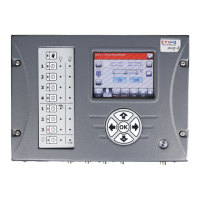
Describes the layout and function of the MCP-8 Control Unit's front panel buttons and display.
Guidance on carefully unpacking the MCP-8 Control unit and its included installation kit components.
Details the components and procedure for mounting the MCP-8 using the standard rail and foot system.
Explains the use and footprint of the swivel mount for remote display touchscreen assemblies.
Instructions for installing a wheel-driven encoder to determine machine speed for the MCP-8 system.
Procedures for mounting the glue station to the parent machine as part of the MCP-8 setup.
Identifies and illustrates the various M12 and Tri-Valve connection ports on the MCP-8 unit.
Details the pin assignments for standard Valve Output and Scanner Input connectors on the MCP-8.
Pinout details for Alarm Beacon and Encoder connections on the MCP-8 unit.
Pinout configurations for External EPC and Diagnostic Port connections on the MCP-8 unit.
Pin assignments for Feeder Signal and Relay connections specific to Tri-Valve configurations.
Detailed pinouts and panel references for various valve connections (Ch. 1-4 and Ch. 4 only).
Guidance on using three wiring configurations to trigger valves and wiring the scanner cable.
Describes the MCP-8's operator interface buttons and explains the function of Status LEDs.
Details the function of navigation (arrow) and edit (plus/minus/OK) buttons for screen interaction.
Explains how to enter passwords to access system functions and security settings.
Outlines the five different security levels for accessing and configuring the MCP-8 system.
Describes how to set the system to Protected Level Mode (Level 0) for enhanced security.
Covers main menu buttons, single-digit vs. thumbwheel editing for parameter input.
Explains the operation of Valve Buttons for manual purge and valve selection modes.
Guidelines and cautions for setting up valve and channel parameters specific to the application.
Step-by-step instructions for selecting and configuring the type for each valve in the MCP-8 system.
Procedures for inputting and editing encoder pulses and repeat length for accurate speed measurement.
How to access and interpret the Diagnostic Screen for system status and troubleshooting.
Explains and guides on setting Ton, Toff, and Tmin parameters for precise glue application timing.
Customizing user access levels to parameters and buttons for simplified operator interface.
Configuration options for Jam Detection to prevent jams and minimize their impact on the system.
Instructions for enabling and configuring the Tipsealer feature for specific applications.
Configuration of Feeder Timeout duration and Feed Signal Polarity for proper tipsealer operation.
Explanation of Manual Mode output options and Output Error Mode settings for the Tipsealer.
How to configure the 'Jogg on Restart' setting to clear nozzles after a system restart.
Using the Reversing Button to set up top-down or bottom-up operation for reversible glue stations.
Procedures for backing up and archiving system settings using the Archive Button.
Step-by-step guide for safely replacing the Micro-SD card in the MCP-8 unit.
Instructions for reprogramming the unit using a USB flash drive and restoring settings.
Guide to inputting pattern data, including modes like Standard, Stitch, Continuous, and Auto.
Procedures for adjusting Electronic Pressure Control (EPC) parameters to match machine speed for consistent glue volume.
Steps for purging air, running adhesive, and testing glue placement for proper operation.
Covers loading, saving, deleting, and copying jobs for efficient production setup and management.
Explains how to use the Archive Screen for restoring, backing up, deleting, and reinitializing settings.
Details on the Service Screen for tracking service intervals and resetting service counts.
Instructions on how to purge air and adhesive from the system at startup or shift changes.
Procedures for performing maintenance during short and long periods of equipment downtime.
Guidelines for flushing the glue system with vinegar-water solution or water under specific conditions.
Instructions for lubricating machined threads, fittings, and quick-disconnect fittings.
Lists key technical details including dimensions, voltage, channels, resolution, and capabilities.
Contact information for Valco offices worldwide to order replacement parts.
Lists different MCP-8 unit configurations (Stand-alone, Remote) with corresponding part numbers.
Identifies specific PCB assemblies and their associated replacement parts and fuses.
Lists part numbers and descriptions for components of the standard mounting system.
Provides detailed wiring diagrams for various FlexoSEAL configurations with the MCP-8 control unit.
Outlines Valco Cincinnati's warranty against material and workmanship defects and liability limitations.
Details warranty durations for Cold Glue Equipment and Hot Melt Units, Hoses, Valves, and Guns.
Information on how to contact ValcoMelton technical support for system issues and service calls.
A template table to record saved job numbers, names, and descriptions for quick reference.
Steps to configure Ethernet Interface settings on the MCP-8 for system connectivity.
Instructions for setting up communication parameters and IP address on the MCP-4 unit.
Guidance on physically connecting the control gluer system to the BC7 Cabinet via Ethernet cable.
Procedures for installing and configuring network cards and connections for the gluer system.
Detailed steps for configuring network adapter settings within Windows for the gluer system.
Steps to add the Gluer Tab in the BC7 System by restarting after connecting the Glue Controller.
 General
| Brand | VALCO MELTON |
|---|---|
| Model | MCP-8 |
| Category | Control Unit |
| Language | English |


 To Next Page