Basic Operation © VeEX Inc. All Rights Reserved. 22
l
Never use excessive pressure on the touch-screen as this may damage its functionality.
l
Never use sharp objects such as a pen, screwdriver etc. as this may damage the surface.
l
Clean the surface of the touch screen using a soft cloth and mild detergent only. Do not use alcohol.
See "Touch Screen Calibration" on page128 for instructions on how to recalibrate the touch-screen.
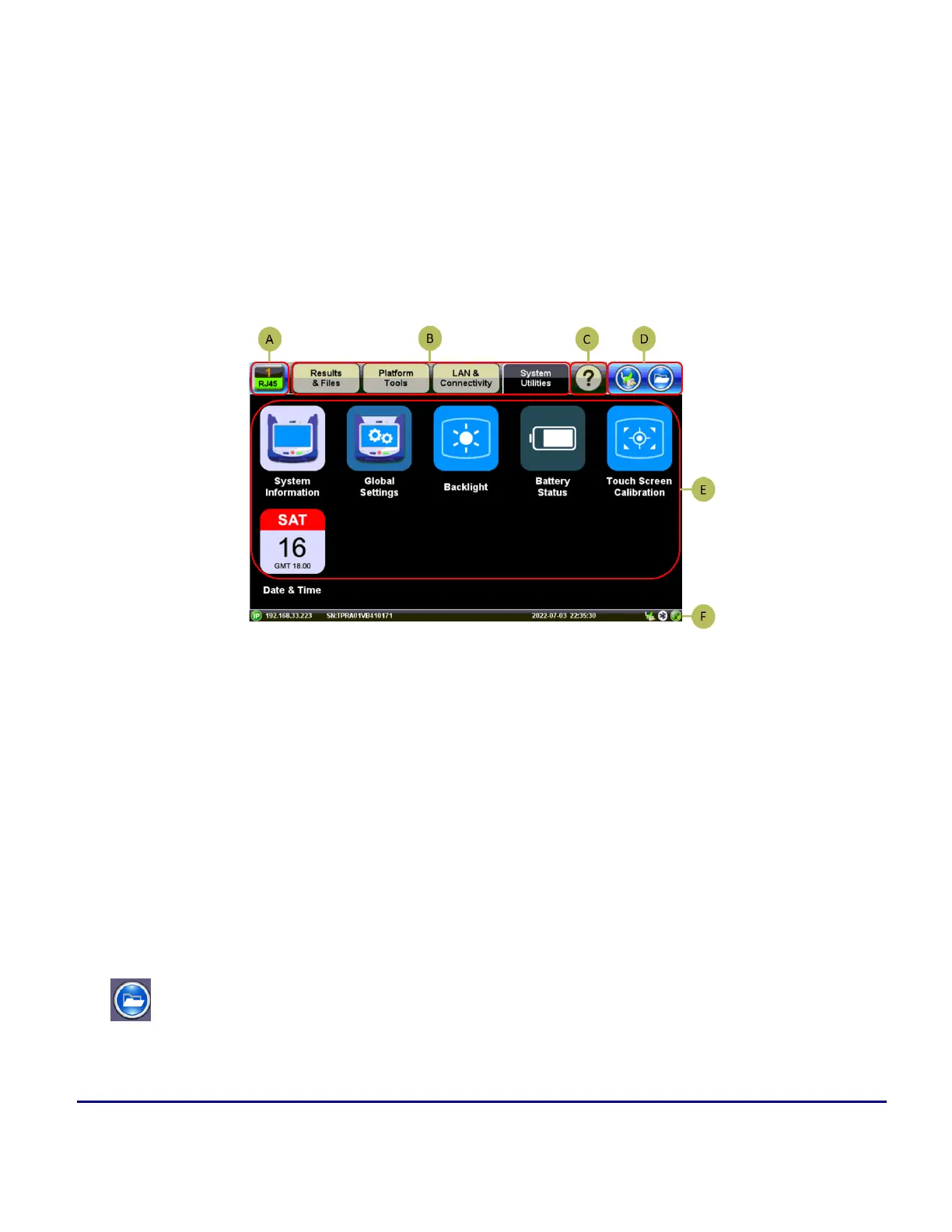
Home Menu and Navigation
A: Test Application The Active Test Application icon indicates the test application in use on the V150 chassis
platform.
B: Utilities Menu
C: Information Icon Provides access to on-line manual and quick guides.
D: Storage and Battery Information Storage and USB drive management. Battery/Charging state.
E: Utilities Menu Icons Select setting to modify.
F: Connection Status Displays the status of external connections, i.e. Bluetooth, WiFi, power supply.
Platform Screen Icons
File: Provides general internal storage information. indicates the presence/detection of com-
patible USB memory stick and provides proper memory stick ejection function (before remov-
ing).



 To Next Page