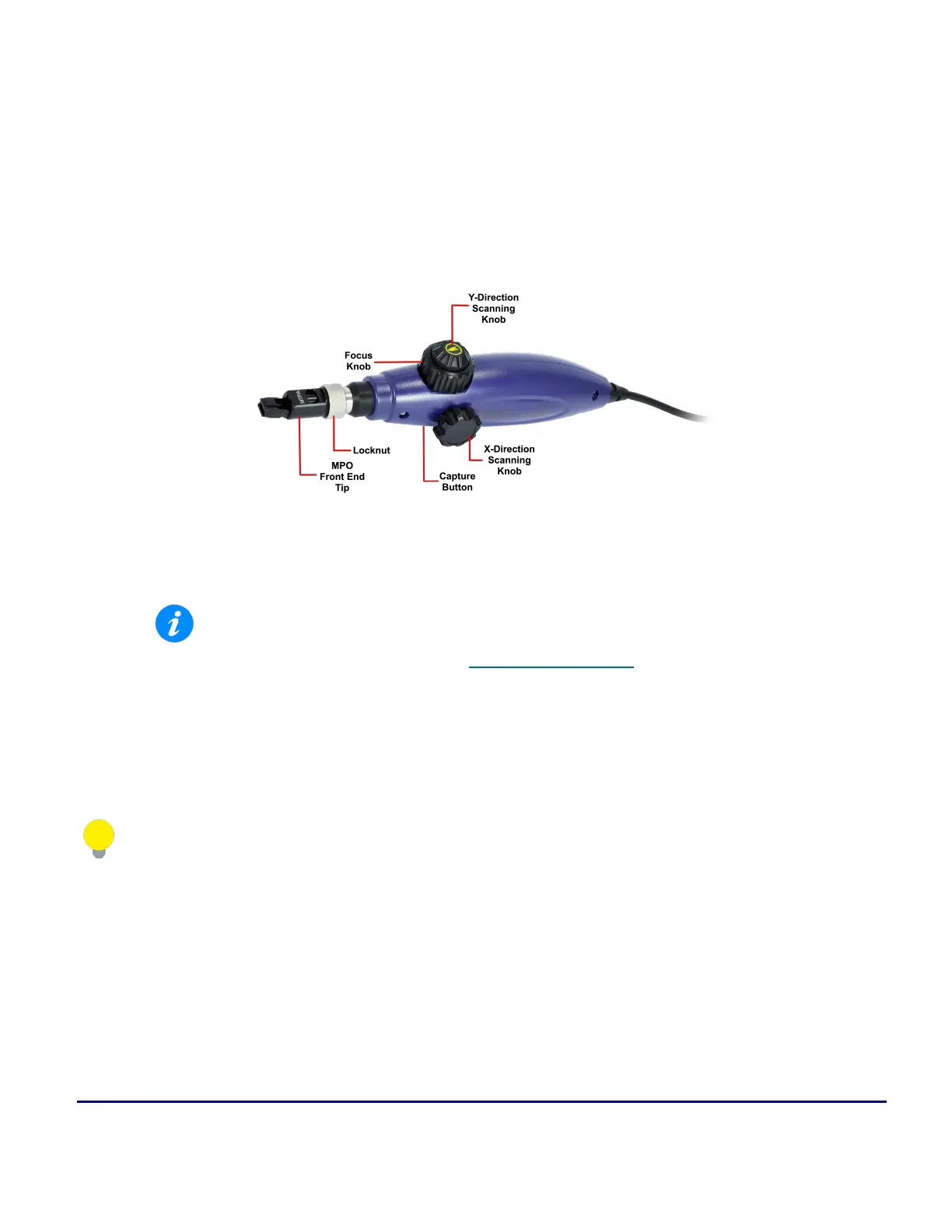
Platform Functions © VeEX Inc. All Rights Reserved. 74
l
Focus Knob: a rotating dial that can be turned clockwise or counterclockwise to view clearer image.
Make sure connector is properly seated in the adapter tip.
l
USB Type A output: USB connector to plug into host power source to enable operation.
DI-1000MPO Digital Fiber Inspection Microscope for Single and Multi-Fiber Connectors
DI-1000MPO Digital Fiber Inspection Microscope for Single and Multi-Fiber Connectors
l
WiFi support requires VeEX Power Bank/WiFi Bridge accessory and host
device/test set has built-in WiFi capability. See the test set's data sheet on
www.veexinc.com or contact VeEX Customer Care for more information.
l
To work with single fiber tips, the front end tip should be replaced with the collar
provided with the scope. For more information adapter tips, see the DI-1000 Digital
Fiber Inspection Microscope Adapter Tips Guide on www.veexinc.com.
For more information on using the DI-1000MPO, see the DI-1000MPO Quick Guide on www.veexinc.-
com.
DI-1000MPO Fiber Analysis
There are two methods to inspect MPO fibers using the DI-1000MPO:
1. Touchscreen (standard)
Press the touchscreen's Capture Fiber button for every MPO fiber properly focused, analyzed, and



 To Next Page