Basic Operation © VeEX Inc. All Rights Reserved. 20
l
Off - Power is OFF, not charging.
l
Orange - Battery is charging.
l
Green - Power is ON.
E. Micro-B USB: Use an USB-A OTG cable (included with purchase) to connect a USB to the micro-B USB
port. The port supports memory drives and USB add-on devices such as fiberscopes. An optional Micro-B
OTG to Ethernet adapter is also available for network connection. (only VeEX approved OTG to Ethernet
Cables can be used)
G. Test port connector
Optical Test Port (SFP+): Ethernet 100BASE-FX, 1/10GBASE-X
UTP Test Port (RJ45): Ethernet 10/100/1000BASE-T, 2.5/5/10BASE-T
Use certified CAT 6a or CAT 7 UTP test patch cords.
H. Touch screen LCD
I. Stylus (use when finer touch screen control is required).
J. DC power socket: (use VeEX-supplied AC/DC chargers only).
Special Functions
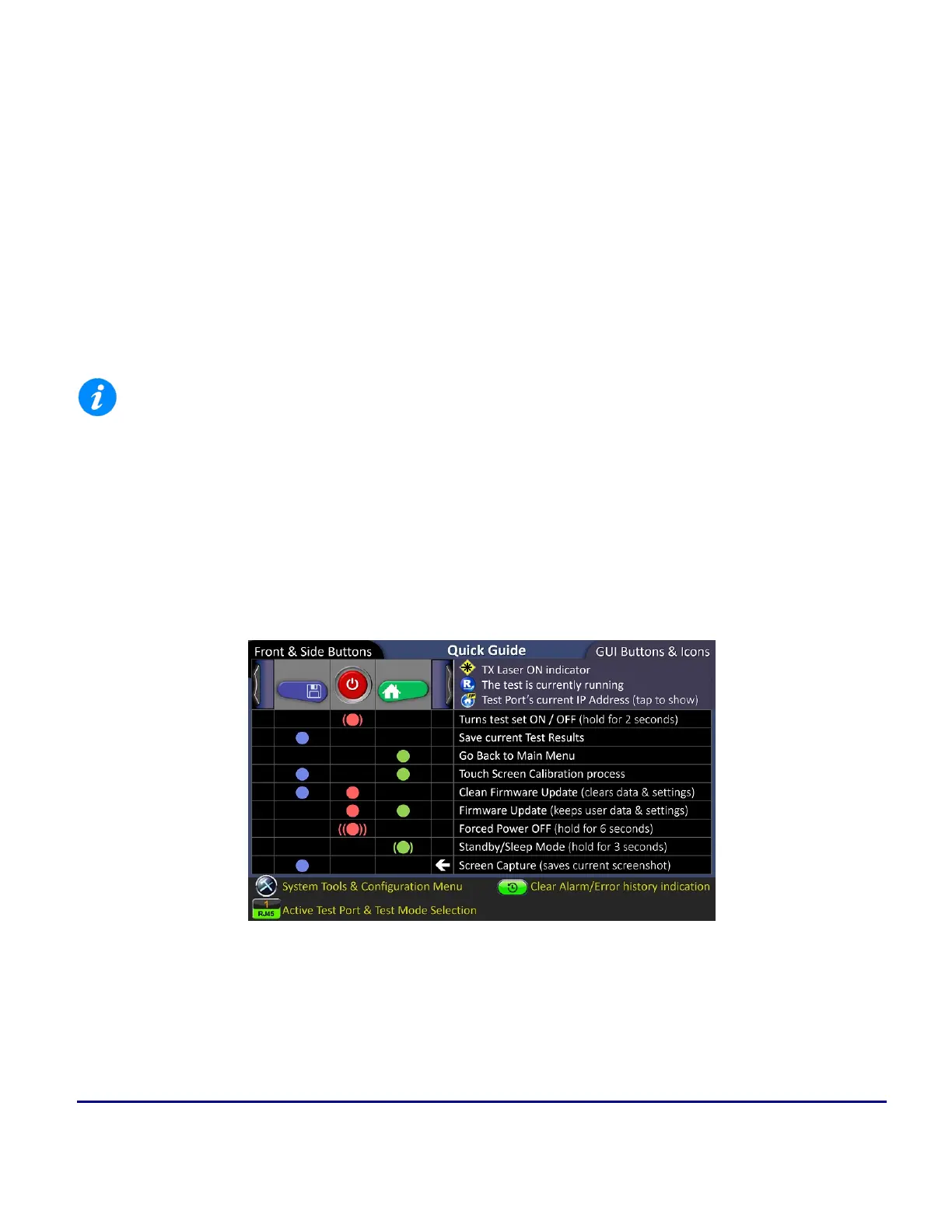
The buttons on the V150 platform provide additional functions, by using combinations of them (may vary
between products).
Button Quick Guide (displayed during the boot-up sequence)



 To Next Page