Chapter 3 Operation Settings
The SmartCabinet2-E product uses a customized 9-inch HMI screen as the monitoring center for the entire system.
The performance indicators and environmental conditions of the whole machine can be visually viewed and set on
the local screen. At the same time, the HMI screen is also used as the intelligent control center of the external access
system. Using the local or remote network, the user can track the running status of the device anytime and anywhere.
The product provides a rich setting interface on the WEB interface, and the user can control the whole unit as
needed, making the operation of the equipment more flexible and reliable.
This chapter describes the operation of the HMI local screen, the WEB intelligent monitoring remote connection and
the settings of common functions.
3.1 HMI Local Display Interface
3.1.1 Introduction to Local Display
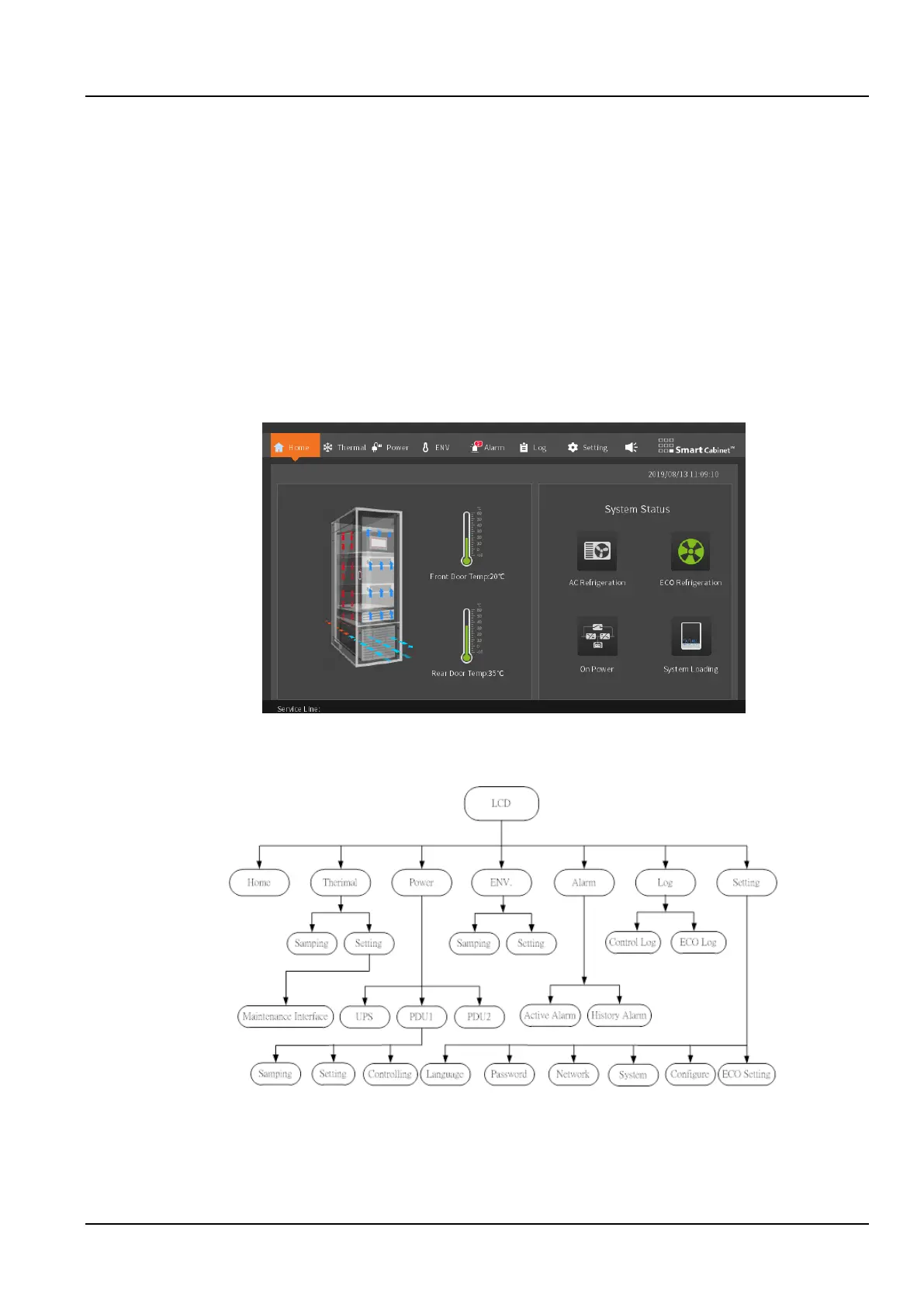
The SmartCabinet2-E system home page is as shown in the Figure.3-1
Figure 3-1 Home page (ECO mode)
In the SmartCabinet2-E homepage, menu items include Home, Thermal, Power, ENV, Alarm, Log, and Settings.
The system menu of the display panel is shown in the Figure 3-2.
Figure 3-2 System menu
3.1.2 Startup Screen
If SmartCabinet2-E intelligent monitoring unit has switched on, the screen is skipped automatically, and directed to
the home page



 To Next Page