After the monitoring link is restored, the maintenance personnel
should manually click the "save and take effect" button in the
"alarm association" page in the WEB background, and the 4DO
module can resume normal operation
Notices
1. Under normal operation of the ECO mode, when the monitoring system goes offline or goes down due to failure, the system
will automatically turn off the ECO mode. If the monitoring system fails to return to normal within 10 min, the air conditioner
will start automatically to ensure the internal temperature environment of the cabinet.
2. When the monitoring system parameters or settings are changed during use, the monitoring system needs to be restarted. The
method is: Switch off the 24 V power supply circuit breaker on the PMU and switch it on after 3 s. The system will start
automatically to ensure that the new configuration information can be accurately sent to each monitoring component.
4.6 Parts Replacement and Recycle
4.6.1 Replace equipment filter
1. Replace filter of ECO fan module
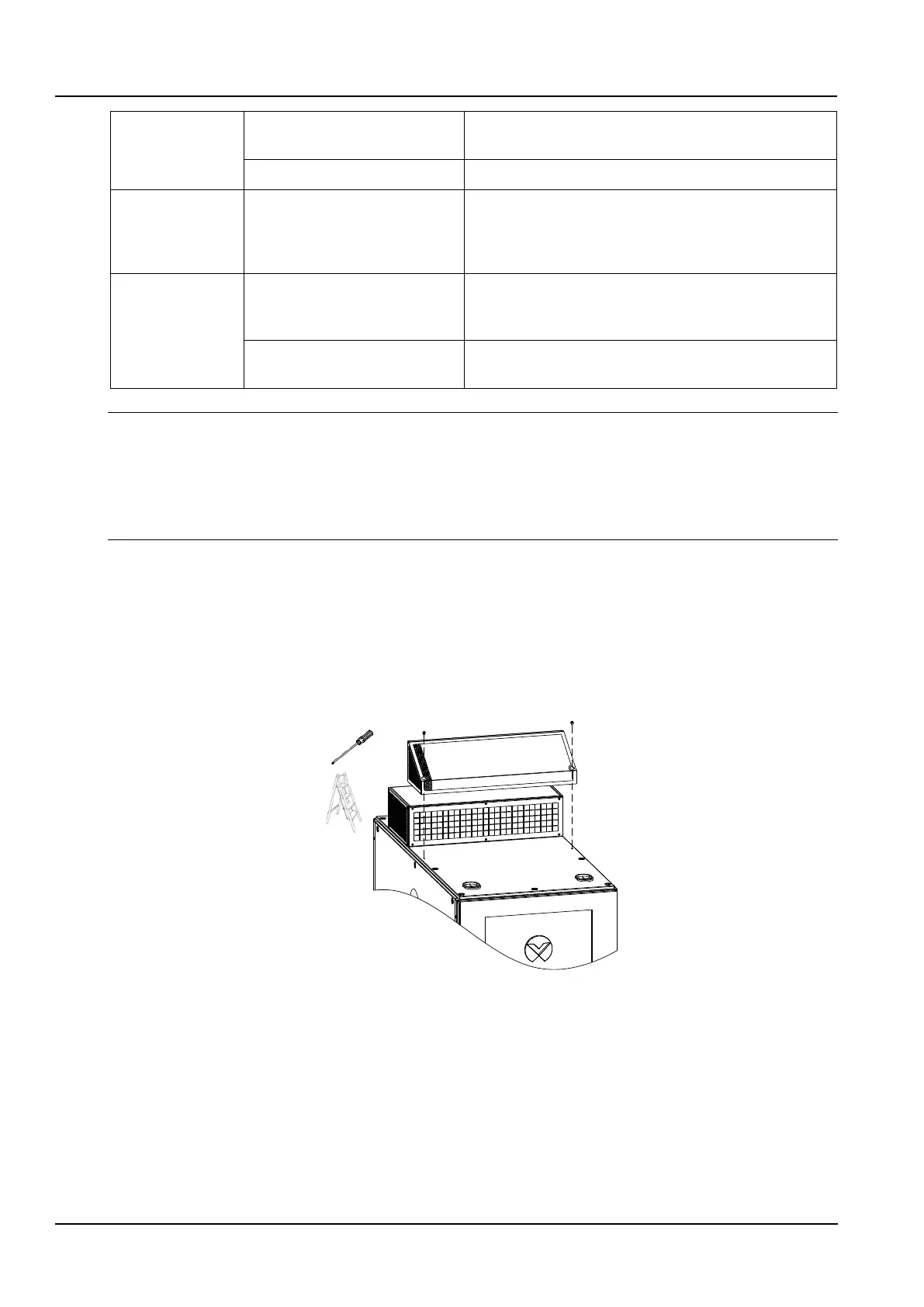
1) Remove the (2 pcs) fixing screws of the decorative guard and upwards remove the decorative guard clamped on
the fan module, as shown in Figure 4-2.
Figure 4-2 Remove Decorative Guard of ECO Fan Module
2) Remove the (14 pcs) fixing screws of the filter hood and remove the old filter, as shown in Figure 4-3.



 To Next Page