3. Disconnect the fan’s power connections in the electrical junction box.
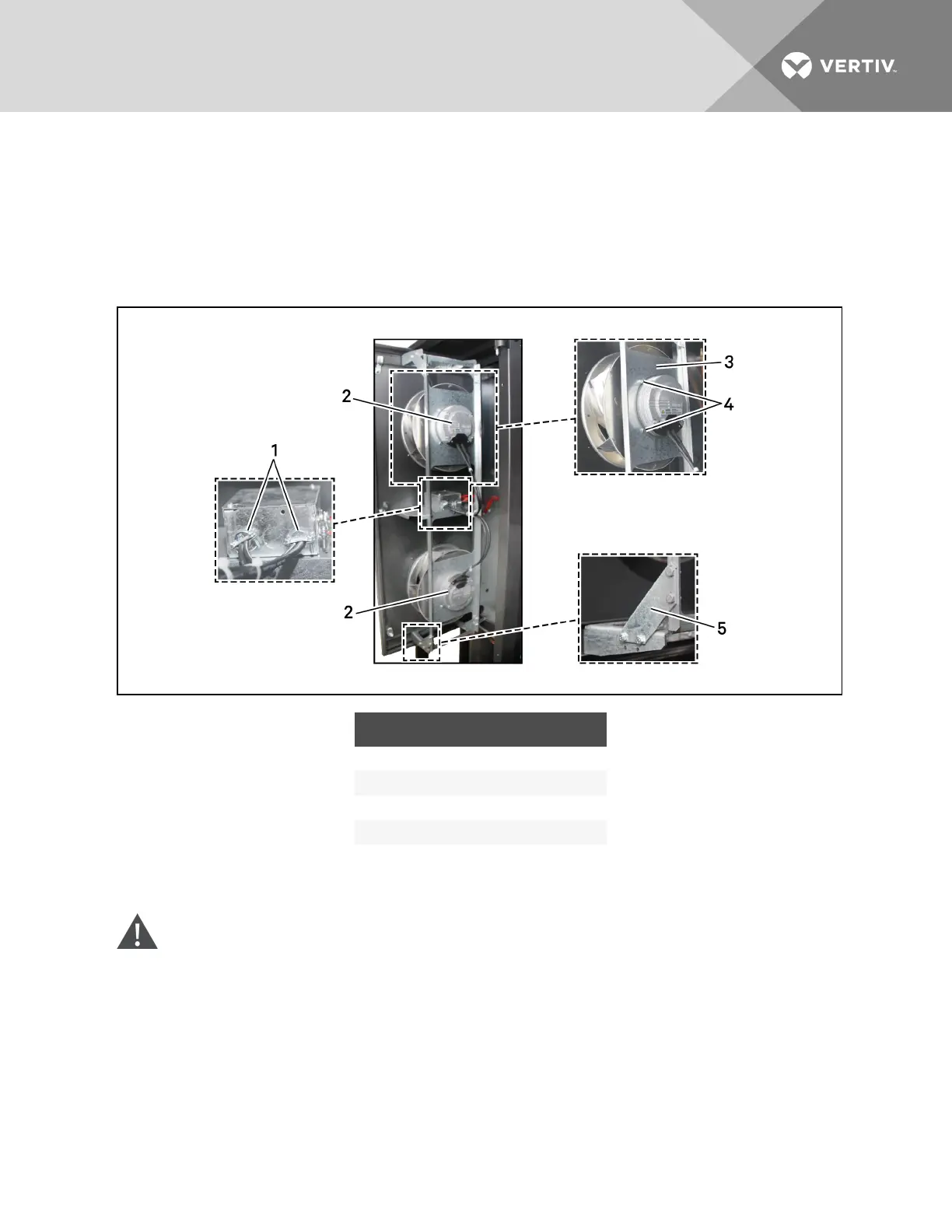
4. Remove the fan frame assembly by removing the 4 bolts from the corner braces at each corner.
5. Set the fan assembly in a work area.
6. Remove the 4bolts that attach the fan to be replaced to the frame assembly.
7. Reverse the steps to install the replacement fan.
Figure 13.7 Fan-assembly components—600-mm (24-in.) models
ITEM DESCRIPTION
1 Wire entry into fan electrical-junction box
2 Fan
3 Mounting plate
4 Bolts, 2 on each side of fan, 4 total
5 Corner brace with 4 bolts
13.11.2 Replacing a Fan in 300-mm (12-in.) Models
WARNING! Risk of contact with high-speed, rotating fan impeller blades. Can cause injury or
death. Open all local and remote electrical-supply disconnect switches, verify with a voltmeter
that power is off, and verify that all fan impellers have stopped rotating before working in the
unit. or disconnecting the fan power wires.
Refer to Figure 13.8 on the facing page for the fan-assembly components.
1. Shut off all power to the unit by closing the main disconnect switch on the electrical panel on
the rear of the Liebert CRV.
2. Open the front door.
Vertiv | Liebert CRV Installer/User Guide | 142







 To Next Page