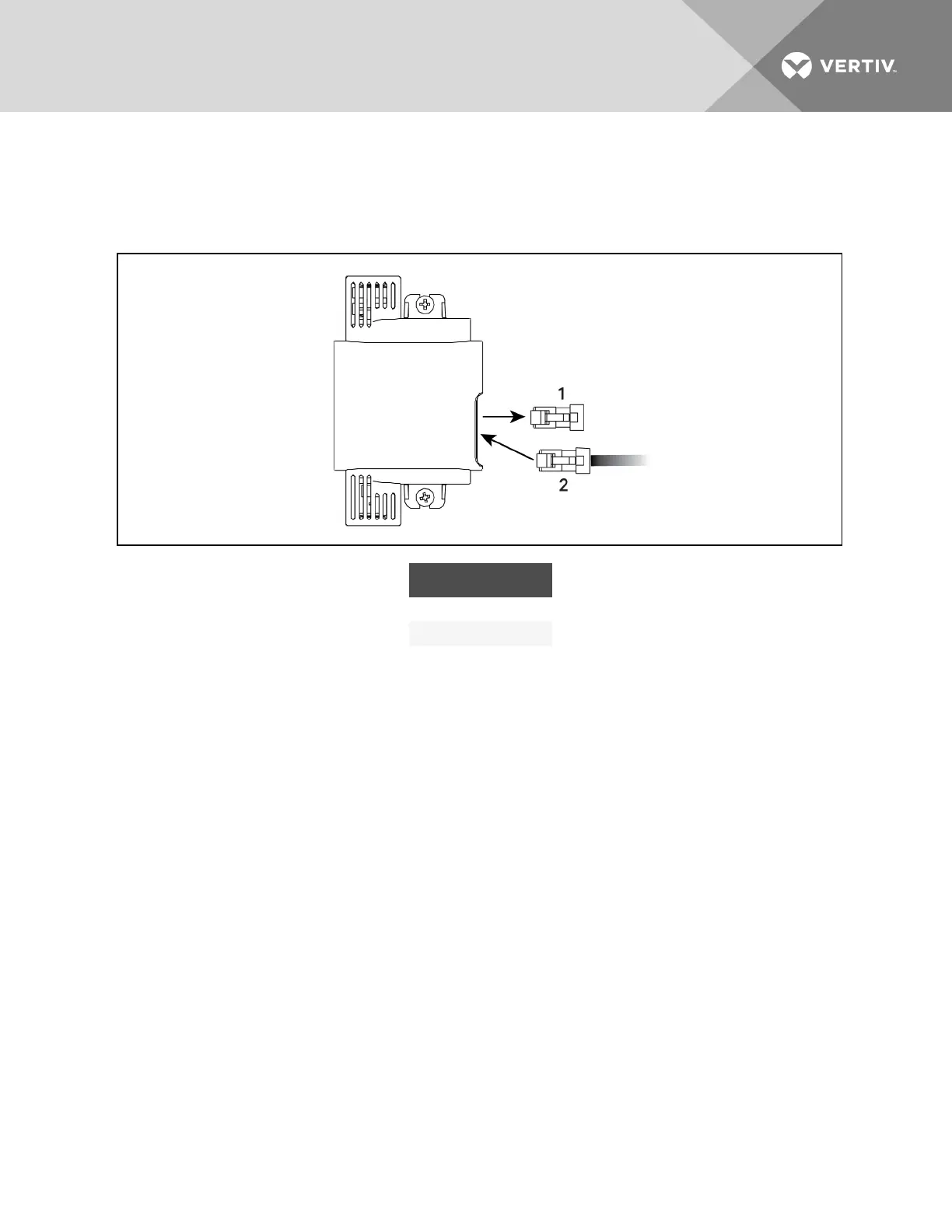
6. Remove the termination plug from the temperature sensor, and discard the plug, and connect
the cable to the open CANbus port, Figure 9.9 below.
7. Connect the CANbus ground to the factory-supplied ground connector.
Figure 9.9 Remove Termination plug and insert CAN cable
ITEM DESCRIPTION
1 Termination plug
2 CANcable
9.1.4 Installing 2T sensors in the racks to monitor
Tools required
• Medium, flat-head screw driver to open electric-panel dead-front
• Cutting tool to trim cable ties
To install the sensors on the racks:
NOTE: Do not install a sensor in the hot aisle. Do not leave sensor probes coiled on top or coiled inside
of a rack.
1. Install the rack temperature sensors on the rack adjacent to the CRV as shown in Figure 9.10
on the facing page or Figure 9.11 on page102.
Vertiv | Liebert CRV Installer/User Guide | 100







 To Next Page