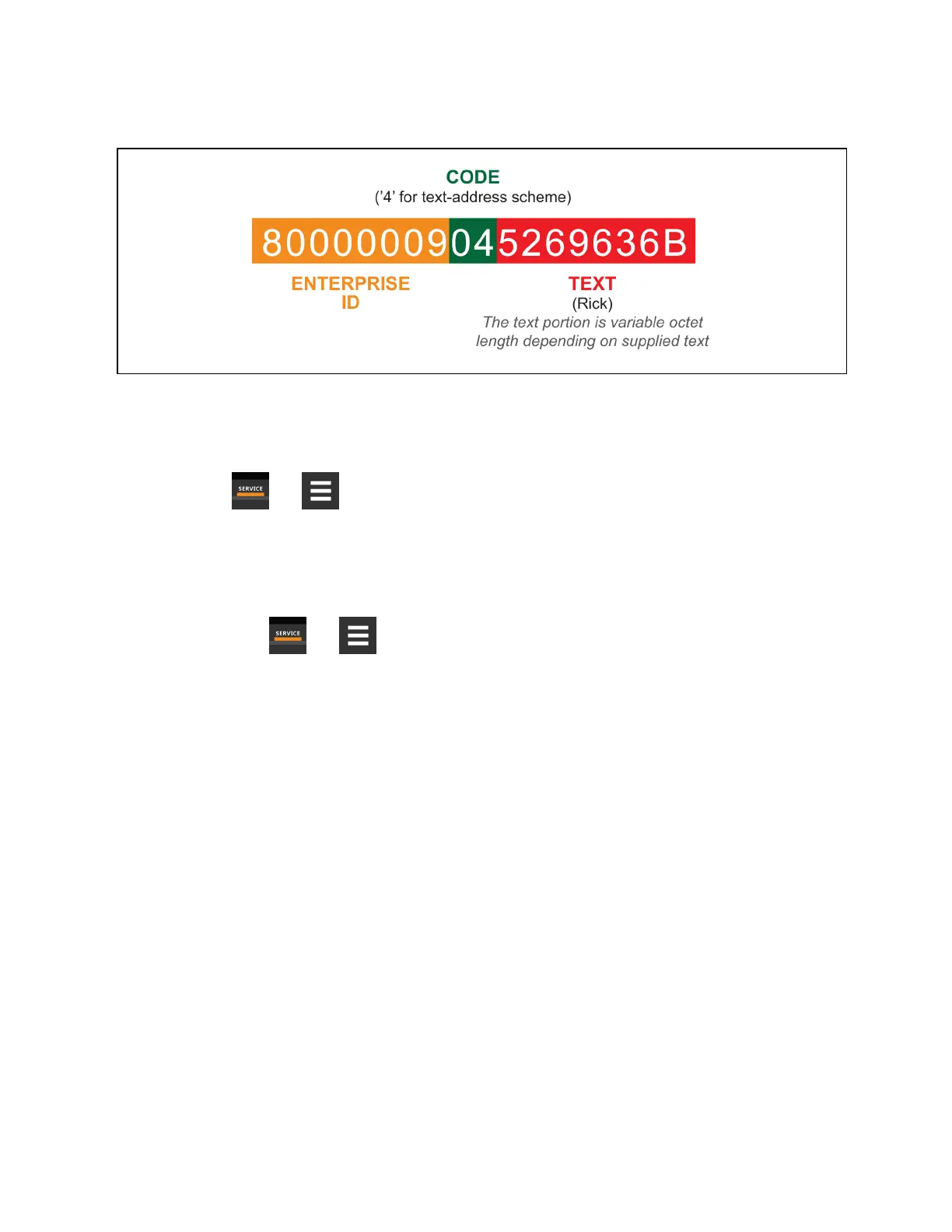
Figure 8.4 SNMP Engine ID Generated Using Text Format Scheme
Configuring SNMPv3 Users
IS-Unity supports up to 20SNMPv3 users. The top level is a list of all 20.
1. Touch , then > BMS & Teamwork > IS-Unity
Setup > Protocols > SNMP> SNMPv3 Users, then one of
the listed users.
2. Enter the information and set the permissions appropriate to the user, and touch Save.
3. Repeat steps 1 and 2 for additional users.
4. Restart Unity:
a. Touch , then > BMS & Teamwork > IS-Unity
Settings.
b. Touch Restart IS-Unity., then touch Yes.
SNMPv3 User Settings
SNMPv3 User Enable
Select to enable read, write or sending notifications with the user's credentials.
SNMPv3 Username
The User name the authentication and privacy settings apply to. This string can be composed of printable characters
except colon, tab, double quote, and question mark.
SNMPv3 Access Type
Read-only, Read/Write, or Traps only
SNMPv3 Authentication
Cryptographic algorithm used for authentication: None, MD5 or SHA-1
8 External Monitoring andBuilding ManagementSystems
148
Vertiv™ Liebert® iCOM™Installer/User Guide










 To Next Page