Chapter 5: Detailed description of parameters
145
Selection of the function of
the JOG key
Only valid for V800-4T0370
to 4T1600 models with
two-row panel
0:JOG button is disabled on DP6-G-3 panels
1: Switching between panel control and external
control (terminal command channel or
communication channel)
2: Switching between FORWARD and REVERSE
3: Activation of FORWARD JOG
4: BACKWARD JOG activation
5: Activation of the STOP button on DP6-E-2
panels
STOP/RESET key enabled only in operation
panel control
STOP/RESET key enabled in any operation
mode
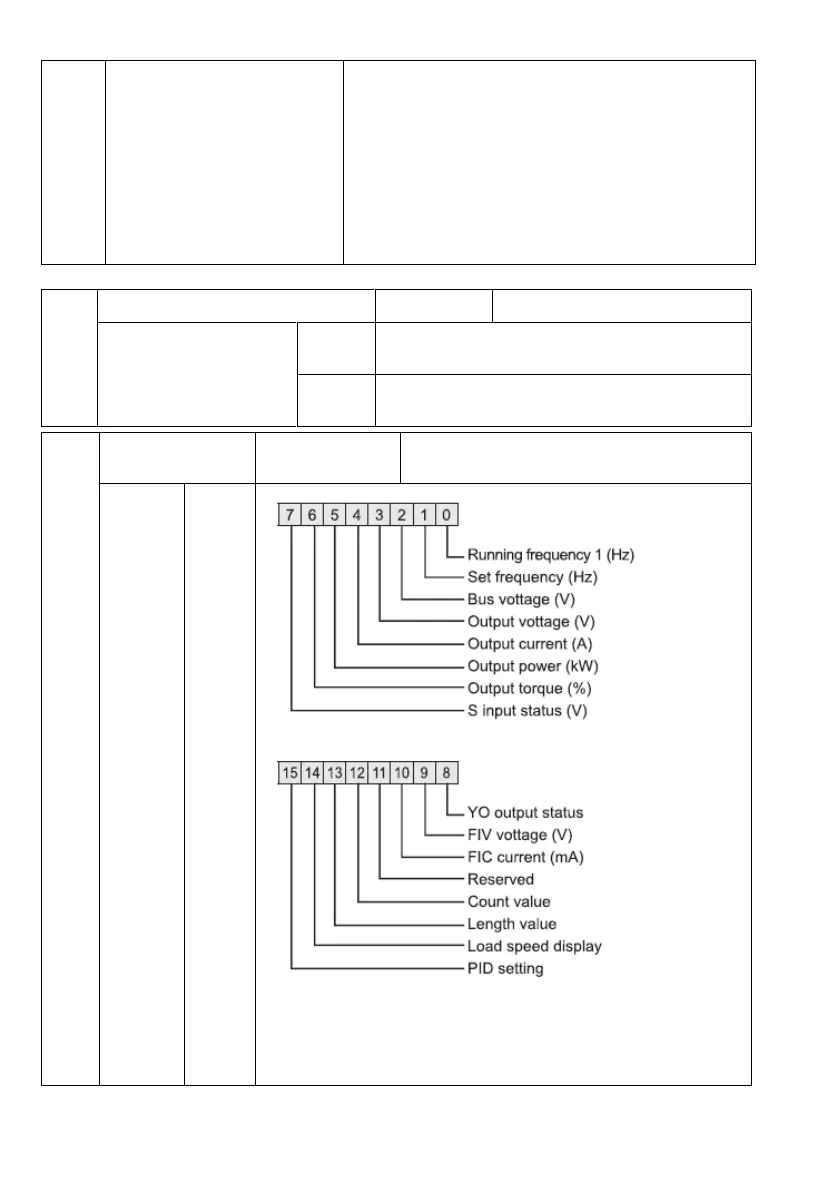
Parameters 1, LED
display during RUN
If we need to display parameters during run, set
the corresponding bit to 1 and set the hexadecimal
equivalent of this binary number in P7.03.



 To Next Page