EasyManua.ls Logo

VYBO Electric Vector V800 - Chapter 3 Operation; Description of the Single-Line Digital Panel; Picture of the Panel for Models 0.4 Kw - 30 Kw; The Descriptions of the Buttons Function

VYBO Electric Vector V800
221 pages
Print Icon
To Next Page IconTo Next Page
To Previous Page IconTo Previous Page
Loading...
Chapter 3 Operation
41
Chapter 3: Operation
3.1 Description of the single-line digital panel
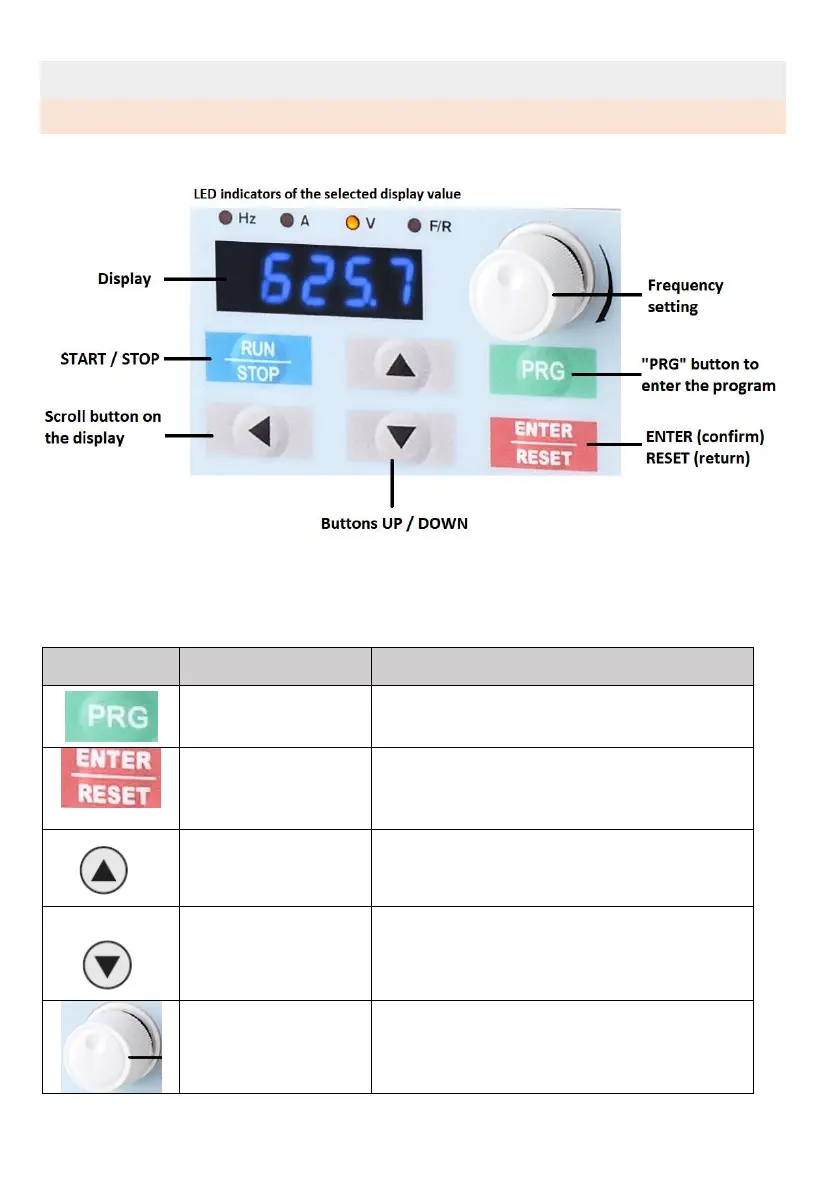
3.1.1 Image of the panel for models 0.4 kW to 30 kW
3.1.2 Description of button functions
Key
Name
Description
Program key
Enter or returns from the first level menu
ENTER/RESET
Step by step through the menu and confirm
the parameters, or return back
Increase value
Gradually increases data or functional codes.
Decrease value
Gradually decreases data or functional
codes.
Rotary knob/Button
Turn the knob to control the frequency /
Press the knob to switch the display

Table of Contents

Related product manuals