SPEEDGATE Installation and Maintenance Manual Revision 1 - MAY 2023
13
INSTALLATION AND COMMISSIONING CHECKLIST: SETTING GATE LIMITS
Installaon and Commissioning Checklist: Seng Gate Limits
Complete Step Descripon
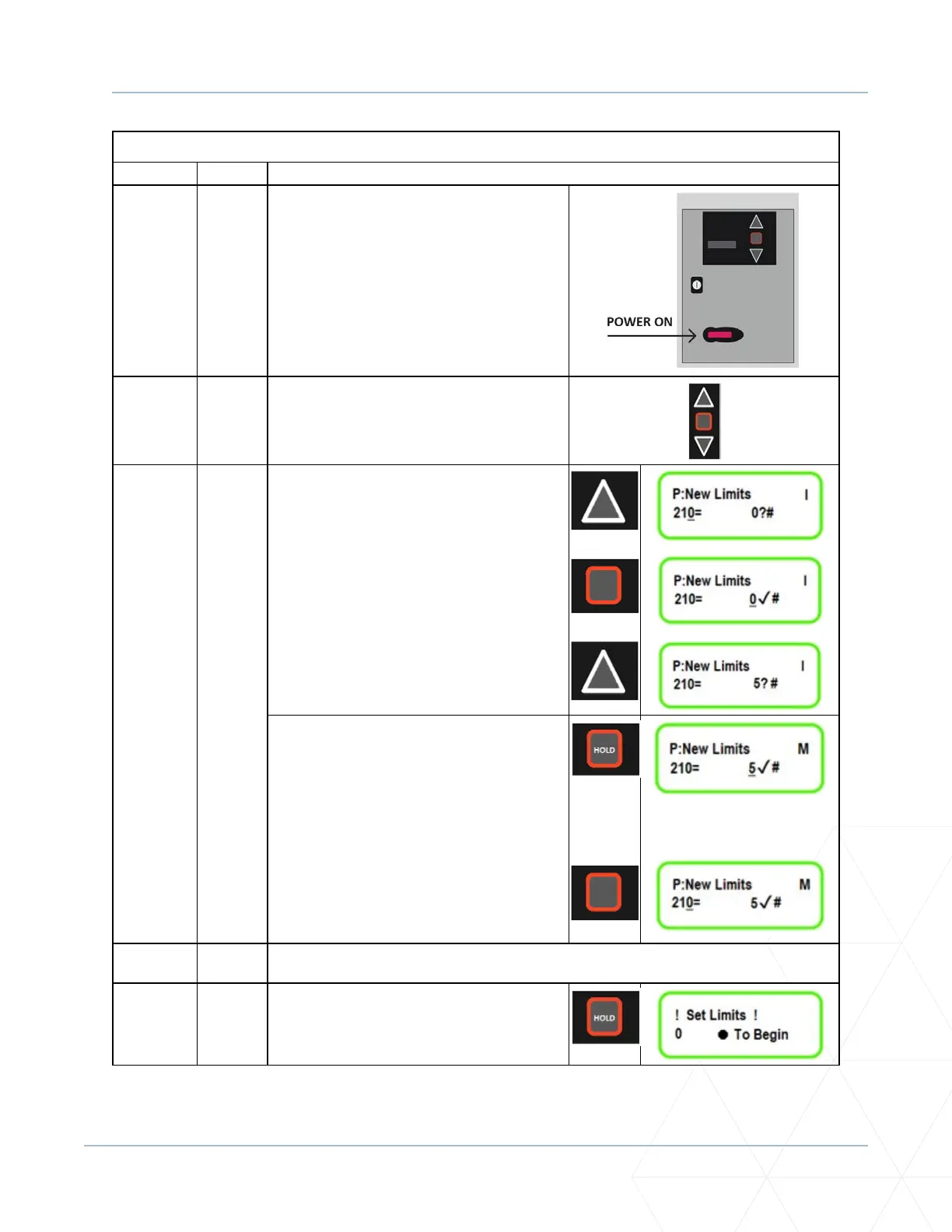
5.3.3-E. IF THE OPERATOR POWER IS ON YOU ARE
NOW IN PROGRAMMING MODE.
5.3.3-F. Use the foil keypad buons (UP arrow,
DOWN arrow and STOP buon), which are
located to the right of the LCD display, to
cycle through the available parameters.
5.3.3-G. Hold the UP arrow to scroll to parameter
210.
At parameter 210 use the STOP buon by
pressing it once to move the underscore
to the parameter value on the right.
Scroll up and change the value to 5. This
parameter is used to set/reset the open
and closed limits.
Push stop buon and HOLD to lock in the
new parameter seng. Repeat on the
other operator [bi-fold gate(s) include two
operators] and check to make sure a check
mark appears on the right-hand side of
the screen.
Once the parameter value for the set/
reset funcon is locked in, press the STOP
buon again to return the underscore to
the parameter 210 on the le.
5.3.3-H. Follow the instrucons on the LCD display, one operator at a me:
5.3.3-I. Press and HOLD STOP to begin seng the
limits.



 To Next Page