14
wallaceperimetersecurity.comPhone: 866.300.1110
INSTALLATION AND COMMISSIONING CHECKLIST: SETTING GATE LIMITS
Installaon and Commissioning Checklist: Seng Gate Limits
Complete Step Descripon
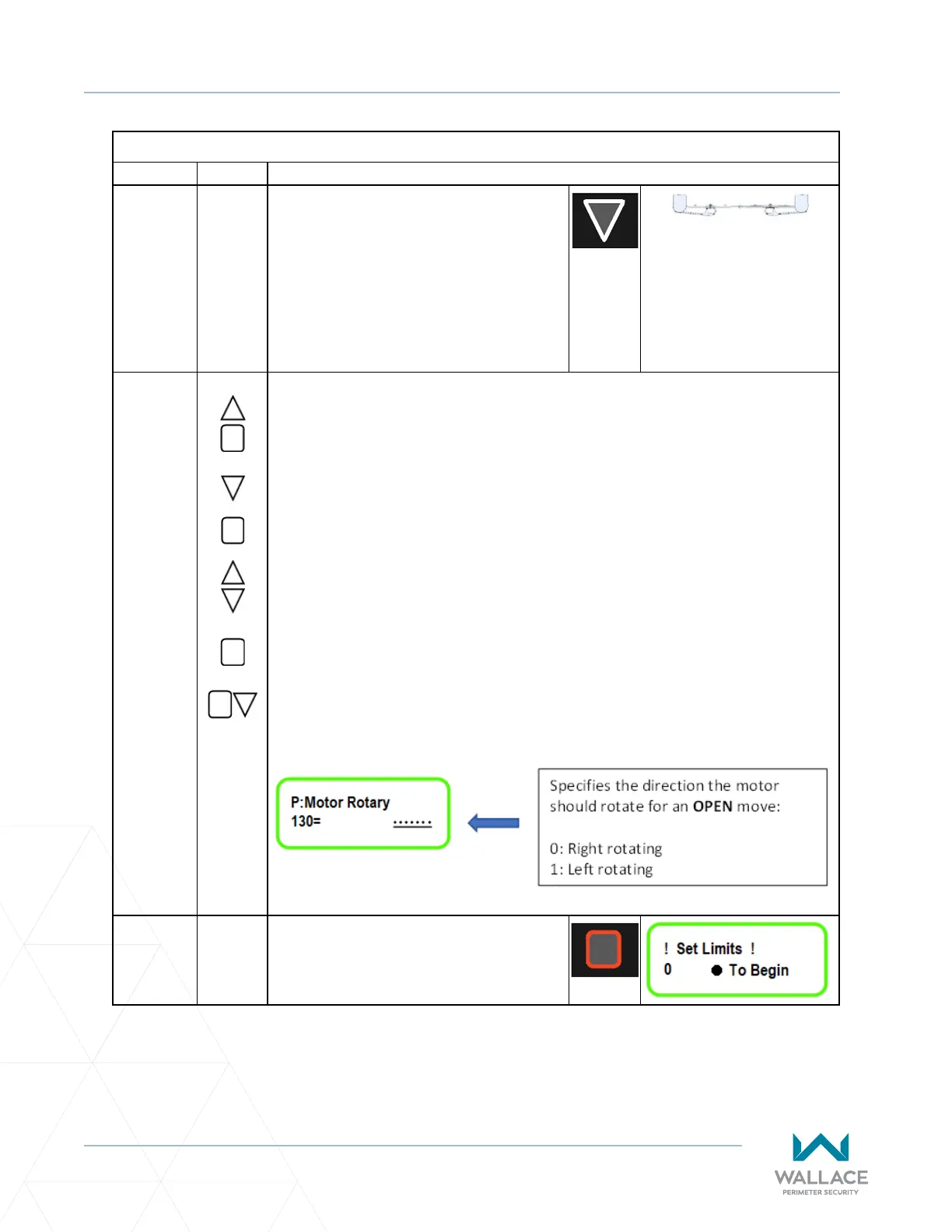
5.3.3-J. Push the down arrow to CLOSE the gate. If
the gate panel OPENS, it means the motor
is turning in the WRONG DIRECTION. This
will require changing the direcon of the
motor rotaon.
Proceed to step 5.3.3-K if motor rotaon
is correct.
PANELS CLOSED: TOP VIEW
IF NECESSARY to change direcon of motor rotaon, go to parameter 130 by
repeang steps 5.3.2-A. to 5.3.2-F above as summarized below:
A. Press and hold UP arrow and STOP buon simultaneously.
B. Press DOWN arrow unl P�999 displays at le.
C. Press STOP buon once.
D. Scroll with arrow unl 4 (the master password, unless changed) displays at
right.
E. Press and hold STOP unl checkmark appears.
✔
F. Press STOP to return to P.999. Scroll to P�130.
G. Change seng to zero or 1, as required.
H. Once the motor direcon is correct,
press STOP to bring cursor back under
P.130 and then hold STOP to exit
programming.



 To Next Page