34 | CFW500
Powering up and Startup
English
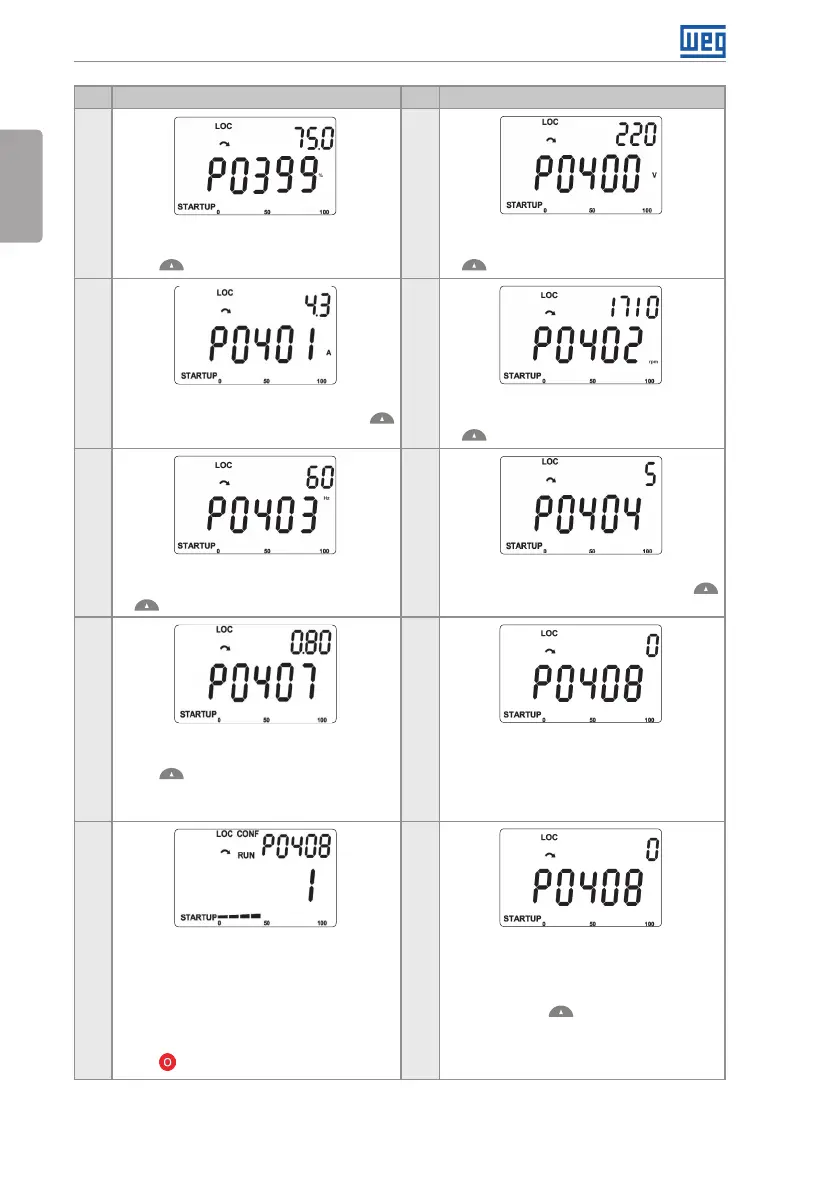
Step Indication on the Display/Action Step Indication on the Display/Action
9 10
If necessary, modify the content of "P0399
- Motor Rated Performance", or press the
key for the next parameter
If necessary, modify the content of "P0400
- Motor Rated Voltage", or press the key
for the next parameter
11 12
If necessary, modify the content of "P0401 -
Motor Rated Current", or press the key
for the next parameter
If necessary, modify the content of "P0402
- Motor Rated Rotation", or press the key
for the next parameter
13 14
If necessary, modify the content of "P0403
- Motor Rated Frequency", or press the Key
for the next parameter
If necessary, modify the content of "P0404
- Motor Rated Power", or press the key
for the next parameter
15 16
If necessary, modify the content of "P0407
- Motor Rated Power Factor", or press the
key for the next parameter
At this point, the HMI shows the option to
do the self-adjustment. Whenever possible,
perform the self-adjustment. Thus, to
activate the self-adjustment, change the
value of P0408 to "1"
17 18
During the Self-Adjustment the HMI will
simultaneously indicate the status of "RUN"
and "CONF". And the bar graph indicates
the progress of the operation
And the bar graph indicates the progress
of the operation. The Self-Adjustment can
be interrupted at any time by means of the
key
At the end of the Self-Adjustment, the value
of P0408 automatically returns to "0", as
well as the Status of "RUN" and "CONF"
are cleared
Press the key for the next parameter





 To Next Page