3-3Maintenance
16-1408348
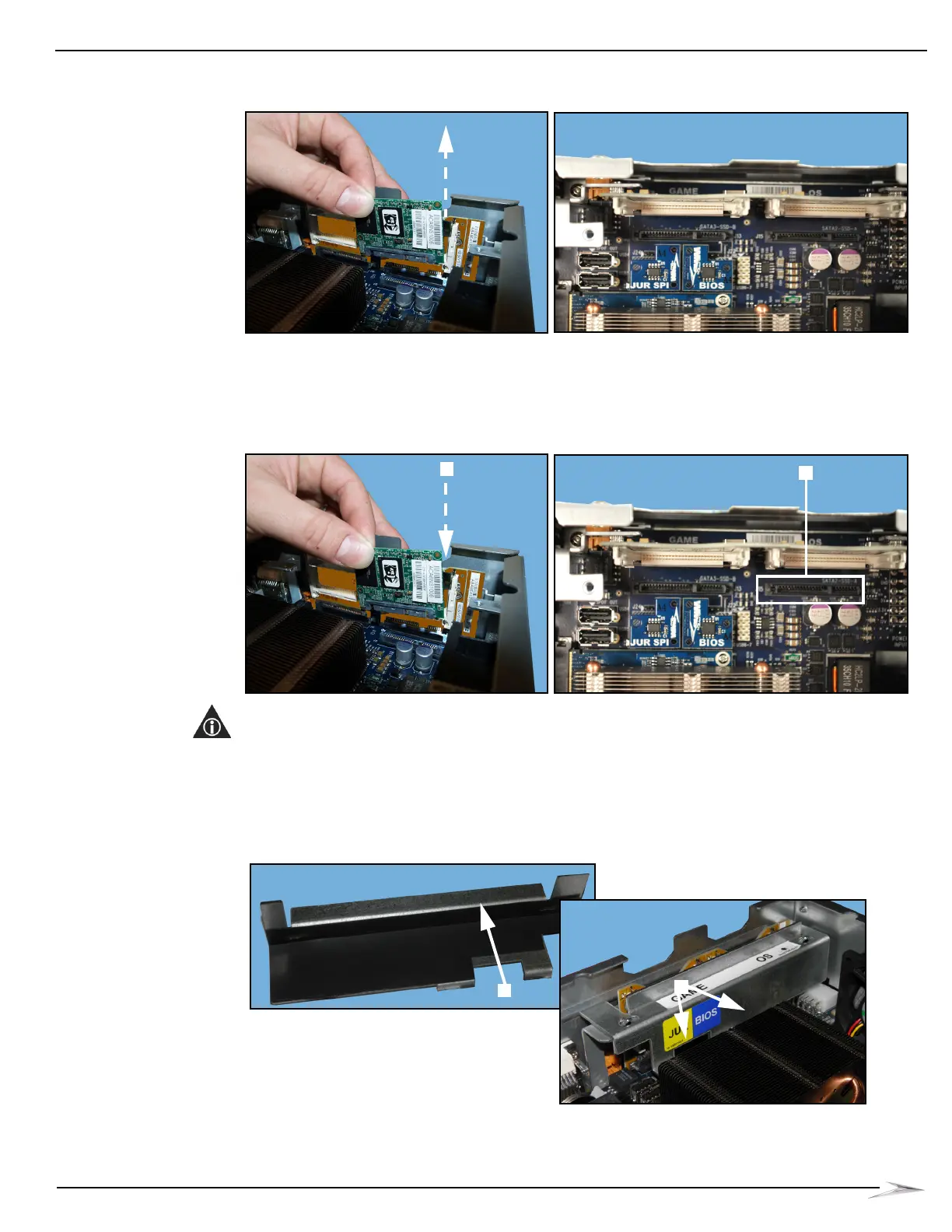
3 Lift the Solid State Drive out, Figure 3-3.
Figure 3-3 Lifting Solid State Drive out (left) and closeup of CompactFlash Bracket (view from above).
Install a New Solid State Drive
Complete the following steps to install a new Solid State Drive in CPU-NXT 3.2:
1 Install the new Solid State Drive at location J15, Figure 3-4 (A).
Figure 3-4 Installing new Solid State Drive (left) and closeup of CompactFlash Bracket (view from above).
NOTE: Confirm that the Solid State Drive connector is lined up correctly with the board connector,
Figure 3-4 (B).
2 Place the new CPU-NXT3.2 SSD Bracket (A-1101365) on the CompactFlash Bracket with the
thin part of the bracket, Figure 3-5 (A), facing towards the CompactFlash holders, and the thick
part and center opening of the bracket facing towards the video card heatsink, Figure 3-5 (B).
Figure 3-5 Placing the CPU-NXT 3.2 SSD Bracket on the CF Bracket.



 To Next Page