2-6
Chapter 2: Installation and Setup
Aug 2012
Installing the Top
Box LCD DVI Cable
Complete the following steps to install the Top Box LCD DVI Cable:
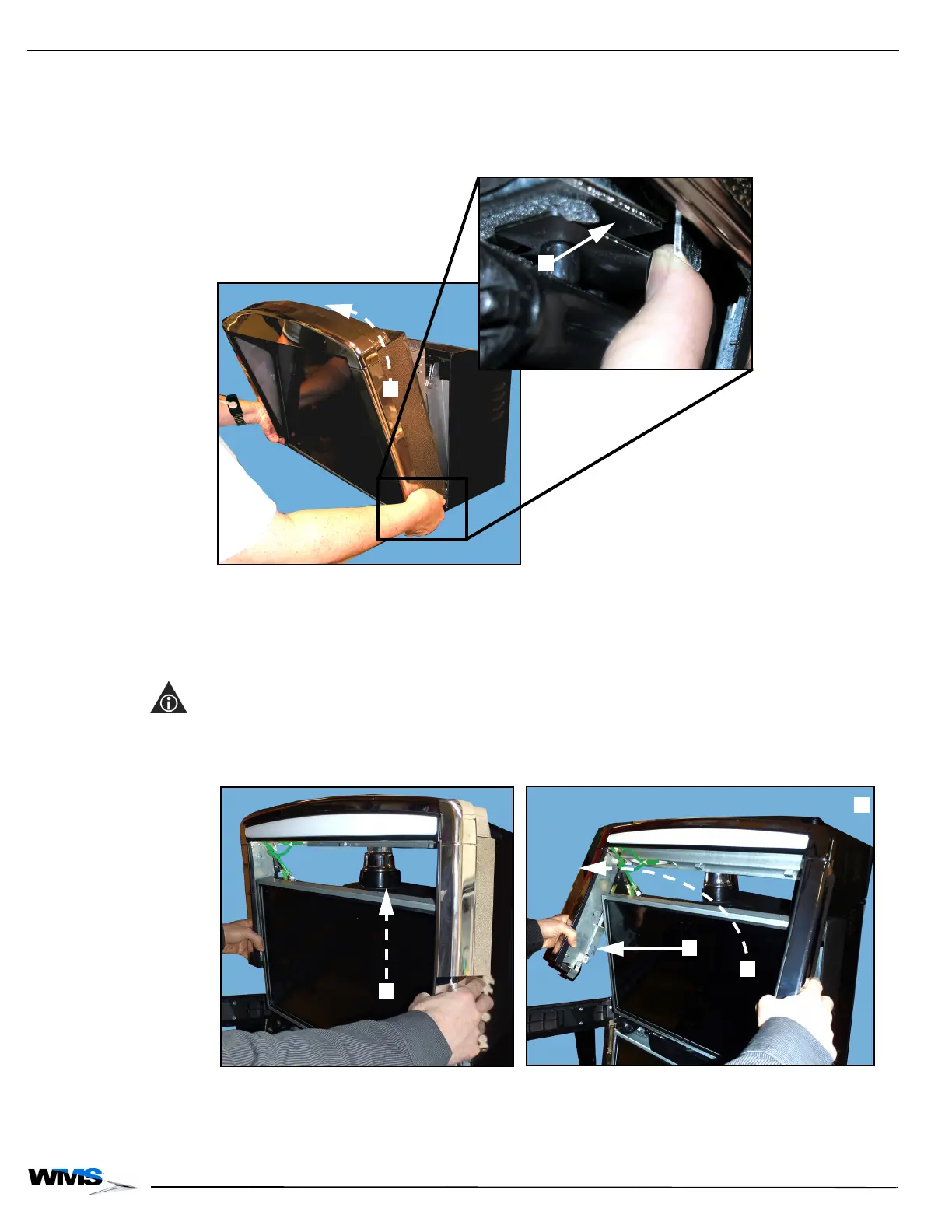
1 Remove the Accessory/Top Box Crown by pushing the latches, Figure 2-8 (A), (located at the
bottom of the left and right flanges) outward, and lifting the crown off the Accessory/Top Box,
Figure 2-8 (B).
Figure 2-8 Removing the Accessory/Top Box Crown.
2 Remove and hold the Accessory/Top Box LCD by lifting it up and then out of the bracket,
Figure 2-9 (A), and remove it from the game.
3 Remove the Accessory/Top Box Crown by lifting the crown straight up, Figure 2-9 (A), then
spreading the sides slightly apart, Figure 2-9 (B), lifting the crown away from the game,
Figure 2-9 (C), and then lifting the crown off the Accessory/Top Box.
NOTE: When spreading the sides of the Accessory/Top Box Crown, confirm the mounting hooks
located on both sides of the crown, Figure 2-9 (D), clear the Top LCD when lifting the crown off of
the Accessory/Top Box.
Figure 2-9 Removing the Accessory/Top Box Crown.
4 Disconnect the Power Cable, Figure 2-10 (A).



 To Next Page