3-8
Chapter 3: Maintenance
Aug 2012
Replacing CPU-NXT
3.2 Enclosure Fan
Complete the following steps to replace the CPU-NXT 3.2 Enclosure Fan.
Remove Existing CPU-NXT 3.2 Enclosure Fan
Complete the following steps to remove the existing CPU-NXT 3.2 Enclosure Fan:
NOTE: CPU-NXT 3.2 Enclosure Fan is not interchangeable with CPU-NXT2 Enclosure Fan.
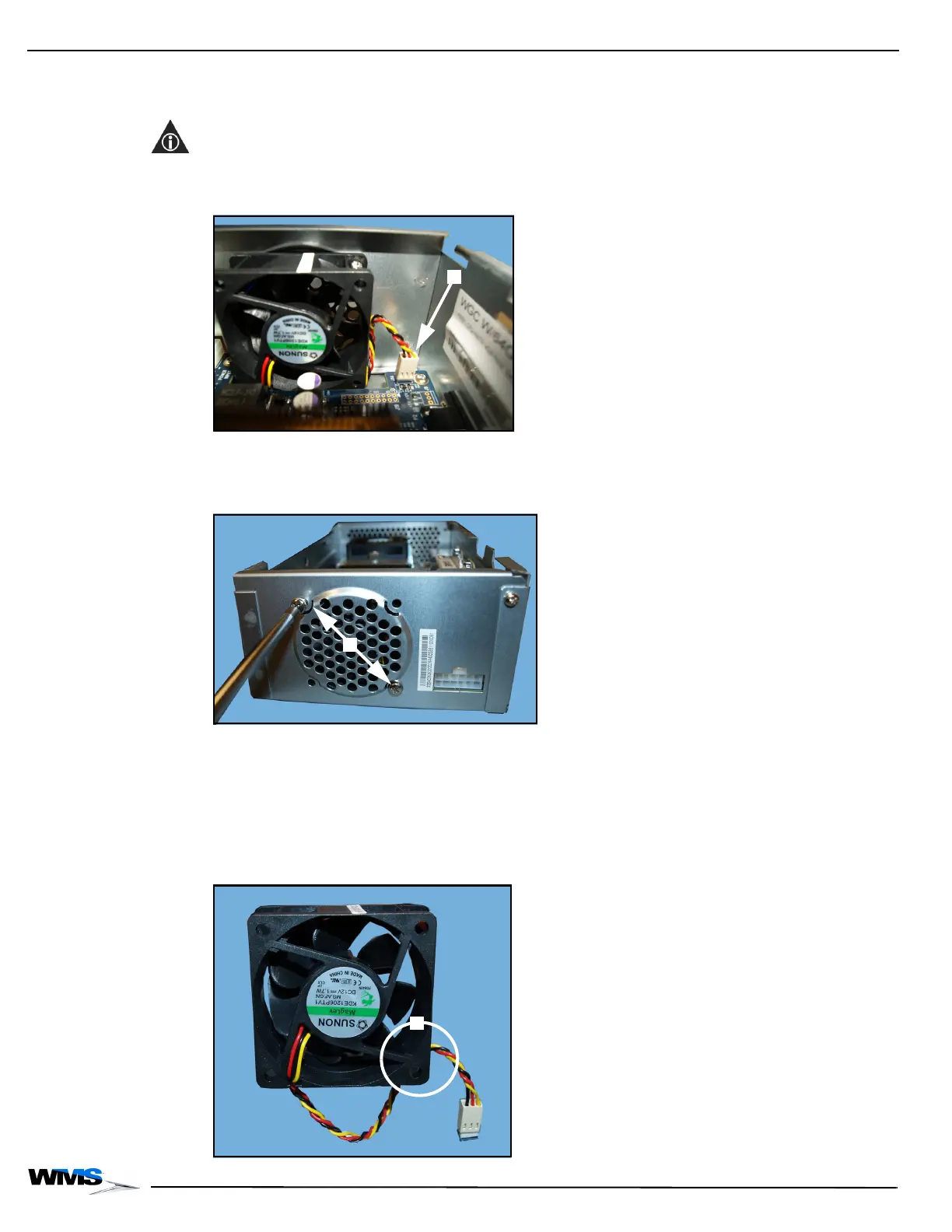
1 Disconnect the Power Cable, Figure 3-15 (A).
Figure 3-15 Disconnecting Power Cable.
2 Using a #2 Phillips screwdriver, remove and save the two #6 Pan head screws securing the
existing Fan to the CPU-NXT 3.2 Enclosure, Figure 3-16 (A).
Figure 3-16 Removing screws.
3 Remove the existing Fan and discard.
Install New CPU-NXT 3.2 Enclosure Fan
Complete the following steps to install the CPU-NXT 3.2 Enclosure Fan (6651-026597-00-00):
1 Locate the new CPU-NXT 3.2 Enclosure Fan, Figure 3-17. Confirm that the wire is routed as
shown, Figure 3-17 (A).
Figure 3-17 CPU-NXT 3.2 Enclosure Fan.



 To Next Page