2-25Installation: CPU-NXT 3.2 into the BBxD
16-1408348
Ethernet Cable
Routing
Complete the following steps to route the Ethernet cables.
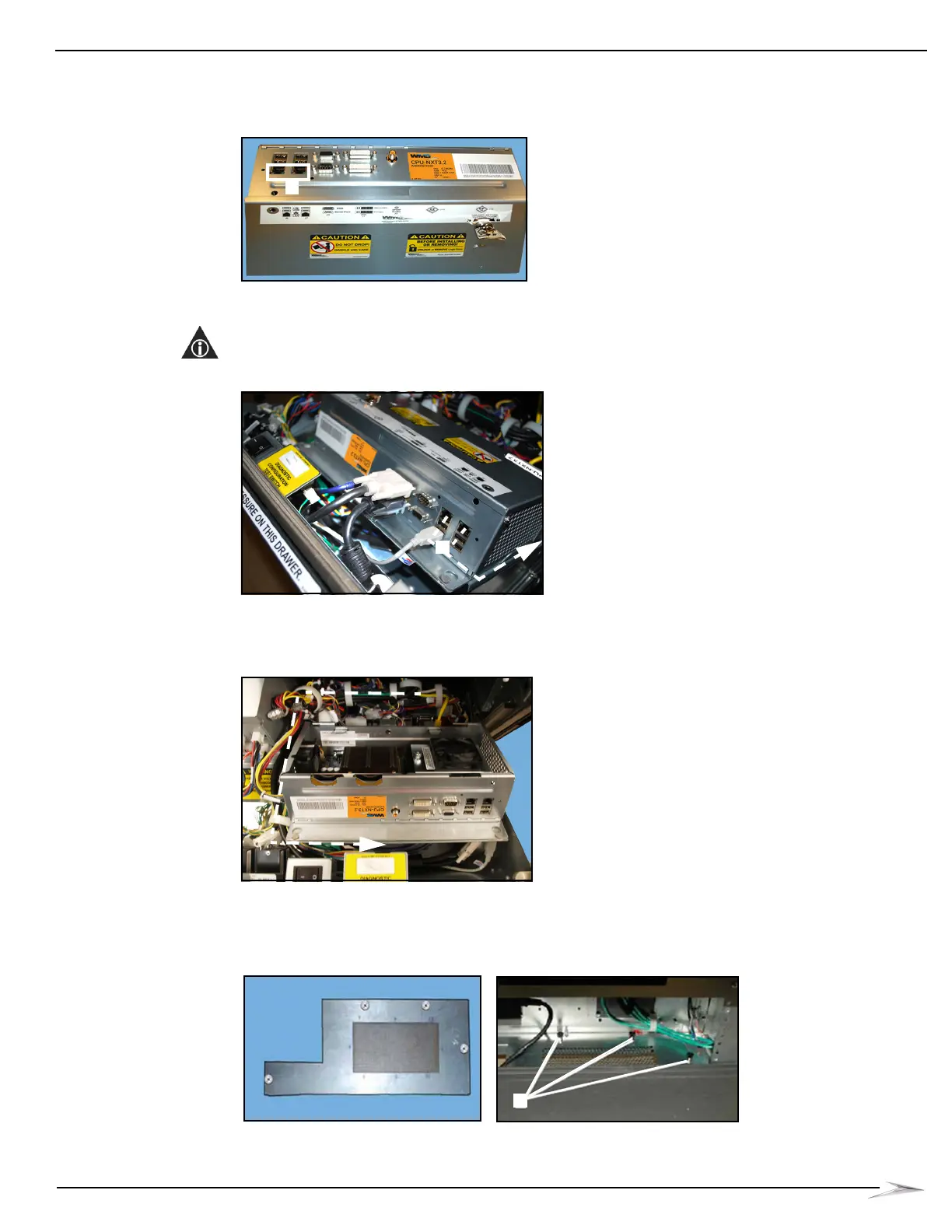
1 Connect the Ethernet cables to the Ethernet ports located on CPU-NXT 3.2, Figure 2-56 (A).
Figure 2-56 Connecting the Ethernet cables to CPU-NXT 3.2.
2 Route the Ethernet cables directly along the right side of the CPU Enclosure and the Bulkhead
Board, Figure 2-57 (A).
NOTE: Do NOT route the Ethernet cables in front of the CPU Enclosure or the Bulkhead Board.
Figure 2-57 Routing the Ethernet cables.
3 Continue routing the Ethernet cables behind the right side of the Component Drawer keeping
them as far away from the main cable bundle as possible, Figure 2-58.
Figure 2-58 Connecting the Ethernet cables to CPU-NXT 3.2.
4 Route the Ethernet cables through the cabinet bottom EMI plate, Figure 2-59 (A), keeping them
as far from the AC Line Cord as possible.
Figure 2-59 Routing the Ethernet cables through the cabinet bottom EMI Plate.



 To Next Page