3-7Maintenance
16-1408348
Removing/Installing
Memory Module
Complete the following steps to removing/installing the Memory Module (6903-026351-00-00) in
CPU-NXT 3.2:
NOTE: Do not replace modules as a troubleshooting step unless directed by Engineering. If two
modules need to be installed, the lower module must be installed first as the top module covers up
the lower module.
The CPU Fan Assembly must first be removed to access the Memory and then reinstalled upon
completion of a Memory Module update.
Removing Memory Module
Complete the following steps to remove the Memory Module:
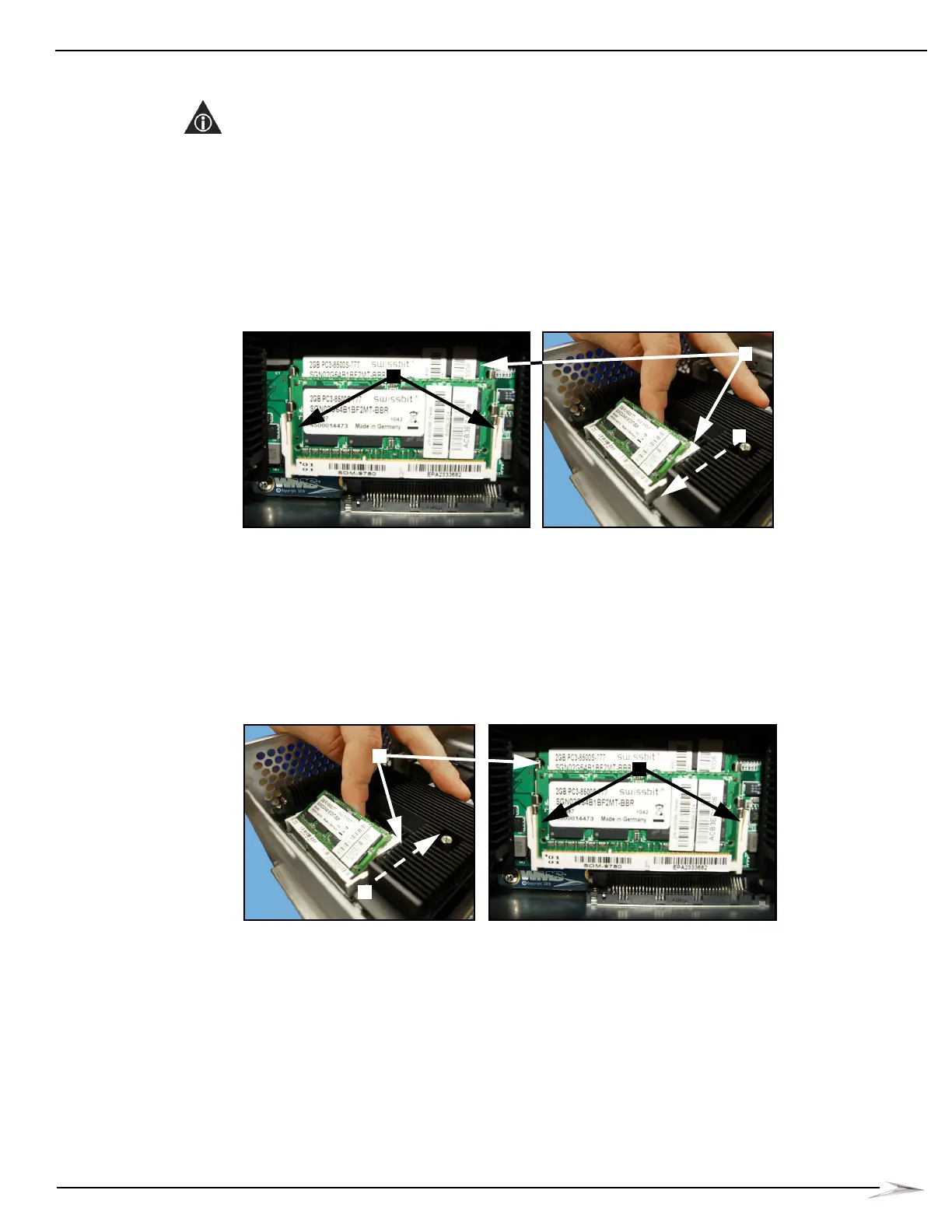
1 Carefully push out Memory Module retaining tabs, Figure 3-13 (A), until Memory Module flips
up, Figure 3-13 (B).
Figure 3-13 Pushing out retaining tabs (left) until Memory Module flips up (right).
2 If appropriate, repeat with second Memory Module, Figure 3-13 (C), located underneath the
first module.
Installing Memory Module
Complete the following steps to install the Memory Module:
1 Starting from a 45 degree angle, insert the memory module fully into the connector, then rotate
the module down into the module housing, Figure 3-14 (A), until the two retaining clips,
Figure 3-14 (B), can be heard snapping into place.
Figure 3-14 Rotating module into housing (left) until retaining clips snap in place (right).
2 If appropriate, repeat with second Memory Module, Figure 3-14 (C), located underneath the
first module.



 To Next Page