2-9Installation: CPU-NXT 3.2 into the BB2
16-1408348
Installing
CPU-NXT 3.2
DC Power
Distribution Cable
Complete the following steps to install the DC Power Distribution Cable (HD-029117-00-00):
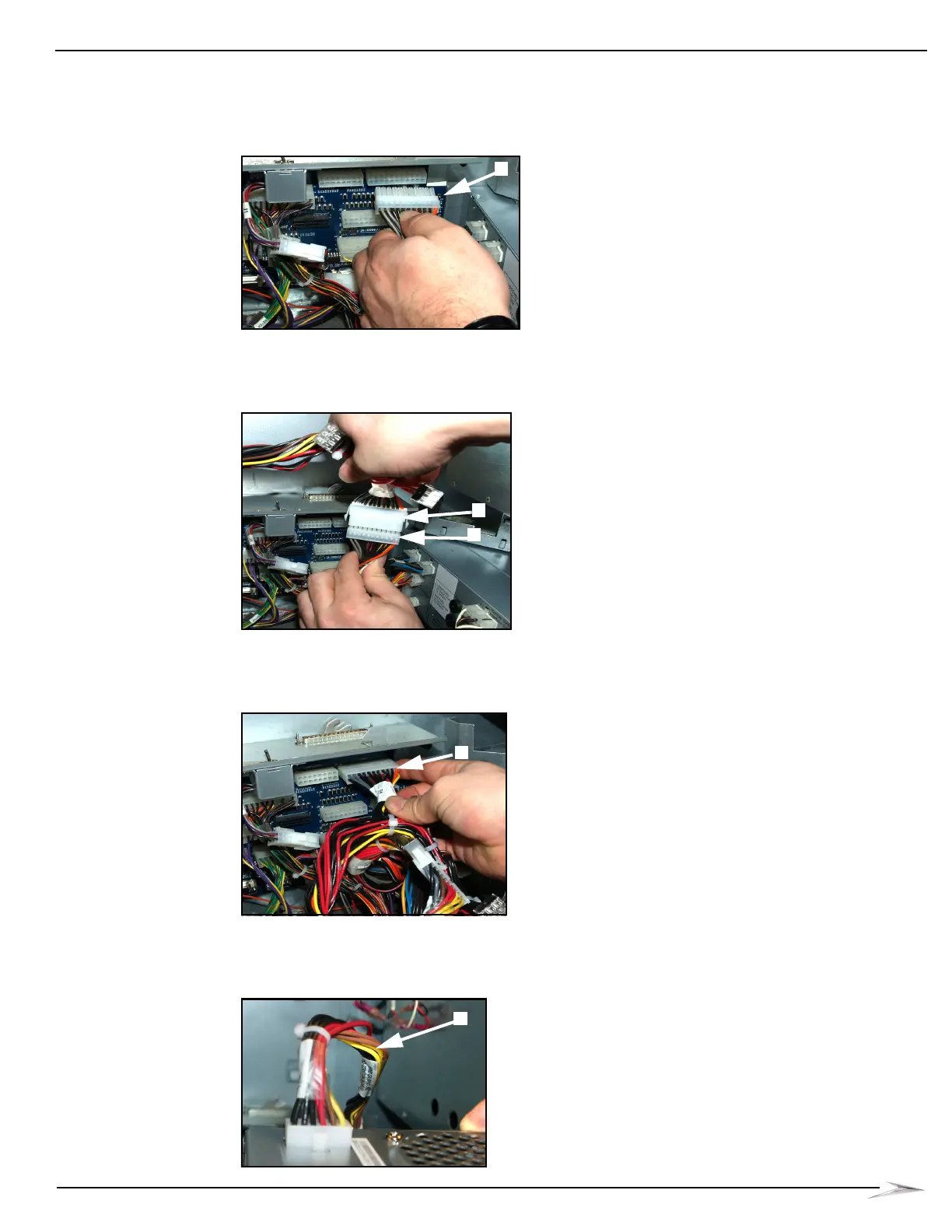
1 Disconnect the 22-pin Primary DC Power cable (HD-021266-00-00) P5 connector,
Figure 2-16 (A), from J9 on the Bulkhead Board.
Figure 2-16 Disconnecting Primary DC Power Cable from Bulkhead Board.
2 Connect the 22-pin Primary DC Power Cable, Figure 2-17 (A), P5 connector into the DC Power
Cable P1 connector, Figure 2-17 (B).
Figure 2-17 Connecting Primary DC Power Cable into DC Power Cable.
3 Connect the Primary DC Power Cable P2 connector to J9 on the Bulkhead Board,
Figure 2-18 (A).
Figure 2-18 Connecting Primary DC Power Cable to Bulkhead Board.
4 Connect the DC Power Cable P3 connector to the 12-pin Mini-Fit Jr. Power Input located on
the side of CPU-NXT 3.2, Figure 2-19 (A).
Figure 2-19 Connecting DC Power Cable to Mini-Fit Jr. Power Input.



 To Next Page