2-8
Chapter 2: Installation and Setup
Aug 2012
11 If applicable, install the reels removed in step 8 on page 2-7. Reference Service Manual 16-
022128-xx: Bluebird 2 Mechanical Reel (BB2-Mech) & Video Gaming Device for information on
how to install a mechanical reel.
12 Reinstall the Main LCD.
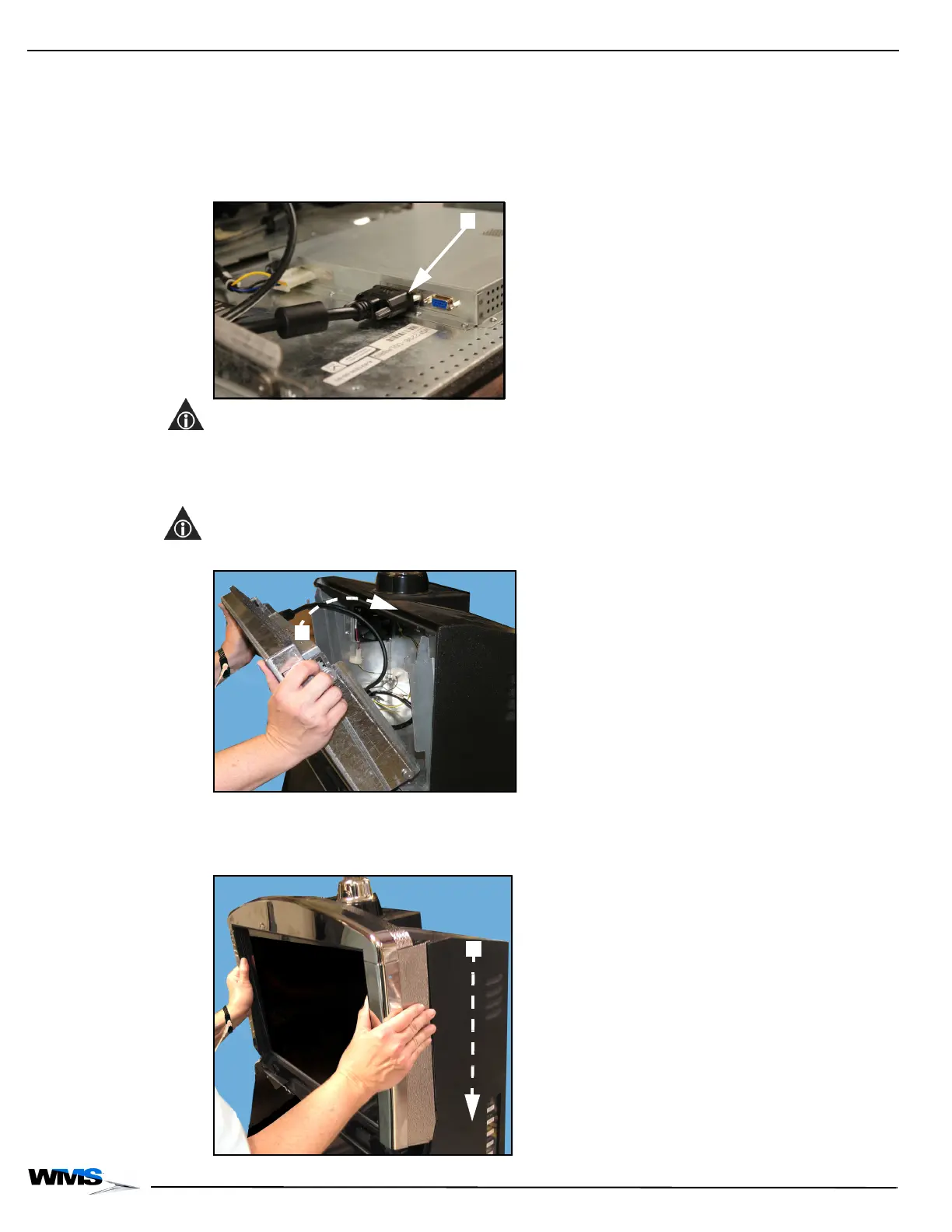
13 Connect the other end of the DVI Cable to the Accessory/Top Box LCD, Figure 2-13 (A).
Figure 2-13 Connecting DVI Cable to Accessory/Top Box LCD.
NOTE: If there is too much slack left in the DVI Cable, it can be looped back through the cable
clamps to tighten.
14 Connect the Power Cable to the Accessory/Top Box LCD.
15 Lift the Accessory/Top Box LCD on to the Accessory/Top Box LCD brackets, Figure 2-14 (A).
NOTE: Verify that the cables do not interfere with the Top Box Fan.
Figure 2-14 Lifting the Accessory/Top Box LCD.
16 Replace the Accessory/Top Box Crown by aligning it with the front of the Accessory/Top Box
and then sliding it down until the latches engage, Figure 2-15 (A).
Figure 2-15 Replacing the Accessory/Top Box Crown.



 To Next Page