2-7Installation: CPU-NXT 3.2 into the BB2
16-1408348
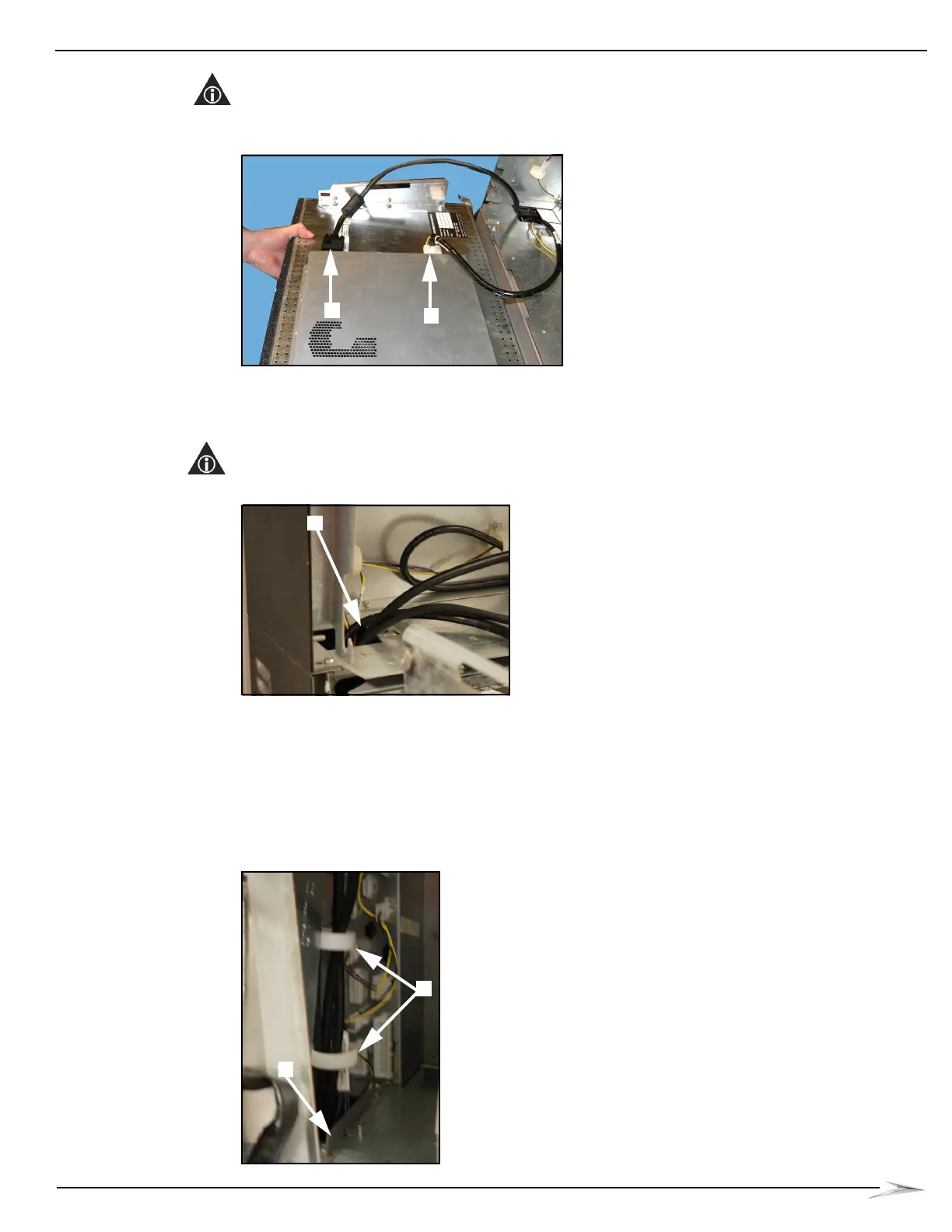
5 Disconnect the VGA Cable, Figure 2-10 (B).
NOTE: After the VGA Cable is disconnected from the Accessory/Top Box LCD, it is to remain in the
game.
Figure 2-10 Disconnecting the Power and VGA cables from Accessory/Top Box LCD.
6 Remove the LCD and set it in a safe location.
7 Route one end of the DVI Cable (HD-029663-00-02) down the cable access hole,
Figure 2-11 (A).
NOTE: It is recommended that at least one foot of cable slack be left in Top Box.
Figure 2-11 Routing DVI Cable down cable access hole.
8 Remove Main LCD.
9 If applicable, disconnect and remove the two extreme left reels from the game. Reference
Service Manual 16-022128-xx: Bluebird 2 Mechanical Reel (BB2-Mech) & Video Gaming
Device for information on how to remove a mechanical reel.
10 Route the DVI Cable through the two cable clamps in front of the left cable channel,
Figure 2-12 (A), and down the cable access hole, Figure 2-12 (B).
Figure 2-12 Routing DVI Cable through cable clamps and down cable access hole.



 To Next Page