Xtreme Power Conversion Corporaon
TX90 6kVA & 10kVA Service Manual
Page 30
Uninterrupble Power Supply
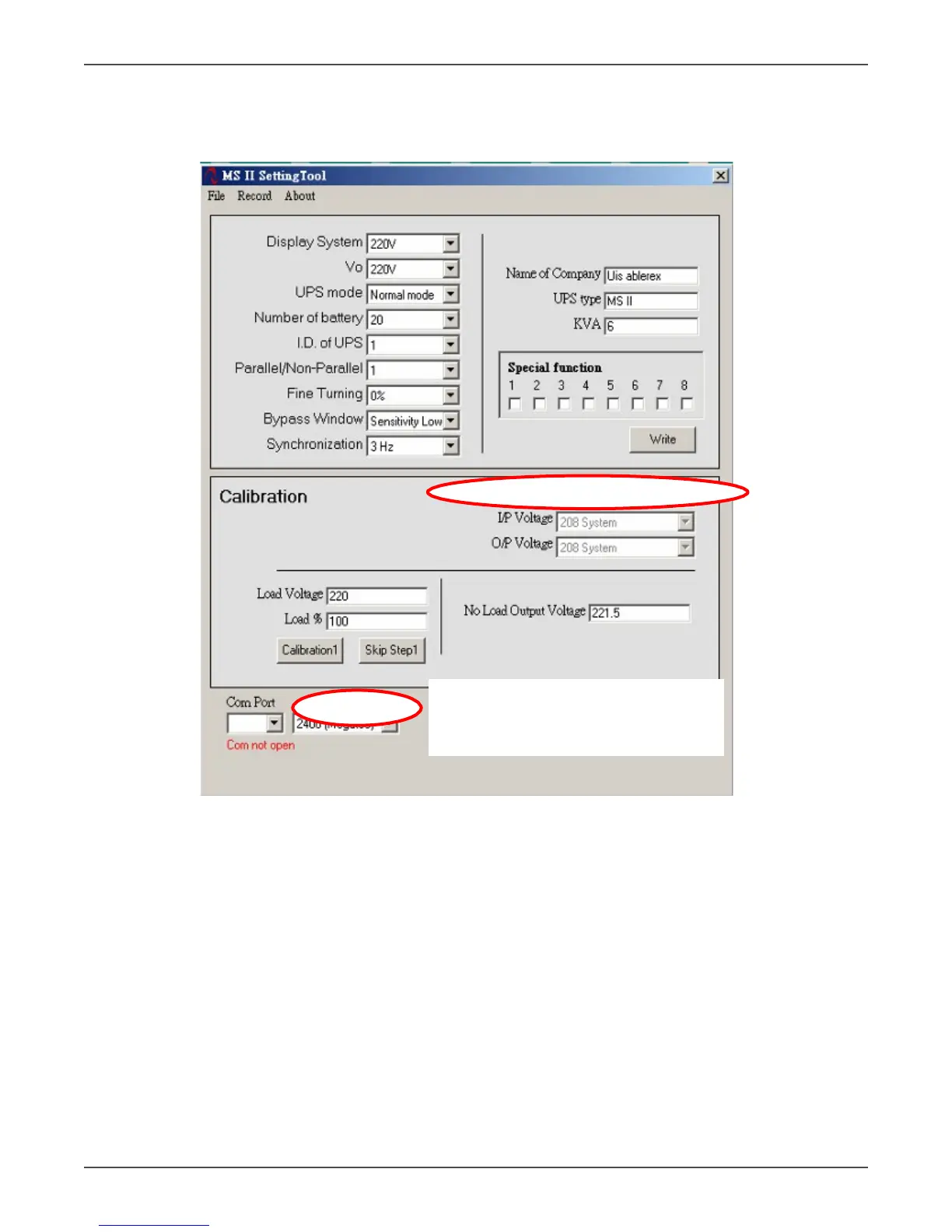
PC Calibraon
Set the communicaon baud rate to 2400. Set “With Transformer” in the calibraon seng to “No” as shown
below.
• Connect a resistance load to point A and point B
• Fill in the values of the voltage and load% measured from the Power Meter into Calibraon Step 1, then
click “ Calibraon1” icon.
• If the buzzer beeps intermiently and connuously, it means your calibraon is in failure. You may click
“skip step 2” icon and repeat
• If the buzzer beeps twice, it means the Calibraon Step 1 is done successfully, then you may enter into
Calibraon Step 2. (The ”ECO”LED light up to indicate the UPS is working under the Calibraon Step2).
• Remove the load to “Null” status, then remove the power meter to the output of the terminal block of
the UPS.
• Set a correct wiring diagram of the output transformer from the “Seng Calibraon parameter” menu
indicated as below.



 To Next Page