98
Functions Used As Needed
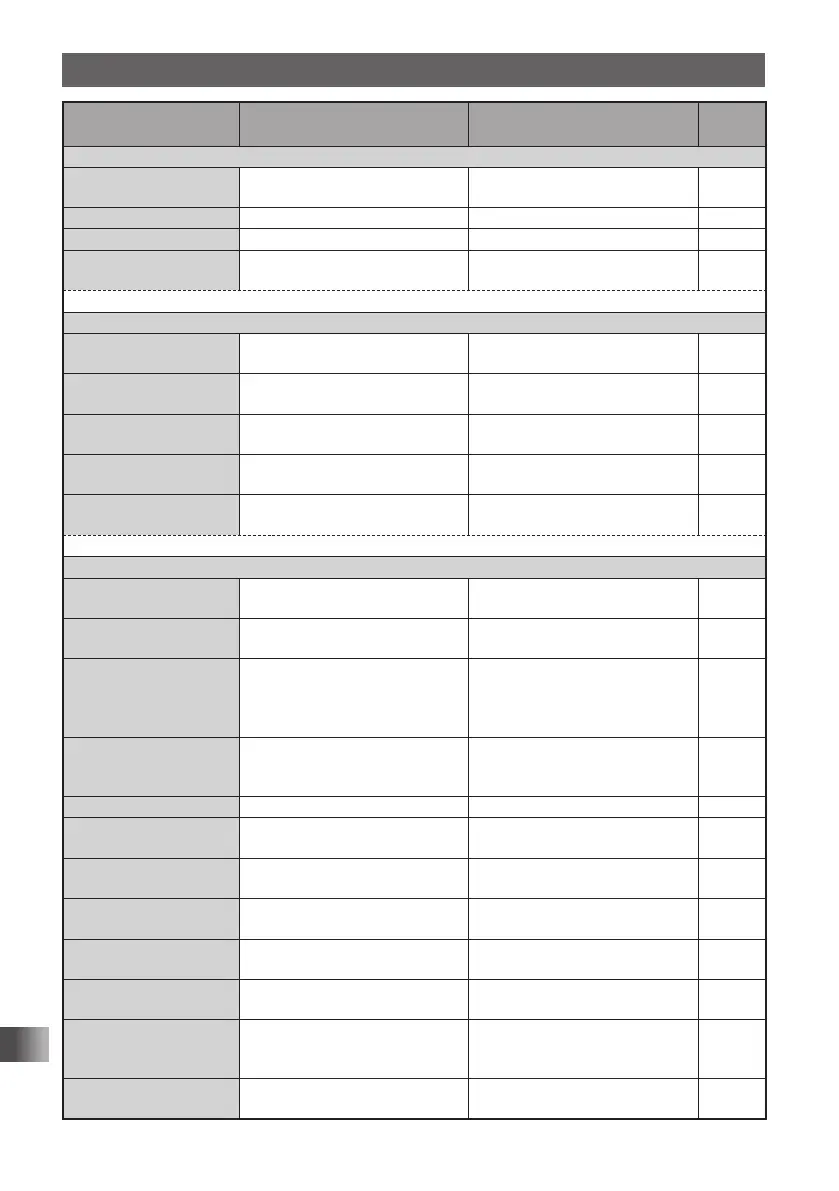
Set Mode
Set mode option No./
setting Item
Description of function
Setting Item
(Bold letters: Default)
Reference
page
6 GM
6-1 LANGUAGE Select the language to use for
writing a message, etc.
JAPANESE
ENGLISH
–
6-2 DELETE GROUP Delete a registered group. – –
6-3 DELETE MEMBER Delete a registered member. – –
6-4 RADIO ID Transceiver specific number(ID)
appears. (This cannot be edited)
––
* For more details of this function, refer to the GM Function Instruction Manual.
7 WIRES-X
7-1 LANGUAGE Select the language to use for
writing a message, etc.
JAPANESE
ENGLISH
–
7-2 RPT/WIRES FREQ Set a frequency to be used for
Repeater/WIRES.
MANUAL / PRESET –
7-3 SERCH SETUP Set the WIRES ROOM selection
method.
HISTORY / ACTIVITY –
7-4 EDT CATEGORY
TAG
Edit a category tag. C1 to C5 –
7-5 REMOVE ROOM/
NODE
Delete a registered Category
ROOM.
C1 to C5 –
* For more details of this function, refer to the WIRES-X Function Instruction Manual.
8 CONFIG
8-1 APO Set the APO operating time. OFF / 0.5 HOUR /
1 HOUR to 12 HOURS
125
8-2 BCLO Turn on/off the busy channel
lockout function.
OFF / ON 126
8-3 BEEP Set the beep output function
and the function of emitting a
beep when a band edge/CH1 is
encountered.
SELECT:
KEY&SCAN / KEY / OFF
EDGE: OFF / ON
126
8-4 BUSY LED Turn on/off the BUSY LED. A BAND: ON / OFF
B BAND: ON / OFF
RADIO: ON / OFF
127
8-5 CLOCK TYPE Set the clock shift function. A / B 128
8-6 GPS LOG Set the GPS access time. OFF / 1 SEC / 2 SEC / 5 SEC /
10 SEC / 30 SEC / 60 SEC
128
8-7 HOME VFO ENABLE/DISABLE of VFO
transmission in Home Channel.
ENABLE / DISABLE 129
8-8 LED LIGHT Turn on/off the white LED
flashlight.
– 129
8-9 LOCK Select a lock mode. KEY&DIAL / PTT / KEY&PTT /
DIAL&PTT / ALL / KEY / DIAL
130
8-10 MONI/T-CALL
Select a monitor switch or
T-CALL switch.
MONI / T-CALL *
1
130
8-11 TIMER Set the power ON/OFF timer. ON: 00:00 to 23:59 ON / OFF
OFF: 00:00 to 23:59 ON / OFF
131
8-12 PASSWORD Turn on/off the password
function.
ON / OFF [ – – – – ] 131
*1: Depends on the transceiver version.
FT1DRDEEng.indb98FT1DRDEEng.indb98 13/06/2815:1613/06/2815:16


 To Next Page