I/O devices and external head amps
Reference Manual
157
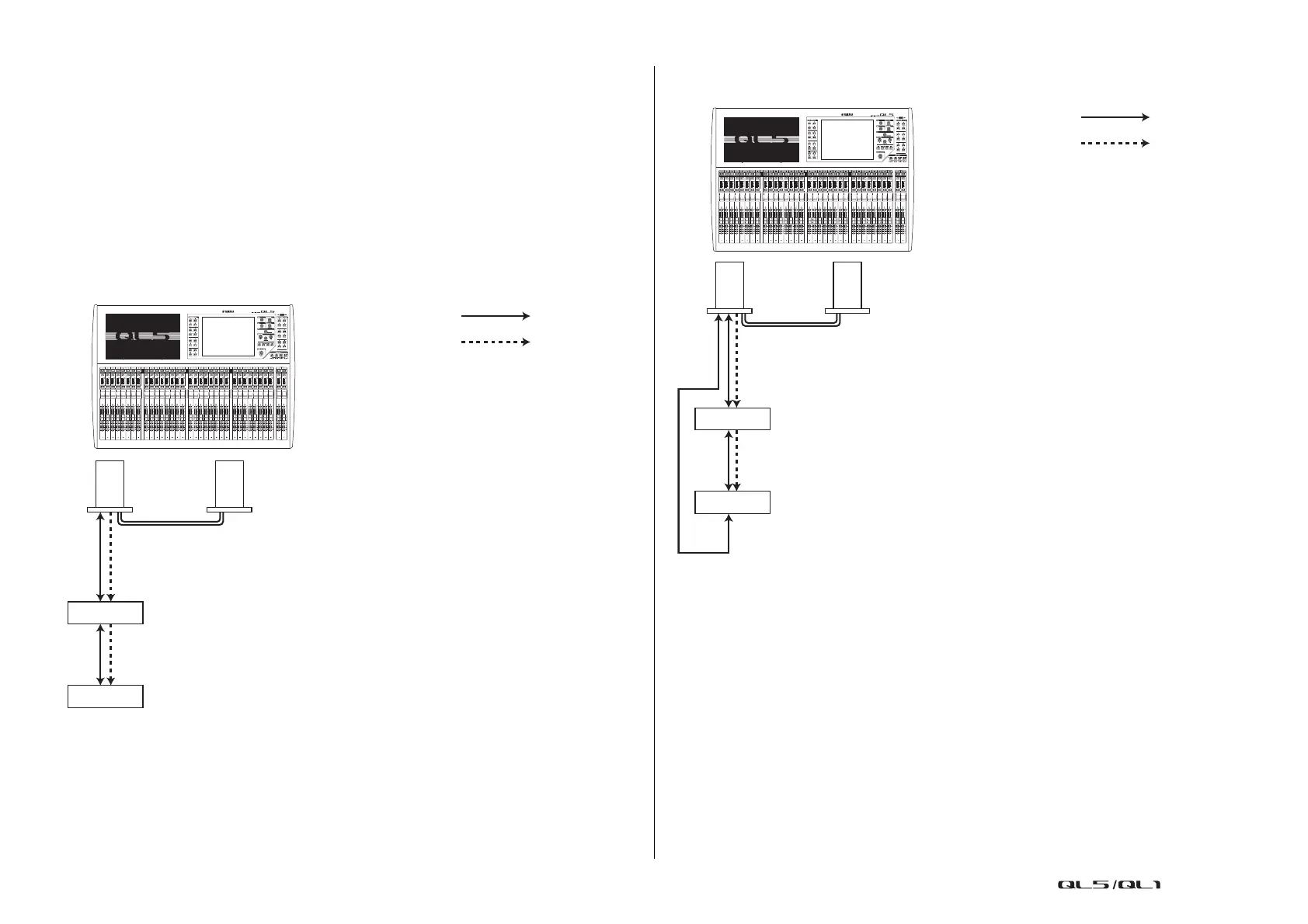
Connecting the QL series console to an SB168-ES
To remotely control the SB168-ES from the QL series console, install an MY16-ES64
EtherSound card in Slot 1 on the QL unit, then use an Ethernet cable to connect the QL unit
to the SB168-ES. This connection enables you to remotely control the SB168-ES from the QL
series console.
Alternatively, you can use a daisy chain or ring connection and install one MY16-EX
expansion card in the slot on the QL unit to remotely control up to two SB168-ES units
simultaneously.
NOTE
Remote control data will be received and transmitted only at Slot 1 of the QL series console.
Daisy chain network
Ring connection
NOTE
Please refer to the SB168-ES Owner’s Manual for information on setting up the MY16-ES64/
MY16-EX cards and EtherSound network.
SB168-ES
SB168-ES
MY16-ES64 MY16-EX
QL5
Audio signal
Remote signal
OUT
IN
IN
OUT
SB168-ES
SB168-ES
QL5
MY16-ES64 MY16-EX
Audio signal
Remote signal
OUT
OUT
IN
IN
OUT


 To Next Page
 Loading...