OUTPUT channels
Reference Manual
53
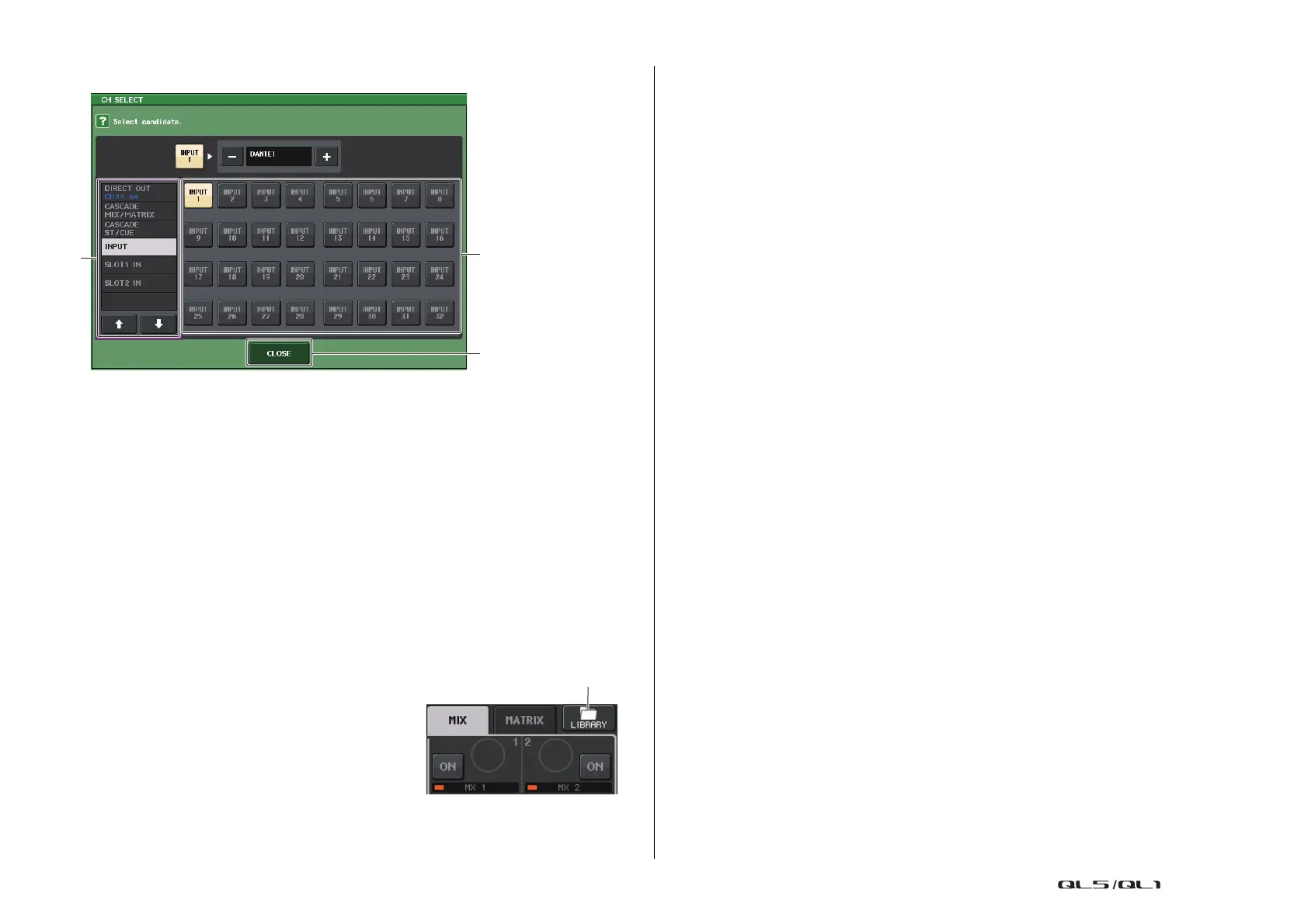
CH SELECT screen
1 Category select list
Select the category of the channel. The categories and channels for the PORT TO PORT
function are shown below.
• INPUT IN................................ INPUT1–32
*1
• SLOT1 IN ............................... SLOT1(1)–SLOT1(16)
• SLOT2 IN ............................... SLOT2(1)–SLOT2(16)
*1. QL1: INPUT1–16
2 Channel select button
Select the channel to be assigned to the output port from the current category.
3 CLOSE button
Closes the screen.
Channel library operations
Channel libraries include “OUTPUT CHANNEL
LIBRARY,” which enables you to store and recall
various parameters for output channels.
To recall the library, while an output channel is selected,
press the LIBRARY button on the SELECTED
CHANNEL VIEW screen.
For details on using the library, refer to the “Using the
libraries” section in the separate Owner’s Manual.
1
2
3



 To Next Page
 Loading...