Scene memory
Reference Manual
92
Outputting a control signal to an external device
in tandem with scene recall (GPI OUT)
A control signal can be output to an external device connected to the GPI connector of the QL
series console when you recall a specific scene. Proceed as follows.
NOTE
For more information on GPI OUT settings, refer to “Using GPI OUT” on page 231.
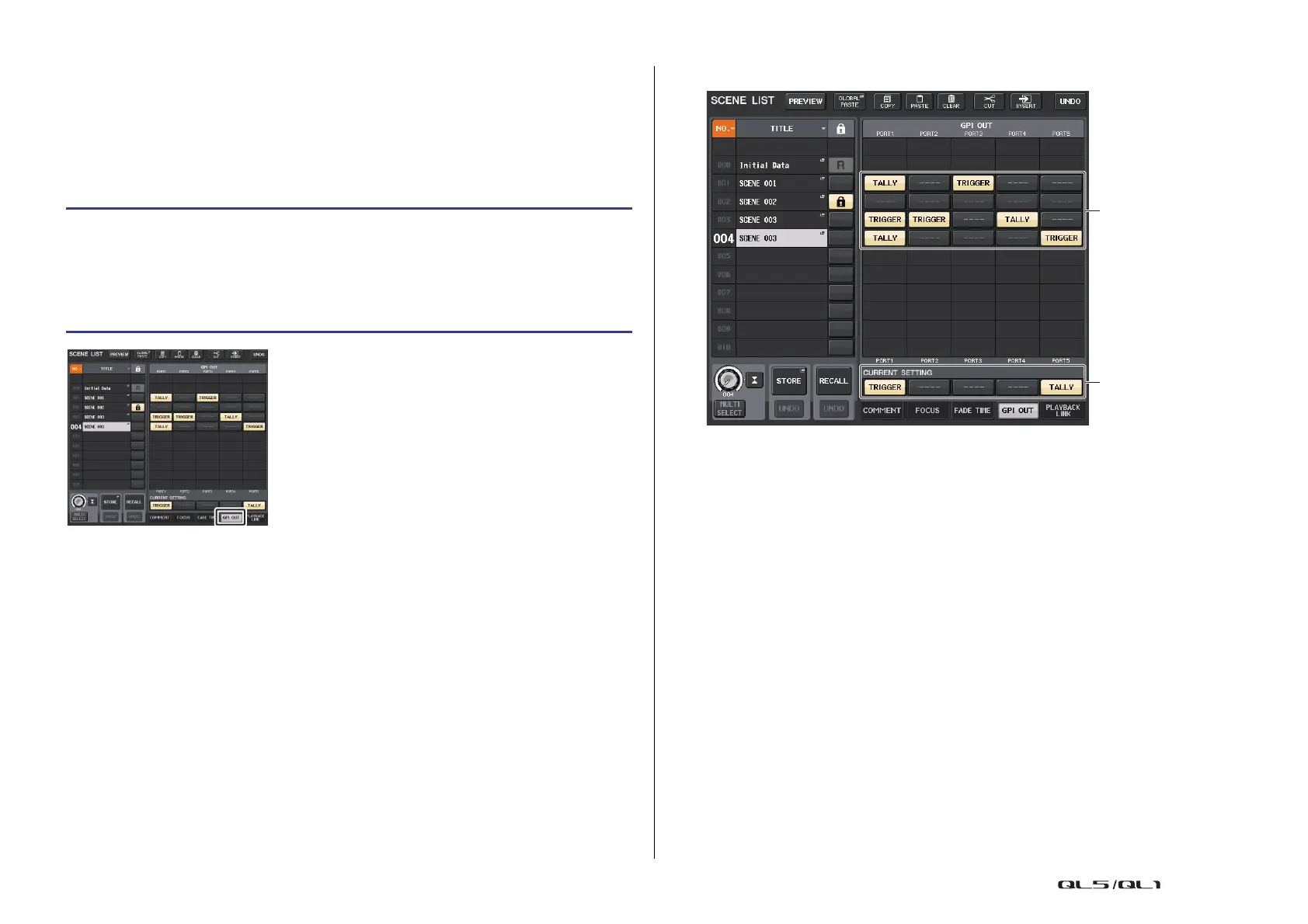
SCENE LIST window (GPI OUT field)
1 GPI OUT CONTROL buttons
These specify the control signal will be output from each GPI OUT.
Pressing a button repeatedly will switch between the following functions.
• ---- (OFF).................. Nothing will be output.
• TRIGGER................. A trigger will be output when the scene is recalled.
• TALLY ...................... A tally will be output when the scene is recalled.
2 CURRENT SETTING field
Specifies the content that will be saved by the next scene store operation.
STEP
1. Press the SCENE field in the Function Access Area.
2. Press the GPI OUT tab at the bottom of the SCENE LIST window.
3. For each scene, specify the control signal that you want to output to each GPI OUT
port.
4. Recall the scene for which you want to output GPI OUT signals.
SCENE LIST window
(GPI OUT field)



 To Next Page
 Loading...