11.7 d: Reference Settings
376 YASKAWA SIEPC71061753C GA500 Technical Manual
11.7 d: Reference Settings
◆ d1: Frequency Reference
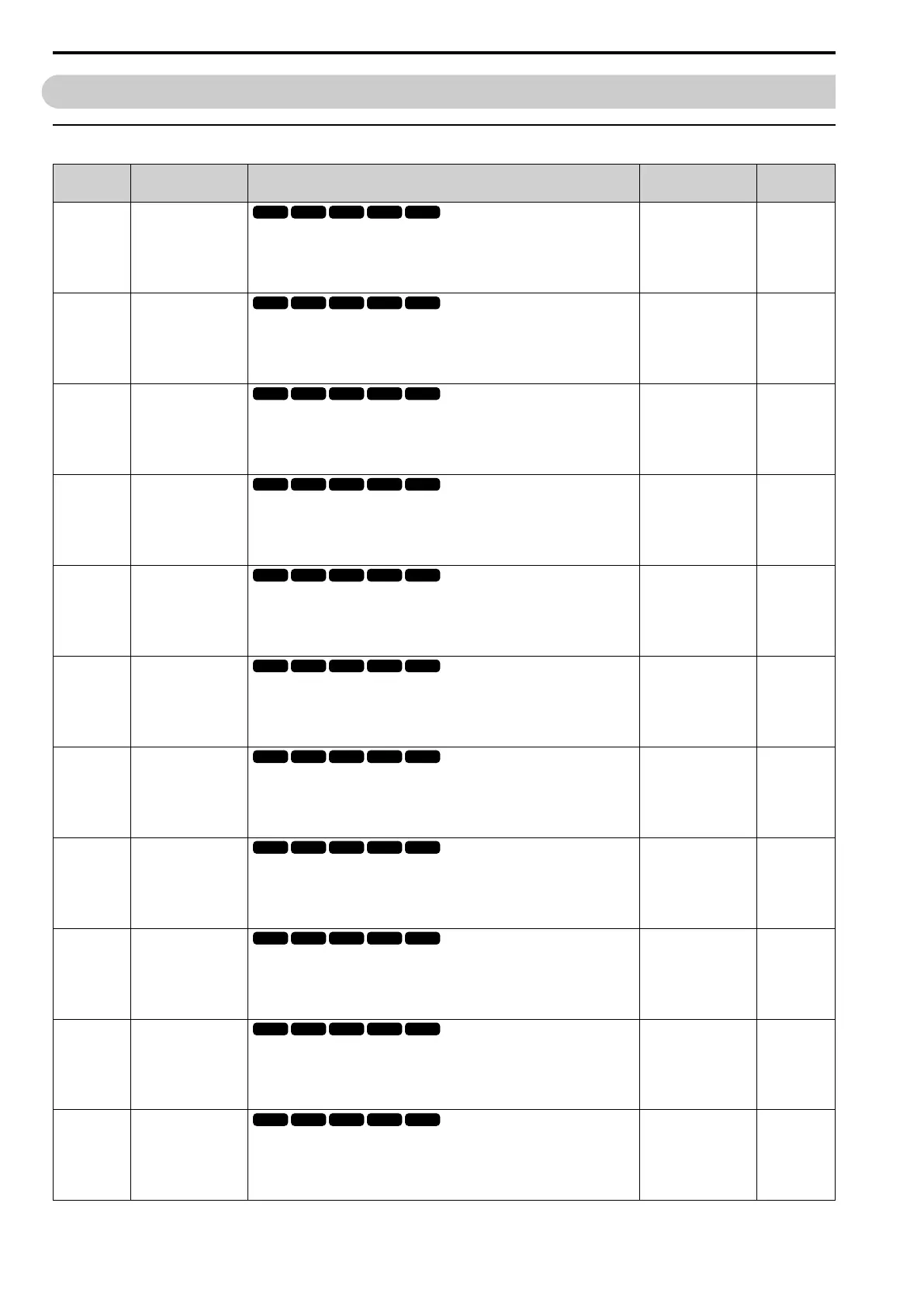
No.
(Hex.)
Name Description
Default
(Range)
Ref.
d1-01
(0280)
RUN
Reference 1
Sets the frequency reference in the units from o1-03 [Frequency Display Unit
Selection].
Note:
When A1-02 = 6 [Control Method Selection = AOLV/PM], the default setting is o1-
03 = 1 [0.01% (100% = E1-04)].
0.00 Hz
(0.00 - 590.00 Hz)
568
d1-02
(0281)
RUN
Reference 2
Sets the frequency reference in the units from o1-03 [Frequency Display Unit
Selection].
Note:
When A1-02 = 6 [Control Method Selection = AOLV/PM], the default setting is o1-
03 = 1 [0.01% (100% = E1-04)].
0.00 Hz
(0.00 - 590.00 Hz)
568
d1-03
(0282)
RUN
Reference 3
Sets the frequency reference in the units from o1-03 [Frequency Display Unit
Selection].
Note:
When A1-02 = 6 [Control Method Selection = AOLV/PM], the default setting is o1-
03 = 1 [0.01% (100% = E1-04)].
0.00 Hz
(0.00 - 590.00 Hz)
569
d1-04
(0283)
RUN
Reference 4
Sets the frequency reference in the units from o1-03 [Frequency Display Unit
Selection].
Note:
When A1-02 = 6 [Control Method Selection = AOLV/PM], the default setting is o1-
03 = 1 [0.01% (100% = E1-04)].
0.00 Hz
(0.00 - 590.00 Hz)
569
d1-05
(0284)
RUN
Reference 5
Sets the frequency reference in the units from o1-03 [Frequency Display Unit
Selection].
Note:
When A1-02 = 6 [Control Method Selection = AOLV/PM], the default setting is o1-
03 = 1 [0.01% (100% = E1-04)].
0.00 Hz
(0.00 - 590.00 Hz)
569
d1-06
(0285)
RUN
Reference 6
Sets the frequency reference in the units from o1-03 [Frequency Display Unit
Selection].
Note:
When A1-02 = 6 [Control Method Selection = AOLV/PM], the default setting is o1-
03 = 1 [0.01% (100% = E1-04)].
0.00 Hz
(0.00 - 590.00 Hz)
569
d1-07
(0286)
RUN
Reference 7
Sets the frequency reference in the units from o1-03 [Frequency Display Unit
Selection].
Note:
When A1-02 = 6 [Control Method Selection = AOLV/PM], the default setting is o1-
03 = 1 [0.01% (100% = E1-04)].
0.00 Hz
(0.00 - 590.00 Hz)
569
d1-08
(0287)
RUN
Reference 8
Sets the frequency reference in the units from o1-03 [Frequency Display Unit
Selection].
Note:
When A1-02 = 6 [Control Method Selection = AOLV/PM], the default setting is o1-
03 = 1 [0.01% (100% = E1-04)].
0.00 Hz
(0.00 - 590.00 Hz)
570
d1-09
(0288)
RUN
Reference 9
Sets the frequency reference in the units from o1-03 [Frequency Display Unit
Selection].
Note:
When A1-02 = 6 [Control Method Selection = AOLV/PM], the default setting is o1-
03 = 1 [0.01% (100% = E1-04)].
0.00 Hz
(0.00 - 590.00 Hz)
570
d1-10
(028B)
RUN
Reference 10
Sets the frequency reference in the units from o1-03 [Frequency Display Unit
Selection].
Note:
When A1-02 = 6 [Control Method Selection = AOLV/PM], the default setting is o1-
03 = 1 [0.01% (100% = E1-04)].
0.00 Hz
(0.00 - 590.00 Hz)
570
d1-11
(028C)
RUN
Reference 11
Sets the frequency reference in the units from o1-03 [Frequency Display Unit
Selection].
Note:
When A1-02 = 6 [Control Method Selection = AOLV/PM], the default setting is o1-
03 = 1 [0.01% (100% = E1-04)].
0.00 Hz
(0.00 - 590.00 Hz)
570


 To Next Page
 Loading...